
YouTube Transcript Plus - full transcript, AI chat with video & summary
Read, search, and summarize YouTube video transcripts. Features AI-powered chapter summaries and chat with video content.
As of May 2026, YouTube Transcript Plus - full transcript, AI chat with video & summary has 632 users and a 5.00/5 rating from 1 reviews in the Productivity category.
Usersdown 5.7 percent−5.7%
632
632
Ratingno change0%
5.00
1 reviews
Reviewsno change0%
1
Version
1.2.1
Manifest V3
History
4 snapshotsTracking since Apr 20, 2026.
View as table
| Date | Users | Rating | Reviews | Version |
|---|---|---|---|---|
| Apr 20, 2026 | 670 | 5.00 | 1 | 1.2.1 |
| May 6, 2026 | 662 | 5.00 | 1 | 1.2.1 |
| May 17, 2026 | 667 | 5.00 | 1 | 1.2.1 |
| May 30, 2026 | 675 | 5.00 | 1 | 1.2.1 |
| Now | 632 | 5.00 | 1 | 1.2.1 |
Permissions & access
- Permissions
- webRequestactiveTabstoragesidePanel
- Host access
- *://*.youtube.com/*, *://*.googlevideo.com/*, *://openai-proxy-terrydjony.deno.dev/*, *://freeproxy-openai-terry.deno.dev/*, *://gptsheet-license-service.terrydjony.workers.dev/*
Screenshots



About
YouTube Transcript Plus, also called as Youtube Caption Plus, enhances your YouTube viewing experience by providing powerful transcript and AI features in a convenient side panel.

🎯 KEY FEATURES:

🤖 AI-Powered Features
• Generate chapter-based summaries of videos
• Chat with AI about the video content
• Get both overall video summary and per-chapter breakdowns
• Ask questions about specific parts of the video
• Get AI-powered insights and explanations

💡 Easy Youtube Transcript
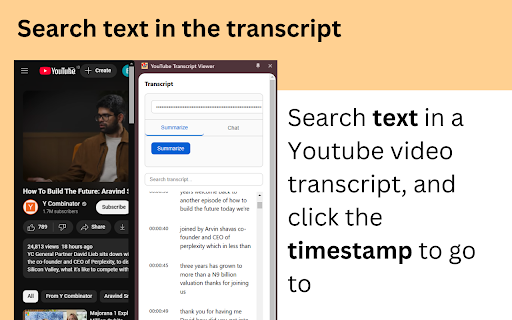
• View complete video transcripts in a clean, readable format
• Click any line to jump to that exact moment in the video
• Search within transcripts to find specific content
• Auto-scrolling transcript follows the video playback
• Works with any YouTube video that has captions enabled


💡 How It Works:
1. Install the extension
2. Go to any YouTube video
3. Click the extension icon to open the side panel
4. Enable captions on the video (CC button)
5. The transcript will automatically appear & you can search any text
6. You can also summarize and chat about video content with AI

🎁 Free Tier:
• Access to transcript viewing and search features
• Limited usage
• Subscribe for unlimited access!


💪 Perfect For:
• Students reviewing lecture videos
• Researchers analyzing content
• Content creators making notes
• Anyone who prefers reading to listening
• Non-native speakers following along with text

✨ Use Cases

Educational use:
• Study more effectively by reading along with educational videos
• Quickly find specific information in long videos
• Create notes and summaries for video content
• Better understand content in non-native languages
• Save time with AI-powered chapter summaries

Professional use:
• Research video content efficiently
• Create meeting notes from video recordings
• Quick review of long presentations
• Extract key points with AI assistance
• Reference specific moments with timestamp links


⚡️ Getting Started:
1. Install the extension
2. Open any YouTube video
3. Click the extension icon to open the icon
4. Enable captions (CC) in the video

🔧 Support:
• Responsive technical support
• Direct developer contact for issues

📧 Contact & Support:
For any questions, issues, or feedback, please contact:
[email protected]

Free webapp is also available here: http://youtubevideotranscripts.com/

Try YouTube Caption Plus today and transform how you interact with YouTube videos!
Technical
- Version
- 1.2.1
- Manifest
- V3
- Size
- 25.01KiB
- Min Chrome
- 88
- Languages
- 1
- Featured
- Yes
Metadata
- ID
- jgknojamnnggedclhogojdkonoholnpa
- Developer ID
- u3b76becd2c52007044b04da7ee92718b
- Developer Email
- [email protected]
- Created
- Feb 25, 2025
- Last Updated (Store)
- May 20, 2025
- Last Scraped
- May 30, 2026
- Website
- —
- Support URL
- https://ytcaptionplus.com/support
- Privacy Policy
- https://ytcaptionplus.com/privacy
Similar extensions
Alternatives to YouTube Transcript Plus - full transcript, AI chat with video & summary, ranked by description similarity.

YouTube Transcript
Instant YouTube video transcripts you can view, copy, or download.
138
★ 5.0

YouTube Transcript & AI Summary Generator – Powered by ChatGPT
Transcribe YouTube videos and create AI-powered summaries. Simple, accurate, and free.
216
★ 3.0

YouTube Transcript Downloader
Download YouTube video transcripts with one click
246
★ 5.0

Simple YouTube Transcript
As a simple extension, it allows you to instantly show or hide subtitles on YouTube videos, enhancing the viewing experience.
142
★ 4.0

CaptionGPT - AI Video Summarizer
Get AI-powered YouTube summaries, interactive captions, and deep video insights using ChatGPT, Claude, Gemini, and more
89
★ 3.0

YouTube AI Assistant - Sessionat
Auto-capture YouTube transcripts. Chat with any LLM about any video using your own OpenRouter key. Privacy-first.
241
★ 5.0

Tubelator: AI Subtitles, Summaries & Transcript Export for YouTube
AI subtitles and summary for YouTube videos. Export YouTube transcripts and download subtitles.
1.0K
★ 3.6

Transcript Youtube Video
Use Transcript Youtube Video to summarize youtube content. Get accurate youtube transcription and full video summary easily.
465
★ 3.7
Data sourced from the Chrome Web Store · last verified May 30, 2026.