
Download table as CSV
Download HTML tables in MS Excel style CSV format.
As of May 2026, Download table as CSV has 20,000 users and a 4.33/5 rating from 57 reviews in the Productivity category.
Usersno change0%
20.0K
20,000
Ratingup 0.7 percent+0.7%
4.33
57 reviews
Reviewsup 5.6 percent+5.6%
57
Version
1.8
Manifest V3
History
2 snapshotsTracking since Apr 20, 2026.
View as table
| Date | Users | Rating | Reviews | Version |
|---|---|---|---|---|
| Apr 20, 2026 | 20.0K | 4.30 | 54 | 1.8 |
| May 6, 2026 | 20.0K | 4.32 | 56 | 1.8 |
| Now | 20.0K | 4.33 | 57 | 1.8 |
Permissions & access
- Permissions
- contextMenusactiveTabstoragescripting
- Host access
- None declared
Screenshots

About
Simple to use!

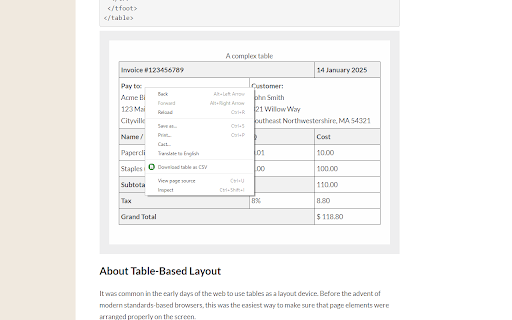
Right click on the table, then select 'Download table as CSV' from the context menu.

Alternatively you can click the icon and then click on the table to download

The extension downloads the HTML tables in MS Excel style CSV format. It will save as TSV if tabs are selected as the delimiter.

Images will be show in the CSV file as the source URL.
Inputs and text-areas will be indicated in the CSV file with a '(i)'

Support for UTF-8 with BOM - You can toggle this in the extensions popup.

Can change the delimiter in the extension popup.

Attempts to follow RFC4180

Source code: https://github.com/arktiv/table-csv-chrome
Technical
- Version
- 1.8
- Manifest
- V3
- Size
- 9.59KiB
- Min Chrome
- 88
- Languages
- 1
- Featured
- No
Metadata
- ID
- jgeonblahchgiadgojdjilffklaihalj
- Developer ID
- uad68628d134c7aa2100debcba61b0554
- Developer Email
- [email protected]
- Created
- Jul 21, 2018
- Last Updated (Store)
- May 14, 2025
- Last Scraped
- May 17, 2026
- Website
- —
- Support URL
- https://github.com/arktiv/table-csv-chrome
- Privacy Policy
- —
Similar extensions
Alternatives to Download table as CSV, ranked by description similarity.

Table Exporter to CSV/TSV
Select rows/columns from HTML tables and copy or download as CSV/TSV.
52
★ 5.0

Table Extractor
Detect HTML tables on any webpage and export them as CSV — copy or download.
—

Table to CSV by Rameja
Download HTML tables to CSV
31

Gimme CSV
Right-click a table and choose 'Pls Gimme CSV' to download it as a CSV file Excel can open. Easy peasy!
5

Table Exporter
Export tables from web pages to CSV or Excel format.
34

Table Exporter (MVP)
Export HTML tables from the current page to CSV/TSV.
—

BankConv - Table Capture
Capture HTML tables and download as CSV
69

Web Page Table Exporter
Export HTML tables or grids to CSV.
23
★ 5.0
Data sourced from the Chrome Web Store · last verified May 17, 2026.