
Writer Analytics
Collects basic story stats from Wattpad & Webnovel and shows them to authors.
As of June 2026, Writer Analytics has 34 users in the Social & Communication category.
Usersup 13.3 percent+13.3%
34
34
Ratingno change0%
—
— reviews
Reviewsno change0%
—
Version
1.5.0
Manifest V3
90-day change · In the last 90 days this extension 2 version updates, changed permissions.
History
10 snapshotsTracking since Apr 1, 2026.
View as table
| Date | Users | Rating | Reviews | Version |
|---|---|---|---|---|
| Apr 1, 2026 | 30 | — | — | 1.3.0 |
| Apr 9, 2026 | 31 | — | — | 1.3.0 |
| Apr 20, 2026 | 30 | — | — | 1.3.0 |
| Apr 25, 2026 | 30 | — | — | 1.4.0 |
| May 2, 2026 | 30 | — | — | 1.4.0 |
| May 9, 2026 | 32 | — | — | 1.4.0 |
| May 19, 2026 | 29 | — | — | 1.4.0 |
| May 26, 2026 | 30 | — | — | 1.4.0 |
| Jun 2, 2026 | 29 | — | — | 1.4.0 |
| Jun 8, 2026 | 31 | — | — | 1.4.0 |
| Now | 34 | — | — | 1.5.0 |
Changelog
- Apr 20, 2026permissions
storage, activeTab, scripting, tabs
storage, activeTab, scripting, tabs, identity
Permissions & access
- Permissions
- storageactiveTabscriptingtabsidentity
- Host access
- https://www.wattpad.com/*, http://www.wattpad.com/*, https://www.webnovel.com/*, http://www.webnovel.com/*, https://*.supabase.co/*, https://zxgsamzogtpaynecrgdr.supabase.co
Screenshots

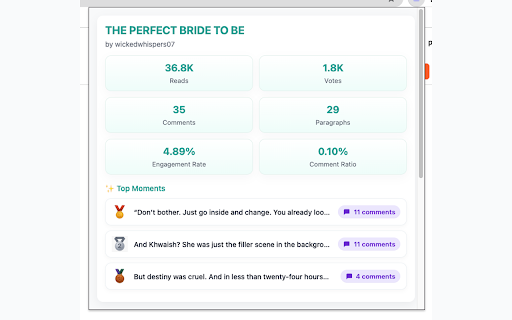


About
Writer Analytics helps authors understand their stories better by transforming raw stats into clear, visual insights — directly inside your browser.

Built for writers on Wattpad and Webnovel, this tool gives you a deeper understanding of how readers engage with your stories, chapter by chapter.


✨ Features

📊 Story Analytics
• Track Reads, Votes & Comments in one place
• See Engagement Rate and Comment Ratio at a glance
• Discover Top Paragraphs where readers react the most
• Export your stats as a clean PNG report

📘 Chapter Analytics (Beta)
• Track stories to unlock chapter-level insights
• Identify reader drop-offs and engagement peaks
• See which chapters perform best over time
• Update stats regularly to build clearer reader trends

(Chapter Analytics is an early-access feature and actively evolving.)


🪄 How to Use

Story Analytics
1. Install the extension from the Chrome Web Store.
2. Open your story on Wattpad or Webnovel in “View as Reader” or "As a Reader" Mode.
3. Click the Writer Analytics icon in your Chrome toolbar.
4. Instantly view your story’s Reads, Votes, and Comment insights.
5. Export your analytics as a PNG report anytime.

Chapter Analytics (Beta)
1. Open your story’s main page (Table of Contents view).
2. Click Track Story to start tracking chapter insights.
3. Use "Update" button to collect chapter stats (background tabs may briefly open).
4. Stay on Wattpad—background tabs will briefly open to gather stats.
5. Update 3–4 times per week for better analytics.
6. Click View Insights to explore chapter-level performance.


🔒 Privacy
Your privacy is important.
• Story content is never uploaded or stored
• Analytics are processed locally in your browser
• Anonymous usage events may be logged to improve features
• No personal user data is collected, sold, or shared

💡 Who is this for?
Perfect for writers who want to:
• Understand reader behavior
• Improve pacing and engagement
• Make informed storytelling decisions using real reader insights

🆕 What’s New
• Added Chapter Analytics (Beta)
• In-app “How to Use” guidance for early-access features
• Refined UI for clarity and usability
• Improved analytics accuracy and export

—
Disclaimer: This extension is an independent tool and is not affiliated with, sponsored, or endorsed by Wattpad or Webnovel.
Technical
- Version
- 1.5.0
- Manifest
- V3
- Size
- 6.64MiB
- Min Chrome
- 110
- Languages
- 1
- Featured
- No
Metadata
- ID
- jfpnlkcnijonciekpphgdipdmipefhjo
- Developer ID
- u631f6b2367e1f74206d32f9c18676a08
- Developer Email
- [email protected]
- Created
- Oct 2, 2025
- Last Updated (Store)
- Jun 7, 2026
- Last Scraped
- Jun 8, 2026
- Website
- —
- Support URL
- —
- Privacy Policy
- https://writer-analytics-extension.vercel.app/privacy
Similar extensions
Alternatives to Writer Analytics, ranked by description similarity.

X Wrapped
X Wrapped is a Chrome extension that helps you visualize your X (formerly Twitter) activity in an interactive and fun way.
8

X-Ray Feed
Analyze feed metrics, track organic vs. suggested content, and optimize your drafts with AI for better reach on X
63
★ 5.0

MediumLytics - Awesome Medium Stats
Everything missing from Medium Stats and other Tools to know about your Medium Audience and Traffic is only a few clicks away!
67
★ 5.0

Toklytics - Free TikTok Analytics
Free TikTok analytics & insights. Engagement rates, viral scores, creator stats, CSV export. No login. Works instantly.
799
★ 5.0

Reddit Analytics
Optimize your Reddit posts with insights on visibility, upvotes, and engagement for better subreddit targeting.
75

Viewstats - YouTube video & channel analytics
View video and channel analytics while browsing YouTube
100.0K
★ 4.5

Medium Distribution Info
Shows distribution info about your (and other people's stories) on Medium!
443
★ 5.0

Reddit User Detective
Discover Reddit users' activity patterns, peak posting hours, controversial comments and more.
60
Data sourced from the Chrome Web Store · last verified Jun 8, 2026.