VoiceChatGPT
You can voice conversation with ChatGPT. This add-on(unofficial) is only valid for pages at https://chat.openai.com/
As of May 2026, VoiceChatGPT has 227 users in the Social & Communication category.
Usersdown 3.8 percent−3.8%
227
227
Ratingno change0%
—
— reviews
Reviewsno change0%
—
Version
1.0.2
Manifest V3
History
3 snapshotsTracking since Apr 1, 2026.
View as table
| Date | Users | Rating | Reviews | Version |
|---|---|---|---|---|
| Apr 1, 2026 | 236 | — | — | 1.0.2 |
| Apr 30, 2026 | 241 | — | — | 1.0.2 |
| May 28, 2026 | 236 | — | — | 1.0.2 |
| Now | 227 | — | — | 1.0.2 |
Permissions & access
- Permissions
- storage
- Host access
- None declared
Screenshots
About
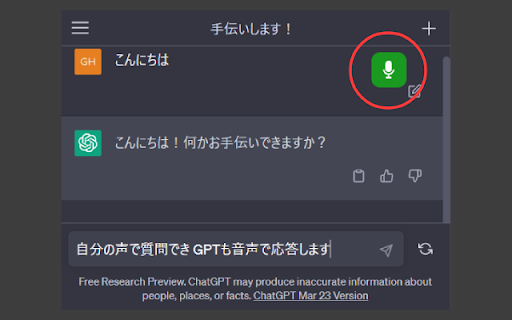
Let's have a voice conversation with ChatGPT.

1. Install this add-on.
2. Open the page at https://chat.openai.com/ (For the first time, you need to create an OpenAI account)
3. A microphone icon is displayed on the top right of the page.
4. Click the microphone icon to turn it on.
5. You will be asked whether to allow the use of the microphone only for the first time, so [Allow].
6. You can talk.
7. Click the microphone icon again to turn it off.

Click the add-on icon to change audio settings.

* Mic must be enabled.
* Since the response sentence is read gradually, the reading may be unnatural.
* Misreading is a specification.
* Rarely speaking may fail.
* This addon is unofficial.
Technical
- Version
- 1.0.2
- Manifest
- V3
- Size
- 43.11KiB
- Min Chrome
- 88
- Languages
- 2
- Featured
- Yes
Metadata
- ID
- jflddflnnaggppnecfphaljgahfajihk
- Developer ID
- uc0ef1c084dd914f243ce3cd8d15b94b3
- Developer Email
- [email protected]
- Created
- May 2, 2023
- Last Updated (Store)
- May 12, 2023
- Last Scraped
- May 28, 2026
- Website
- —
- Support URL
- https://twitter.com/Gharacter
- Privacy Policy
- —
Similar extensions
Alternatives to VoiceChatGPT, ranked by description similarity.

GPT Vokal
Give voice instructions to ChatGPT.
27

Voice control for chatGPT
Revolutionary browser extension enables voice chat with ChatGPT, enhancing AI interactions. Upgrade your experience now!
4.0K
★ 3.0

Talk With ChatGPT - by ByteWise.One
Voice chat - talk with ChatGPT by ByteWise.One
30

Chat Assistant For TT
This is a Chat Assistant powerful tool to give you the AI magic on TT for marketing promotion.
3.0K
★ 5.0

Message Chatbot: AI-Powered by Chat GPT-4
Ultimate Efficiency Tool for FB Message, Create replies 10x faster with ChatGPT!
381

Comment Assistant In LinkedIn™
This is an AI assistant to generate comment by one click in LinkedIn™, powered by ChatGPT. Save time and increase your engagement.
744
★ 4.1

Comment Reader for Twitch (powered by Voicevox)
TwitchのコメントをVOICEVOXで読み上げる拡張機能です。
30

GPT3-slack
GPT-3 for slack web
19
Data sourced from the Chrome Web Store · last verified May 28, 2026.