
Youtube Navigation Shortcuts
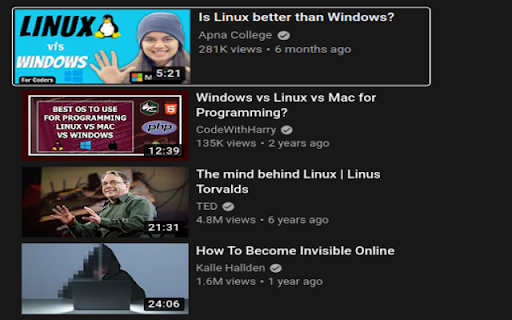
This extension lets you use arrow/WASD keys to navigate through youtube search list.
As of May 2026, Youtube Navigation Shortcuts has 86 users and a 4.75/5 rating from 4 reviews in the Accessibility category.
Usersdown 13.1 percent−13.1%
86
86
Ratingno change0%
4.75
4 reviews
Reviewsno change0%
4
Version
1.3
Manifest V3
History
3 snapshotsTracking since Apr 1, 2026.
View as table
| Date | Users | Rating | Reviews | Version |
|---|---|---|---|---|
| Apr 1, 2026 | 99 | 4.75 | 4 | 1.3 |
| Apr 30, 2026 | 89 | 4.75 | 4 | 1.3 |
| May 28, 2026 | 76 | 4.75 | 4 | 1.3 |
| Now | 86 | 4.75 | 4 | 1.3 |
Permissions & access
- Permissions
- storage
- Host access
- None declared
Screenshots
About
Youtube doesn't support navigation using arrow keys or WASD by default. This extension enables navigational shortcuts for youtube. Using this extension you can change vidoes just by using ctrl + arrow keys or by using WASD.
You cannot just use arrow keys because youtube has its own set of shortcuts to seek playback and increase/decrease volume using the arrow keys. This extension lets you use CTRL (windows) / CMD (mac) + the Arrow keys to navigate through the videos and press Enter to select and view a video.
WASD shortcuts are disabled by default, but you can enable them from the settings.
Technical
- Version
- 1.3
- Manifest
- V3
- Size
- 14.94KiB
- Min Chrome
- 88
- Languages
- 1
- Featured
- No
Metadata
- ID
- jfecpfnhkgikbhhdeecbmghfonmfnged
- Developer ID
- u6077251a8cacc8baa6cc6850fe473784
- Developer Email
- [email protected]
- Created
- Sep 14, 2022
- Last Updated (Store)
- Sep 14, 2022
- Last Scraped
- May 28, 2026
- Website
- —
- Support URL
- —
Similar extensions
Alternatives to Youtube Navigation Shortcuts, ranked by description similarity.

YouTube Quick Keys
Control Youtube with your keyboard
86
★ 4.0

YouTube Scoll Seek
Seek YouTube videos by hovering mouse over video and scrolling Up / Down (Forward / Backward)
771
★ 4.7

Media Keys for Youtube™
Improve hardware media key handling!
965
★ 3.9

Youtube Manual AD Remover
Manually remove the youtube ads by pressing the ESC key (or Shift + E).
554
★ 5.0

Video Speed Controller
Control HTML video speed.
378
★ 4.3

YTKeys — Keyboard Shortcuts for YouTube
Keyboard shortcuts for YouTube. Like, subscribe, skip ads, share, theater mode, Shorts navigation — all remappable.
42
★ 5.0

Youtube Speed Control Hotkeys
Allows you to customize your own speed control hotkeys in Youtube
793
★ 4.3
YouTube Keyboard Shortcuts Plus
for 3 seconds forward/backward
3.0K
★ 4.0
Data sourced from the Chrome Web Store · last verified May 28, 2026.