Gmail Settings Extender
Bookmark mails and start compose in chrome-like tabs, add custom rich-text editor, auto add CC/BCC, reverse conversations and more..
As of June 2026, Gmail Settings Extender has 10,000 users and a 4.44/5 rating from 61 reviews in the Productivity category.
Usersup 11.1 percent+11.1%
10.0K
10,000
Ratingdown 0.9 percent−0.9%
4.44
61 reviews
Reviewsdown 1.6 percent−1.6%
61
Version
4.7
Manifest V3
90-day change · In the last 90 days this extension gained 1.0K users.
History
3 snapshotsTracking since Apr 18, 2026.
View as table
| Date | Users | Rating | Reviews | Version |
|---|---|---|---|---|
| Apr 18, 2026 | 9.0K | 4.48 | 62 | 4.7 |
| May 12, 2026 | 9.0K | 4.47 | 60 | 4.7 |
| May 25, 2026 | 9.0K | 4.44 | 61 | 4.7 |
| Now | 10.0K | 4.44 | 61 | 4.7 |
Permissions & access
- Permissions
- storage
- Host access
- https://mail.google.com/
Screenshots
About
Version 4.7:
-Bug fixes.

Version 4.6:
-Added an option to always show attachments on top of the mail body.

Version 4.5:
-Fixed the new Google AI assistant is not working on tabbed compose window.
-Fixed the compose window is not auto scrolling after adding new line.
-Added an option to auto show CC or BCC list separately.

Version 4.2, 4.3, 4.4:
-Bug fixes, fixed auto add cc/bcc.

Version 4.1:
-Bug fixes, Enabled compose tab controller.

By default, Gmail doesn't allow dragging mails outside the opened window, so you'll not be able to download your mails or transfer them as attachment to another browser window or tab, unless you download them manually from mail menu.

Also, you can't drag an attachment from any opened mail and drop it into the compose window as attachment, the same when you need to transfer this attachment to another account opened in another browser window.

By using this extension, you'll be able to drag attachments directly to any opened compose window, you'll notice a download mail button which is draggable to your file system, or to compose window, or even to another browser tab, you'll get another button which will move the attachment section to top.

To make it easy for you to reply or forward mails, this extension adds action buttons and moves the inline compose view to top.

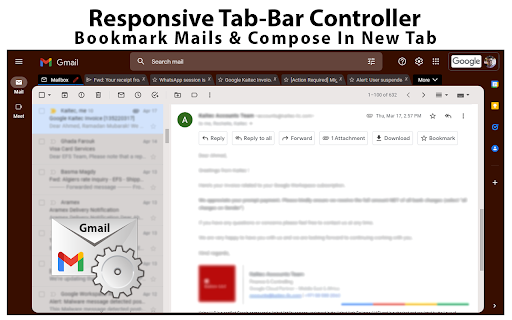
A new tab bar will change the look of Gmail and will allow composing mails in new tabs inside the same window, or add mails as chrome like bookmark tab.

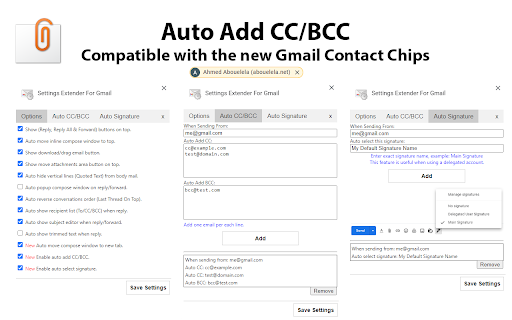
Another feature to allow auto adding CC/BCC while composing new mails.

For those who are using a delegated Gmail accounts and looking for a way to auto change the signature without being forced to select it manually on each compose or change it from the main settings, this extension adds an option to do it for you, just enter the name of the signature from the main settings and the account you are delegated access to and it will be selected automatically.

That's it!. add this extension to your browser now and enjoy.
wanted scrolling area.
Technical
- Version
- 4.7
- Manifest
- V3
- Size
- 1.24MiB
- Min Chrome
- 88
- Languages
- 1
- Featured
- Yes
Metadata
- ID
- jfagfdnkjealcolbjcdmkhamfmemimnb
- Developer ID
- u180e8711b4c97f08317aa9a2b75e4224
- Developer Email
- [email protected]
- Created
- Mar 29, 2022
- Last Updated (Store)
- Oct 20, 2025
- Last Scraped
- Jun 6, 2026
- Website
- —
- Support URL
- —
- Privacy Policy
- https://abouelela.net/privacy-policy.html
Similar extensions
Alternatives to Gmail Settings Extender, ranked by description similarity.

Smart Gmail Assistant
Supercharge your Gmail with AI-powered features like smart replies, email summarization and more.
5
★ 4.0

Gmail BCC Auto-Add
Automatically adds a specified email address or your current Gmail account to BCC when composing emails in Gmail
240
★ 5.0

Gmail Inbox
Gmail Inbox - manage multiple accounts, get notifications, read, or delete emails without opening Gmail app.
399
★ 5.0

GMail Countifier v2.61
Displays a GMail unread email badge over the extension/custom tab icon and one of a kind 'Resend' email button.
19
★ 5.0

Mailto to Gmail in Browser
Open mailto links in Gmail instead of the default email client.
7

HTMaiL: Insert HTML into Gmail, Outlook and Yahoo Mail
Edit and easily insert HTML code into the body of your email message in Gmail, Outlook, and Yahoo Mail.
20.0K
★ 4.3

BETTER GMAIL TABS
Boost Gmail productivity with custom tabs for labels and searches. Organize your inbox your way.
110
★ 5.0

Mailto → Gmail
Opens Gmail compose for every mailto: link.
98
Data sourced from the Chrome Web Store · last verified Jun 6, 2026.