
PinchGrab
Click any element on a page to capture it with a comment, then export the whole UI critique for your AI coding agent.
As of July 2026, PinchGrab has — users in the Developer Tools category.
Usersno change0%
—
—
Ratingno change0%
—
— reviews
Reviewsno change0%
—
Version
1.1.1
Manifest V3
History
1 snapshotsTracking since Jul 9, 2026.
Not enough history yet for this metric — the chart fills in as we collect more snapshots.
View as table
| Date | Users | Rating | Reviews | Version |
|---|---|---|---|---|
| Jul 9, 2026 | — | — | — | 1.1.1 |
| Now | — | — | — | 1.1.1 |
Permissions & access
- Permissions
- sidePanelstorageactiveTabtabsscriptingcontextMenusdownloads
- Host access
- None declared
Screenshots
About
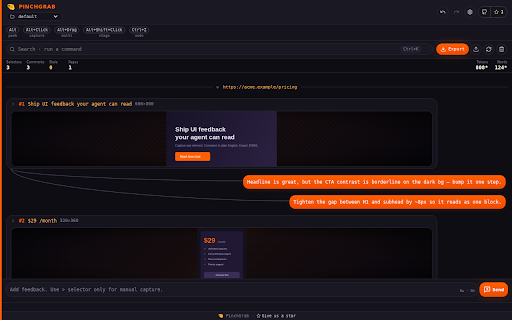
PinchGrab turns "this button is wrong" into something your AI coding agent can actually act on.

Click the PinchGrab icon on any page, then Alt+Click the elements you want to critique. Each capture grabs the element's selector, structure, text, and a screenshot — and you attach plain-language comments right next to it. When you're done, export the whole thing as a structured bundle (JSONL + screenshots + a README/AGENTS guide) that drops straight into Claude, Cursor, or any coding agent so it can find the exact element and make the fix.

Built for the loop between human design feedback and AI implementation:

• Alt+Click to capture an element — selector, outer HTML, text, and a screenshot.
• Alt+Shift+Click to group several elements into one capture.
• Type comments inline; they stay paired with the element they describe.
• Organize work by tab — each page you activate PinchGrab on is its own workspace.
• Export a clean handoff bundle (or copy a single capture as JSON) for your agent.
• Point your agent at the included DESIGN.md to keep fixes on-brand.

Privacy-first by design: PinchGrab only reads a page after you explicitly activate it by clicking the toolbar icon. Everything you capture stays on your device — saved to your Downloads folder. Nothing is sent to any server, and there is no analytics or tracking.
Technical
- Version
- 1.1.1
- Manifest
- V3
- Size
- 157KiB
- Min Chrome
- 88
- Languages
- 1
- Featured
- No
Metadata
- ID
- jenjnicjfmgbddgconejmjhmdfphhlji
- Developer ID
- u6cfb61172c1c9a731b85ed8a2f1db992
- Developer Email
- [email protected]
- Created
- Jul 8, 2026
- Last Updated (Store)
- Jul 8, 2026
- Last Scraped
- Jul 9, 2026
- Website
- —
- Support URL
- https://wranngle.com/about
- Privacy Policy
- https://wranngle.com/privacy
Data sourced from the Chrome Web Store · last verified Jul 9, 2026.