
FocusBoard — New Tab Whiteboard
Organize your custom whiteboard to facilitate and boost your activity: studying, working, planning, daily routine, etc. Be focused!
As of May 2026, FocusBoard — New Tab Whiteboard has 714 users and a 4.41/5 rating from 17 reviews in the Education category.
Usersup 7.9 percent+7.9%
714
714
Ratingno change0%
4.41
17 reviews
Reviewsno change0%
17
Version
0.108
Manifest V3
History
5 snapshotsTracking since Apr 1, 2026.
View as table
| Date | Users | Rating | Reviews | Version |
|---|---|---|---|---|
| Apr 1, 2026 | 662 | 4.41 | 17 | 0.108 |
| Apr 20, 2026 | 672 | 4.41 | 17 | 0.108 |
| May 6, 2026 | 707 | 4.41 | 17 | 0.108 |
| May 17, 2026 | 710 | 4.41 | 17 | 0.108 |
| May 30, 2026 | 730 | 4.41 | 17 | 0.108 |
| Now | 714 | 4.41 | 17 | 0.108 |
Permissions & access
- Permissions
- storageunlimitedStorage
- Host access
- https://apps.kanasero.com/
Screenshots


About
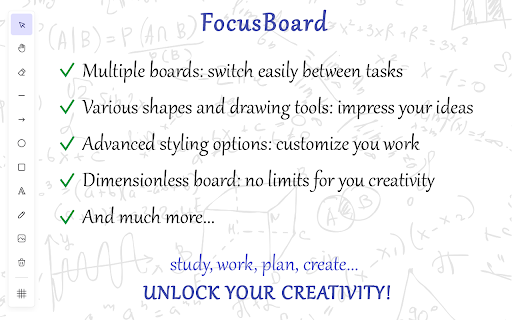
Since the New Tab page constantly appears before your eyes, it is the perfect place to display information that you need to focus on or memorize. 👩🎓 USE CASES: - Planning tasks, goal lists, habit tracking. A visual board that regularly appears before your eyes is an excellent place for reminders of your planned tasks or goals, as well as for daily monitoring and tracking of habits you're building. - Studying a topic, memorization. For example, you can place key concepts, theses, and ideas of the topic you're studying on the board, draw structural diagrams, and display relationships for a better understanding of the subject area. - Vision board. It really works. No, it’s not magic, and a luxurious mansion won’t appear just because you placed it on your board. A vision board doesn’t perform miracles on its own, but it helps you focus on your goals and tasks, constantly reminding you of what’s important and what you aspire to. - Learning foreign languages. On the board, you can write down new words, phrases, and expressions in the foreign language you’re learning. It’s also useful to jot down grammar rules and other concepts that require memorization. The regular appearance of the interactive board before your eyes will help you memorize the necessary information quickly and effectively. - Design and planning. You can use the interactive board for design in any field: designing application logic, business processes, work planning, structuring texts, etc. - Creative work. Use the interactive board during your creative process for quick sketches and idea development. Or, on the contrary, take a break from work by immersing yourself in a spontaneous creative flow or creative relaxation. Create whatever comes to mind on the board — simply express yourself through your creativity. - Come up with your own use case! 📝 FEATURES - Customize your activity with various widgets: Todo List, Search Bar, Quick Links, Quotes; - Multiple boards: switch between tasks easily; - Unlimited board: the board size is not limited — you can freely move and expand the boundaries of the workspace; - Drawing shapes: line, ellipse, rectangle, arrow; - Freehand drawing with a brush; - Adding text and images; - Styling elements: color, size, style, rotation angle, etc.; - Save the interactive board to a file and import it back later; - Exporting the board as an image; - Action history and undo functionality; - Snap grid for better arrangement of the elements on the board; - All data is stored locally in your browser. 💡 IMPROVEMENTS AND FEATURE EXPANSION If you think that this extension is missing some features or you'd like to see certain changes, please don't hesitate to share your comments using the contact button in our app to reach out to the developers. We will definitely review and implement your ideas and requests.
Technical
- Version
- 0.108
- Manifest
- V3
- Size
- 486KiB
- Min Chrome
- 88
- Languages
- 41
- Featured
- No
Metadata
- ID
- jejebdgbkkhgalnkdhopleaoikggghop
- Developer ID
- u2e44e558b7eef4c0e3d1b5157fb891b3
- Developer Email
- [email protected]
- Created
- Sep 3, 2023
- Last Updated (Store)
- Jun 13, 2025
- Last Scraped
- May 30, 2026
- Website
- —
- Support URL
- —
- Privacy Policy
- https://mxsite.ru/privacy/
Similar extensions
Alternatives to FocusBoard — New Tab Whiteboard, ranked by description similarity.

Ziteboard
Ziteboard – manage folders and boards with our online whiteboard for seamless real-time collaboration.
—
★ 4.3

Whiteboard Vibe - AI Canvas & Mind Maps
AI whiteboard with mind maps, icons, hand gesture drawing, file tools, templates, and PPTX export.
208
★ 4.7

Page Marker Extension
Use Page Marker Extension — Website Annotation Tool. Draw on page, draw on screen, annotate website, work in whiteboard online mode.
4.0K
★ 4.9

Flashcard Maker
Free flashcard maker: highlight text on any page, create cards in one click, and study with FSRS-5 spaced repetition.
294
★ 5.0

Learnitab – Productivity Study New Tab, AI Form Solver, & StudyWithMe
Customize your new tab with KPOP backgrounds, productivity tools, remote jobs, and ChatGPT access for enhanced studying.
256
★ 4.9

Canvas Chart
Add a chart to canvas for a better to-do list sidebar visual.
6.0K
★ 4.6

Binapani Academy: Your Web Learning Companion
A smarter way to study while browsing, create flashcards from any webpage and integrate with Binapani Academy learning platform.
13
★ 5.0

Flashcard Maker App: Spaced Repetition Learning
Select words on any webpage, translate instantly, and add to flashcards. Learn vocabulary while browsing with spaced repetition.
36
★ 5.0
Data sourced from the Chrome Web Store · last verified May 30, 2026.