
Delete Facebook Messages (Turbo)
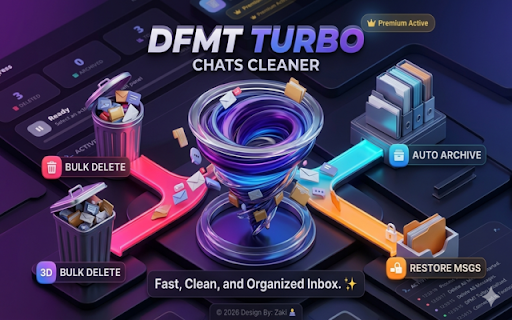
Turbo tool to delete 🗑️, archive 📂, or restore 🔓 messages in bulk for a fast, clean, and organized inbox. ✨
As of June 2026, Delete Facebook Messages (Turbo) has 273 users and a 4.72/5 rating from 25 reviews in the Social & Communication category.
Usersdown 5.9 percent−5.9%
273
273
Ratingup 0.2 percent+0.2%
4.72
25 reviews
Reviewsup 4.2 percent+4.2%
25
Version
2.2
Manifest V3
90-day change · In the last 90 days this extension 1 version update.
History
5 snapshotsTracking since Apr 1, 2026.
View as table
| Date | Users | Rating | Reviews | Version |
|---|---|---|---|---|
| Apr 1, 2026 | 290 | 4.71 | 24 | 2.1 |
| Apr 30, 2026 | 281 | 4.71 | 24 | 2.1 |
| May 28, 2026 | 272 | 4.71 | 24 | 2.1 |
| Jun 4, 2026 | 264 | 4.72 | 25 | 2.2 |
| Jun 9, 2026 | 270 | 4.72 | 25 | 2.2 |
| Now | 273 | 4.72 | 25 | 2.2 |
Changelog
- May 28, 2026description
Key Advantages:
* Efficient Cleanup: Quickly remove all spam messages with just a few clicks.
* User-Friendly: Simple and intuitive interface ensures an effortless experience.
* Free Trial: Test the extension’s features by deleting up to 5 messages at no cost.
* Time-Saving: Eliminate the need for manual deletion, saving you valuable time.

How to Use:
1. Install the Extension: Add it to your Chrome browser.
2. Click the Extension Icon: Open the extension by clicking its icon in your browser.
3. Navigate: Click the button "Go to Facebook Messages page" if
    not already open.
4. Open spam chats: Click "click to open spam chats" to prepare the messages for deletion.
5. Start Deletion: Click "Delete all spam messages" to begin . You can
     also click "Stop"  in the bottom popup at any time if you wish to halt the process.
🚀 Advantages & Features ✅ Turbo Speed Performance Bulk delete 🗑️, archive 📂, or restore 🔓 messages quickly with smooth Turbo processing. ✅ Smart & Easy to Use Clean, modern, and advanced UI designed for simple one-click actions. ✅ 100% Browser-Based Works directly inside your browser without external software or complicated setup. ✅ No Sign-Up Required No account creation, no login, and no personal data collection. ✅ Privacy Focused Your messages and activity are not saved on external servers. ✅ Dark & Light Mode Enjoy a beautiful interface with both dark 🌙 and light ☀️ themes. ✅ Bulk Inbox Management Manage delete, archive, unarchive, and Buy/Sell conversations easily. ✅ Stop Anytime Pause or stop the process instantly whenever you want. ⚡ How It Works 1️⃣ Install the extension. 2️⃣ The extension will automatically open the Messages page. 3️⃣ Click the extension icon from your browser toolbar. 4️⃣ You will see options like: Delete Messages 🗑️ Archive Chats 📂 Unarchive Chats 🔓 Buy/Sell Messages 🛒 5️⃣ Choose the action you want to perform. 6️⃣ You can stop the process anytime using the Stop button. ⚠️ Note: This extension is an independent tool and is not authorized by any platform.
- May 28, 2026short_description
Bulk delete with one easy click!
Turbo tool to delete 🗑️, archive 📂, or restore 🔓 messages in bulk for a fast, clean, and organized inbox. ✨
- May 28, 2026name
Delete All Spam Chats on Facebook 2024
Delete Facebook Messages (Turbo)
Permissions & access
- Permissions
- tabsstorage
- Host access
- None declared
Screenshots


About
🚀 Advantages & Features

✅ Turbo Speed Performance
Bulk delete 🗑️, archive 📂, or restore 🔓 messages quickly with smooth Turbo processing.

✅ Smart & Easy to Use
Clean, modern, and advanced UI designed for simple one-click actions.

✅ 100% Browser-Based
Works directly inside your browser without external software or complicated setup.

✅ No Sign-Up Required
No account creation, no login, and no personal data collection.

✅ Privacy Focused
Your messages and activity are not saved on external servers.

✅ Dark & Light Mode
Enjoy a beautiful interface with both dark 🌙 and light ☀️ themes.

✅ Bulk Inbox Management
Manage delete, archive, unarchive, and Buy/Sell conversations easily.

✅ Stop Anytime
Pause or stop the process instantly whenever you want.

⚡ How It Works

1️⃣ Install the extension.

2️⃣ The extension will automatically open the  Messages page.

3️⃣ Click the extension icon from your browser toolbar.

4️⃣ You will see options like:

Delete Messages 🗑️
Archive Chats 📂
Unarchive Chats 🔓
Buy/Sell Messages 🛒

5️⃣ Choose the action you want to perform.

6️⃣ You can stop the process anytime using the Stop button.

⚠️ Note: This extension is an independent tool and is not authorized by any platform.
Technical
- Version
- 2.2
- Manifest
- V3
- Size
- 3.31MiB
- Min Chrome
- 88
- Languages
- 1
- Featured
- No
Metadata
- ID
- jeeblhndfoaoglabfahbkhljbegplklk
- Developer ID
- u5ddd1a8e7e8a414ad05a2ecefeaecdf4
- Developer Email
- [email protected]
- Created
- May 18, 2022
- Last Updated (Store)
- May 11, 2026
- Last Scraped
- Jun 9, 2026
- Website
- —
- Support URL
- —
- Privacy Policy
- —
Similar extensions
Alternatives to Delete Facebook Messages (Turbo), ranked by description similarity.

Delete Facebook message Quickly
🗑️ Delete all message types, 📥 Archive messages, and 📤 Restore archived messages effortlessly!
308
★ 4.2

Delete Facebook Messages
This extension allows you delete or archive all your Facebook messages with just one click.
451
★ 4.7

Delete All Archived Chats on Facebook 2026
🗑️ Effortlessly clear all types of your archived chats on Facebook with just a click. ✅
646
★ 4.0

Delete Facebook Messages & Mrkt-Plc
🗑️ Quickly delete all types of messages ⚡ with a single click 🧹 for a clutter-free conversation list ✨
195
★ 4.6

Delete Whatsapp Messages Fast
Delete 🗑️ whatsapp chats (not groups) and keep your conversations organized.
63
★ 5.0

Delete Facebook Messages
🚀 Manage your Facebook messages effortlessly with our extension — delete, archive, and activate easily! 📩
5.0K
★ 3.2

Delete Facebook Messages Pro
✨New Feature! Add checkboxes ✅ — select chats ☝️ or all 🔘, then delete 🗑️ & archive 📦 🌟 together in one click!
787
★ 4.2

Insta Message Cleaner 2026
Easily add checkboxes ☑️ to select and delete individual chats 💬❌ or clear all chats in a single click ⚡🧹
49
★ 5.0
Data sourced from the Chrome Web Store · last verified Jun 9, 2026.