
Image Color Finder
The tool Image Color Finder extracts hex id from image to generate color palette.
As of June 2026, Image Color Finder has 120 users and a 5.00/5 rating from 3 reviews in the Productivity category.
Usersup 7.1 percent+7.1%
120
120
Ratingno change0%
5.00
3 reviews
Reviewsno change0%
3
Version
1.0.4
Manifest V3
90-day change · In the last 90 days this extension changed permissions.
History
5 snapshotsTracking since Apr 1, 2026.
View as table
| Date | Users | Rating | Reviews | Version |
|---|---|---|---|---|
| Apr 1, 2026 | 112 | 5.00 | 3 | 1.0.4 |
| Apr 20, 2026 | 117 | 5.00 | 3 | 1.0.4 |
| May 11, 2026 | — | — | — | — |
| May 24, 2026 | 104 | 5.00 | 3 | 1.0.4 |
| Jun 5, 2026 | 121 | 5.00 | 3 | 1.0.4 |
| Now | 120 | 5.00 | 3 | 1.0.4 |
Changelog
- May 11, 2026description
(empty)
Sometimes we come across photos of interiors or outfits online that captivate us with their mood. We want to recreate that same feeling — in our own room, fabric choices, or even a website design. With this tool, you can easily extract the key visual accents and bring them into your own projects.

And if you’re working on a presentation, packaging, or creative concept inspired by an artist’s work or a particular photo style, this assistant helps you accurately capture that tone — without guesswork or manual matching.

What Does This Extension Do?

This is your  image color finder that:
1️⃣ Scans any picture on the page
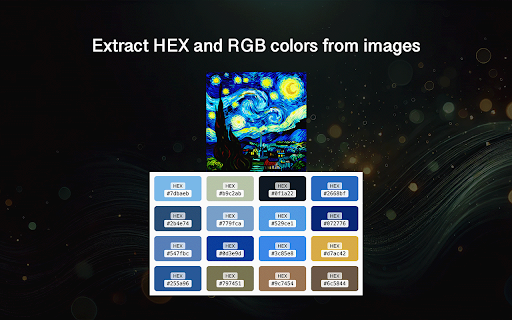
2️⃣ Detects 16 dominant hues
3️⃣ Displays each hex code from the picture clearly or RGB colors
4️⃣ Lets you copy color codes with a single click

How Does It Work?
The extension identifies the most prominent hues in a picture — not just the pixel you click. It analyzes the whole picture and extracts the tones that matter most. It’s fast, accurate, and designed for creatives and developers alike.

Use it to:
• Automatically find image color
• Get a full 16-swathes palette
• Copy hex codes easily
• Create a mood board, UI design, or inspiration set

Image Color Finder is more than just a color picker. Instead of giving you a single pixel information, it instantly extracts 16 dominant shades from any picture. You get a full visual palette, easy swatch name lookup, and one-click hex code copying — all right in your browser. This workflow is perfect for designers and marketers, and offers a more advanced alternative to traditional tools like the Google Color Picker, which focus on just one pixel at a time.

Key Features
1. Fast, intelligent hex color finder
2. Palette of 16 key swatches
3. One-click copy for each hex code
4. Lightweight and intuitive interface
5. Works on PNG, JPG, WebP

Use Cases You’ll Love

The extension helps you:
• Find color code from image to match a brand’s visual identity
• Discover and copy swatches in seconds
• Act as your on-demand swatch panel generator

Do you know, how to find the color code of an image? For example how to find hair color from image of this beautiful girl. Or maybe you saw a beautiful photo and thought, how do I find the color code of an image like that? With our extension your guesswork is over. This powerful color finder from image helps you instantly find a hex color from an image, visualize the top 16 swatches, and copy their hex codes for use anywhere.

Who Is It For?
Whether you’re a:
➤ Web designer
➤ UX/UI developer
➤ Content creator
➤ Digital artist
➤ Social media manager
➤ SEO or branding specialist 🎨
...image color finder will save you time and level up your design workflow.

How Is It Better Than Other Tools?

▸ Works directly in Chrome
▸ Acts as a true image color finder
▸ Helps you find out color code of the picture instantly
▸ Ideal for photos, logos, icons, and more

Real-World Scenarios
❓Loved the interior design in a photo and want to extract its hex code?
❓Like the model’s outfit and want to recreate the look in similar tones?
❓ Want to find out color code from image for a branding guide?
❓ Curious about the hue of a painting or photo?

This is the exact image color code finder you’ve been looking for.
• Simplicity Meets Functionality
• Works seamlessly on most websites
• Requires no coding or design skills
• Acts as your always-ready colorpicker
• Pinpoints true color id from web pic

How to Use image color finder
1. Install the extension from Chrome Web Store
2. Open any picture on a website
3. Click the extension icon
4. Copy any hex code with a click

Why Choose the Extension?

✅ Super easy to use
✅ Fast and lightweight
✅ Built for designers and non-designers
✅ Extracts multiple hues instantly
✅ The smartest way to find hex color of image

In addition if you're a photographer aiming to sharpen your visual intuition and develop a deeper understanding of tone relationships, This tool can be a game-changer. The ability to recognize subtle shifts in hue, contrast, and warmth is what sets great photography apart. With this extension, you can extract and compare the dominant palettes of different photographs, helping you train your eye to spot patterns and harmony that might otherwise go unnoticed.

To Wrap It Up

Image color finder it’s your creative sidekick. Whether you need a color identifier from image, or just want to explore visual trends, this color find from image tool will make your job easier and more fun.
🖌️ Discover, copy, and use swatches — straight from any picture!
- May 11, 2026short_description
(empty)
The tool Image Color Finder extracts hex id from image to generate color palette.
- May 11, 2026name
Unknown
Image Color Finder
- May 11, 2026category
(empty)
productivity/tools
- May 11, 2026permissions
(empty)
activeTab, contextMenus
- Apr 20, 2026description
Sometimes we come across photos of interiors or outfits online that captivate us with their mood. We want to recreate that same feeling — in our own room, fabric choices, or even a website design. With this tool, you can easily extract the key visual accents and bring them into your own projects.

And if you’re working on a presentation, packaging, or creative concept inspired by an artist’s work or a particular photo style, this assistant helps you accurately capture that tone — without guesswork or manual matching.

What Does This Extension Do?

This is your  image color finder that:
1️⃣ Scans any picture on the page
2️⃣ Detects 16 dominant hues
3️⃣ Displays each hex code from the picture clearly or RGB colors
4️⃣ Lets you copy color codes with a single click

How Does It Work?
The extension identifies the most prominent hues in a picture — not just the pixel you click. It analyzes the whole picture and extracts the tones that matter most. It’s fast, accurate, and designed for creatives and developers alike.

Use it to:
• Automatically find image color
• Get a full 16-swathes palette
• Copy hex codes easily
• Create a mood board, UI design, or inspiration set

Image Color Finder is more than just a color picker. Instead of giving you a single pixel information, it instantly extracts 16 dominant shades from any picture. You get a full visual palette, easy swatch name lookup, and one-click hex code copying — all right in your browser. This workflow is perfect for designers and marketers, and offers a more advanced alternative to traditional tools like the Google Color Picker, which focus on just one pixel at a time.

Key Features
1. Fast, intelligent hex color finder
2. Palette of 16 key swatches
3. One-click copy for each hex code
4. Lightweight and intuitive interface
5. Works on PNG, JPG, WebP

Use Cases You’ll Love

The extension helps you:
• Find color code from image to match a brand’s visual identity
• Discover and copy swatches in seconds
• Act as your on-demand swatch panel generator

Do you know, how to find the color code of an image? For example how to find hair color from image of this beautiful girl. Or maybe you saw a beautiful photo and thought, how do I find the color code of an image like that? With our extension your guesswork is over. This powerful color finder from image helps you instantly find a hex color from an image, visualize the top 16 swatches, and copy their hex codes for use anywhere.

Who Is It For?
Whether you’re a:
➤ Web designer
➤ UX/UI developer
➤ Content creator
➤ Digital artist
➤ Social media manager
➤ SEO or branding specialist 🎨
...image color finder will save you time and level up your design workflow.

How Is It Better Than Other Tools?

▸ Works directly in Chrome
▸ Acts as a true image color finder
▸ Helps you find out color code of the picture instantly
▸ Ideal for photos, logos, icons, and more

Real-World Scenarios
❓Loved the interior design in a photo and want to extract its hex code?
❓Like the model’s outfit and want to recreate the look in similar tones?
❓ Want to find out color code from image for a branding guide?
❓ Curious about the hue of a painting or photo?

This is the exact image color code finder you’ve been looking for.
• Simplicity Meets Functionality
• Works seamlessly on most websites
• Requires no coding or design skills
• Acts as your always-ready colorpicker
• Pinpoints true color id from web pic

How to Use image color finder
1. Install the extension from Chrome Web Store
2. Open any picture on a website
3. Click the extension icon
4. Copy any hex code with a click

Why Choose the Extension?

✅ Super easy to use
✅ Fast and lightweight
✅ Built for designers and non-designers
✅ Extracts multiple hues instantly
✅ The smartest way to find hex color of image

In addition if you're a photographer aiming to sharpen your visual intuition and develop a deeper understanding of tone relationships, This tool can be a game-changer. The ability to recognize subtle shifts in hue, contrast, and warmth is what sets great photography apart. With this extension, you can extract and compare the dominant palettes of different photographs, helping you train your eye to spot patterns and harmony that might otherwise go unnoticed.

To Wrap It Up

Image color finder it’s your creative sidekick. Whether you need a color identifier from image, or just want to explore visual trends, this color find from image tool will make your job easier and more fun.
🖌️ Discover, copy, and use swatches — straight from any picture!
(empty)
- Apr 20, 2026short_description
The tool Image Color Finder extracts hex id from image to generate color palette.
(empty)
- Apr 20, 2026name
Image Color Finder
Unknown
- Apr 20, 2026category
productivity/tools
(empty)
- Apr 20, 2026permissions
activeTab, contextMenus
(empty)
Permissions & access
- Permissions
- activeTabcontextMenus
- Host access
- None declared
Screenshots

About
Sometimes we come across photos of interiors or outfits online that captivate us with their mood. We want to recreate that same feeling — in our own room, fabric choices, or even a website design. With this tool, you can easily extract the key visual accents and bring them into your own projects.

And if you’re working on a presentation, packaging, or creative concept inspired by an artist’s work or a particular photo style, this assistant helps you accurately capture that tone — without guesswork or manual matching.

What Does This Extension Do?

This is your  image color finder that:
1️⃣ Scans any picture on the page
2️⃣ Detects 16 dominant hues
3️⃣ Displays each hex code from the picture clearly or RGB colors
4️⃣ Lets you copy color codes with a single click

How Does It Work?
The extension identifies the most prominent hues in a picture — not just the pixel you click. It analyzes the whole picture and extracts the tones that matter most. It’s fast, accurate, and designed for creatives and developers alike.

Use it to:
• Automatically find image color
• Get a full 16-swathes palette
• Copy hex codes easily
• Create a mood board, UI design, or inspiration set

Image Color Finder is more than just a color picker. Instead of giving you a single pixel information, it instantly extracts 16 dominant shades from any picture. You get a full visual palette, easy swatch name lookup, and one-click hex code copying — all right in your browser. This workflow is perfect for designers and marketers, and offers a more advanced alternative to traditional tools like the Google Color Picker, which focus on just one pixel at a time.

Key Features
1. Fast, intelligent hex color finder
2. Palette of 16 key swatches
3. One-click copy for each hex code
4. Lightweight and intuitive interface
5. Works on PNG, JPG, WebP

Use Cases You’ll Love

The extension helps you:
• Find color code from image to match a brand’s visual identity
• Discover and copy swatches in seconds
• Act as your on-demand swatch panel generator

Do you know, how to find the color code of an image? For example how to find hair color from image of this beautiful girl. Or maybe you saw a beautiful photo and thought, how do I find the color code of an image like that? With our extension your guesswork is over. This powerful color finder from image helps you instantly find a hex color from an image, visualize the top 16 swatches, and copy their hex codes for use anywhere.

Who Is It For?
Whether you’re a:
➤ Web designer
➤ UX/UI developer
➤ Content creator
➤ Digital artist
➤ Social media manager
➤ SEO or branding specialist 🎨
...image color finder will save you time and level up your design workflow.

How Is It Better Than Other Tools?

▸ Works directly in Chrome
▸ Acts as a true image color finder
▸ Helps you find out color code of the picture instantly
▸ Ideal for photos, logos, icons, and more

Real-World Scenarios
❓Loved the interior design in a photo and want to extract its hex code?
❓Like the model’s outfit and want to recreate the look in similar tones?
❓ Want to find out color code from image for a branding guide?
❓ Curious about the hue of a painting or photo?

This is the exact image color code finder you’ve been looking for.
• Simplicity Meets Functionality
• Works seamlessly on most websites
• Requires no coding or design skills
• Acts as your always-ready colorpicker
• Pinpoints true color id from web pic

How to Use image color finder
1. Install the extension from Chrome Web Store
2. Open any picture on a website
3. Click the extension icon
4. Copy any hex code with a click

Why Choose the Extension?

✅ Super easy to use
✅ Fast and lightweight
✅ Built for designers and non-designers
✅ Extracts multiple hues instantly
✅ The smartest way to find hex color of image

In addition if you're a photographer aiming to sharpen your visual intuition and develop a deeper understanding of tone relationships, This tool can be a game-changer. The ability to recognize subtle shifts in hue, contrast, and warmth is what sets great photography apart. With this extension, you can extract and compare the dominant palettes of different photographs, helping you train your eye to spot patterns and harmony that might otherwise go unnoticed.

To Wrap It Up

Image color finder it’s your creative sidekick. Whether you need a color identifier from image, or just want to explore visual trends, this color find from image tool will make your job easier and more fun.
🖌️ Discover, copy, and use swatches — straight from any picture!
Technical
- Version
- 1.0.4
- Manifest
- V3
- Size
- 188KiB
- Min Chrome
- 88
- Languages
- 52
- Featured
- No
Metadata
- ID
- jeahjodimjimoejccbkfoilpcmfjhppc
- Developer ID
- u287918858112b6e0991ac46f29f94f85
- Developer Email
- [email protected]
- Created
- May 29, 2025
- Last Updated (Store)
- Jun 2, 2025
- Last Scraped
- Jun 5, 2026
- Website
- —
- Support URL
- —
Similar extensions
Alternatives to Image Color Finder, ranked by description similarity.

color identifier
The color identifier app helps you to find hex code from images or web pages. Use our rgb color finder to detect a color in seconds
52

Color Palette from Image
Use Color Palette from Image app to get color palette from image instantly. Palette generator from uploaded or web page images.
49

Image Color Picker
Color Picker for desktop.
6

ColorPicker
Easily pick colors from your browser screen.
94
★ 4.8

Color Picker – Eye Dropper & Palette Generator
Pick colors, generate palettes, export to JSON/CSS/ASE.
—

ColorSnap - Color Picker for Web
ColorSnap: Advanced color picker extension. Extract colors from websites, images. RGB, HEX, RGBA support. Essential for web design.
299
★ 5.0

Color Palette Creator
Use this extension to instantly create and export color palettes from any image on a webpage for your design work.
—

Get Color Palette from Website
Try to get color palette from website using our new color picker combined with enhanced color palette extractor from website.
4.0K
★ 5.0
Data sourced from the Chrome Web Store · last verified Jun 5, 2026.