
MojiScrub
Productivity extension that removes distracting emojis from web text while preserving useful symbols.
As of June 2026, MojiScrub has — users in the Productivity category.
Usersno change0%
—
—
Ratingno change0%
—
— reviews
Reviewsno change0%
—
Version
1.0.0
Manifest V3
History
3 snapshotsTracking since May 10, 2026.
Not enough history yet for this metric — the chart fills in as we collect more snapshots.
View as table
| Date | Users | Rating | Reviews | Version |
|---|---|---|---|---|
| May 10, 2026 | — | — | — | 1.0.0 |
| May 15, 2026 | — | — | — | 1.0.0 |
| Jun 9, 2026 | 1 | — | — | 1.0.0 |
| Now | — | — | — | 1.0.0 |
Permissions & access
- Permissions
- storagecontextMenustabs
- Host access
- None declared
Screenshots
About
Tired of visual clutter? Reclaim your focus with MojiScrub.

MojiScrub is a lightweight, privacy-focused utility designed for developers, researchers, and professional readers who find heavy emoji usage distracting. Whether you are copying AI-generated code snippets or reading dense technical articles, MojiScrub cleans the web text so you can focus on the content that matters.

Key Features:

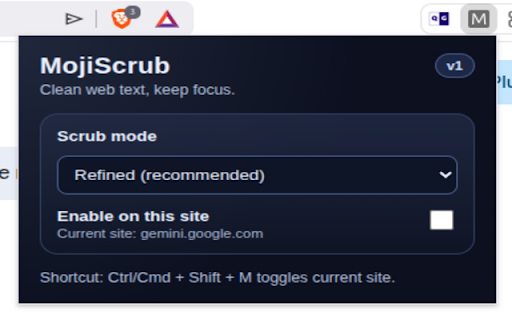
Refined Scrubbing: Intelligently identifies and removes emojis while preserving essential UI symbols and technical icons.

Site-Specific Control: Enable or disable scrubbing on a per-site basis.

Instant Toggle: Quickly switch focus modes with the global shortcut: Ctrl/Cmd + Shift + M.

Privacy-First: All text processing happens locally in your browser. No data is ever sent to a server.

Why use MojiScrub?

Clean Code Snippets: Easily strip emojis from AI chat responses before pasting them into your IDE.

Better Readability: Reduce visual noise on social platforms and news sites.

Accessibility: Improve the experience for users who prefer a minimalist, text-only interface.

For support or feedback, please contact us at [email protected].
Technical
- Version
- 1.0.0
- Manifest
- V3
- Size
- 14.33KiB
- Min Chrome
- 88
- Languages
- 1
- Featured
- No
Metadata
- ID
- jdckabbfphgbooalpihaooipjmbajolh
- Developer ID
- ua6f6e63b3c9af9539dfba766946c972b
- Developer Email
- [email protected]
- Created
- May 9, 2026
- Last Updated (Store)
- May 9, 2026
- Last Scraped
- Jun 9, 2026
- Website
- —
- Support URL
- https://mojiscrub.lachmed.com/
- Privacy Policy
- https://mojiscrub.lachmed.com/privacy.html
Data sourced from the Chrome Web Store · last verified Jun 9, 2026.