
Quick Links
Your quick access to your bookmarks
As of May 2026, Quick Links has 20 users in the Productivity category.
Usersup 33.3 percent+33.3%
20
20
Ratingno change0%
—
— reviews
Reviewsno change0%
—
Version
1.1.0
Manifest V3
History
2 snapshotsTracking since Apr 30, 2026.
View as table
| Date | Users | Rating | Reviews | Version |
|---|---|---|---|---|
| Apr 30, 2026 | 15 | — | — | 1.1.0 |
| May 27, 2026 | 13 | — | — | 1.1.0 |
| Now | 20 | — | — | 1.1.0 |
Permissions & access
- Permissions
- tabsactiveTabcontextMenus
- Host access
- None declared
Screenshots


About
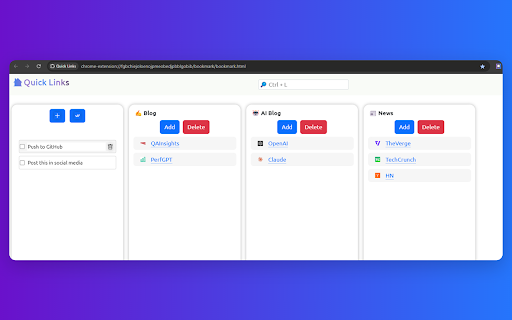
Quick Links: Kanban-Style Bookmark Management with Todo Support

Revolutionize your browsing experience with Quick Links, the Chrome extension that transforms how you manage bookmarks and tasks. Designed for efficiency-minded users, Quick Links introduces a visually intuitive Kanban-style interface for organizing your bookmarks, coupled with powerful todo list functionality.

Key Features:
• Kanban Board for Bookmarks: Visualize and organize your bookmarks in customizable columns, making it easy to prioritize and categorize your saved links.
• Integrated Todo Support: Seamlessly manage tasks alongside your bookmarks, enhancing your productivity in a single, streamlined interface.
• Drag-and-Drop Simplicity: Effortlessly move bookmarks and todos between columns, adapting to your workflow in real-time.
• Quick Access: Open your most important links and view pending tasks with just one click, directly from your browser.

Why Install Quick Links?
• Boost Productivity: Combine bookmark management and task tracking in one tool, reducing tab clutter and improving focus.
• Visual Organization: The Kanban layout provides a clear, at-a-glance view of your digital landscape, helping you stay organized and prioritize effectively.
• Flexibility: Customize columns to match your unique workflow, whether you're managing projects, planning research, or curating content.
• Time-Saving: Quickly find and access the resources you need, when you need them, without sifting through endless bookmark folders.

Quick Links is perfect for students, professionals, researchers, and anyone looking to streamline their online experience. Install now and transform your browser into a powerful productivity hub!
Technical
- Version
- 1.1.0
- Manifest
- V3
- Size
- 583KiB
- Min Chrome
- 88
- Languages
- 1
- Featured
- No
Metadata
- ID
- jcpngbilapanldphljagkbkjkmkmeiii
- Developer ID
- u2e37820ce5b7edc41c8e645d26a2ab9a
- Developer Email
- [email protected]
- Created
- Aug 21, 2024
- Last Updated (Store)
- Aug 23, 2024
- Last Scraped
- May 27, 2026
- Website
- http://qainsights.com/
- Support URL
- —
Similar extensions
Alternatives to Quick Links, ranked by description similarity.

QuickLinks New Tab
Organize your favorite links in customizable columns with drag-and-drop, emojis, and favicons for easy access and management.
106
★ 5.0

Quick Links
Save and quickly access your favorite links.
9
★ 5.0

Smart Folio
Your all-in-one productivity workspace. Bookmarks, projects, tasks and ideas — private, fast, and 100% yours.
9
★ 5.0

Bookmarkly
Automatically organize and sort your bookmarks by name and see recent bookmarks.
7
★ 5.0

Beautiful Bookmarks
A beautiful way to save and manage your favorite URLs with Google Tasks sync
24
★ 5.0

Tabbizz — The missing bookmark manager for this century
Bookmarks rethought for modern browsing, fast organization, and daily use.
24
★ 5.0

Bookmark Kanban
Organize bookmarks in a visual kanban board. Simple, intuitive management with drag-and-drop functionality.
16
★ 5.0

Bookmark Maestro
Bookmark Manager
153
★ 5.0
Data sourced from the Chrome Web Store · last verified May 27, 2026.