
UI Builder Coach AI
Analyze UI and generate FlutterFlow structures & prompts.
As of June 2026, UI Builder Coach AI has 3 users in the Developer Tools category.
Usersno change0%
3
3
Ratingno change0%
—
— reviews
Reviewsno change0%
—
Version
1.0.0
Manifest V3
History
8 snapshotsTracking since Apr 16, 2026.
View as table
| Date | Users | Rating | Reviews | Version |
|---|---|---|---|---|
| Apr 16, 2026 | 3 | — | — | 1.0.0 |
| Apr 22, 2026 | 2 | — | — | 1.0.0 |
| Apr 27, 2026 | 3 | — | — | 1.0.0 |
| May 4, 2026 | 4 | — | — | 1.0.0 |
| May 15, 2026 | 3 | — | — | 1.0.0 |
| May 21, 2026 | 5 | — | — | 1.0.0 |
| May 28, 2026 | 4 | — | — | 1.0.0 |
| Jun 5, 2026 | 5 | — | — | 1.0.0 |
| Now | 3 | — | — | 1.0.0 |
Permissions & access
- Permissions
- activeTabstoragecontextMenus
- Host access
- https://generativelanguage.googleapis.com/*, https://analyzewithgemini-hllok73ena-an.a.run.app/*
Screenshots



About
Detailed Description (English)
【UI Builder Coach AI: Your AI-Powered Design Accelerator】

"How can I make this UI look more professional?"
"I need a hint on how to recreate this design in FlutterFlow..."

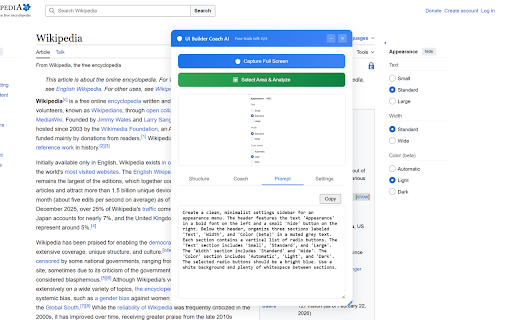
UI Builder Coach AI is the ultimate Chrome extension for developers and designers who want to bridge the gap between "good" and "great." Simply select any area of your screen, and our advanced Gemini AI will analyze the design to provide concrete improvement plans and actionable feedback.

🚀 Key Features

Intuitive Area Selection: Just drag and drop to specify the exact UI components you want to analyze.

Professional Design Review: Get expert feedback on layout, color theory, typography, and accessibility powered by Gemini AI.

FlutterFlow Optimization: Receive structural hints and ready-to-use prompts specifically tailored for FlutterFlow development.

Technical Implementation Tips: Go beyond looks—get practical advice on frontend implementation and UX flow optimization.

Hybrid API System: Start immediately with 3 free daily uses, or plug in your own Gemini API key for unlimited access.

🛠 Perfect For These Scenarios

FlutterFlow Development: When you're stuck on how to structure a specific component or layout.

Polishing Your App: When you want to remove the "amateur" feel and elevate your app's visual quality.

Design Communication: When you need to verbalize design intentions to explain them clearly to team members.

🔒 Privacy & Peace of Mind

Intentional Capture: Screen capture only occurs at the exact moment you trigger an analysis. No background data collection.

Developer-Focused: Built for efficiency—lightweight, ad-free, and designed by a developer for developers.
Technical
- Version
- 1.0.0
- Manifest
- V3
- Size
- 21.92MiB
- Min Chrome
- 88
- Languages
- 19
- Featured
- No
Metadata
- ID
- jcifcjbnkkgcckmmfingikdgggnhkobc
- Developer ID
- u12b2b6e0e71eb25d085dedf7c3e25f06
- Developer Email
- [email protected]
- Created
- Feb 25, 2026
- Last Updated (Store)
- Feb 25, 2026
- Last Scraped
- Jun 5, 2026
- Website
- iamuuid.com
- Support URL
- —
Similar extensions
Alternatives to UI Builder Coach AI, ranked by description similarity.

in-browser-design-llm
AI-powered in-browser design assistant for web developers.
2

RefineUI
Build better web apps with instant UI analysis and actionable guidance.
4

UI Assist
AI-powered UI assistant that helps create and edit user interfaces through glutamate UIassist MCP server
25
★ 5.0

FlowState
Circle broken UI, speak fixes in plain English, pick from AI variations. Visual debugging in 30 seconds.
—

Design Copilot
AI powered design feedback on any website. Your personal design copilot.
311
★ 4.2

DirectCodeUI Capture
Select any area on any webpage to capture a screenshot
16
★ 4.0

Web Developer Helper Suite
Measure, Annotate, Extract web data & Optimize local projects for AI/LLM context generation.
18

Rechrome
A powerful web development toolkit for content, design, SEO, and CSS editing. Perfect for developers and designers.
68
★ 5.0
Data sourced from the Chrome Web Store · last verified Jun 5, 2026.