
Highlights to Notion
Save highlighted text to Notion
As of June 2026, Highlights to Notion has 155 users and a 2.00/5 rating from 1 reviews in the Workflow & Planning category.
Usersup 8.4 percent+8.4%
155
155
Ratingno change0%
2.00
1 reviews
Reviewsno change0%
1
Version
1.0
Manifest V3
History
3 snapshotsTracking since Apr 1, 2026.
View as table
| Date | Users | Rating | Reviews | Version |
|---|---|---|---|---|
| Apr 1, 2026 | 143 | 2.00 | 1 | 1.0 |
| May 3, 2026 | 146 | 2.00 | 1 | 1.0 |
| Jun 2, 2026 | 153 | 2.00 | 1 | 1.0 |
| Now | 155 | 2.00 | 1 | 1.0 |
Permissions & access
- Permissions
- contextMenusstorage
- Host access
- None declared
Screenshots

About
Highlights to Notion is a browser extension that allows you to easily save highlights from any webpage directly into your Notion database. With a straightforward and smooth user experience, you can effortlessly save important information while browsing the web and keep it organized in your Notion workspace.

Key features:

Highlight text on any webpage
Save the selected text to a Notion database with just a few clicks
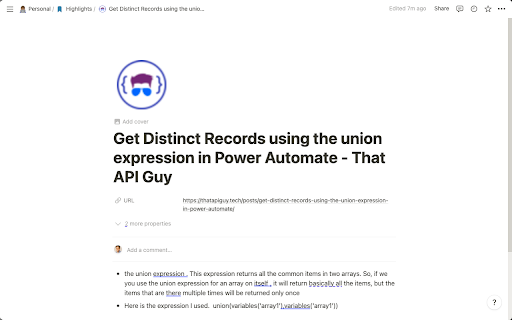
Automatically save associated metadata, such as page title, URL, and favicon
Customize the Notion database you want to save to
Choose your preferred property mapping for title and URL in your selected database
Save multiple highlights from the same webpage as bullets in the Notion page
Using Highlights to Notion, you can greatly enhance your web browsing experience and ensure that you never lose any important information. Boost your productivity and knowledge organization with Highlights to Notion!

Instructions:

Install the extension and click on the extension icon to open the popup.
Enter your Notion API key and choose the Notion database that you want to save highlights to.
Map the Title and URL properties in your selected database.
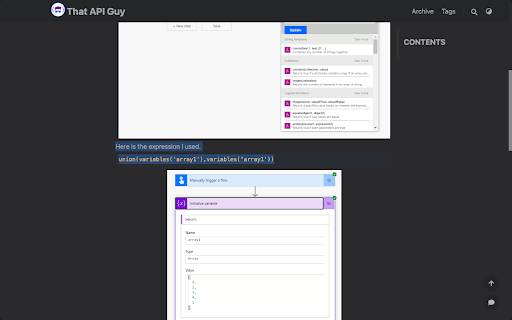
Browse the web and highlight any text you want to save to your Notion database.
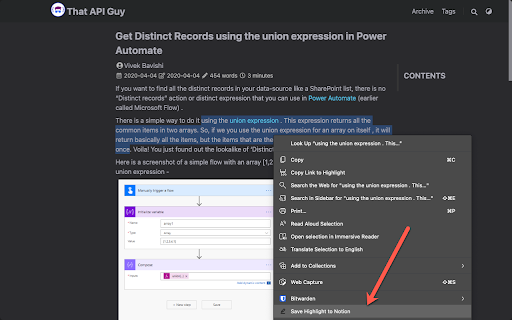
Right-click on the highlighted text and select "Save Highlight to Notion" to save the selected text along with the page title, URL, and favicon to your Notion database.
Start using Highlights to Notion today, and make web browsing more productive and organized!
Technical
- Version
- 1.0
- Manifest
- V3
- Size
- 11.46KiB
- Min Chrome
- 88
- Languages
- 1
- Featured
- Yes
Metadata
- ID
- jciaajikhlfbhoacombmgahnkienjbhf
- Developer ID
- ucfa73a5518800865f0cb38727642218a
- Developer Email
- [email protected]
- Created
- Aug 14, 2023
- Last Updated (Store)
- Aug 14, 2023
- Last Scraped
- Jun 2, 2026
- Website
- thatapiguy.tech
- Support URL
- —
- Privacy Policy
- —
Similar extensions
Alternatives to Highlights to Notion, ranked by description similarity.

Highlightion - Save Highlights to Notion
Highlight content on any web page and save to Notion databases.
441
★ 3.9

Notion Highlights
Save web highlights to Notion instantly. Detects open Notion pages. Zero friction! 🔥
23
Bookmarks to Notion
Sync Browser Bookmarks with Notion Database. Centralize your bookmarks.
3.0K
★ 4.6

NotesToNotion
Notes, Highlights, Videos, Audios, Articles, Posts, Books in One Notion.
1.0K
★ 3.5

Save to Notion
Save the Web to Notion
400.0K
★ 4.3

StoreNotion
StoreNotion:
The Use:
Save the link of webpages you visit in your own Notion database along with the created time in IST with a…
8
★ 5.0

Push to Notion
A Chrome extension to send web pages to multiple Notion databases.
4

NoteFlow
Clip pages and highlights into your Notion workspace with tags and organization
—
Data sourced from the Chrome Web Store · last verified Jun 2, 2026.