
Save Google Books preview as PDF
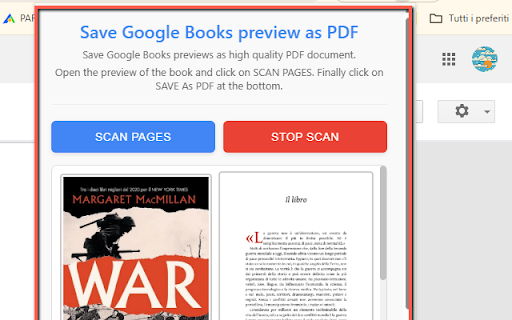
Save and download Google Books previews as PDF
As of June 2026, Save Google Books preview as PDF has 3,000 users and a 4.43/5 rating from 7 reviews in the Productivity category.
Usersup 50.0 percent+50.0%
3.0K
3,000
Ratingup 2.3 percent+2.3%
4.43
7 reviews
Reviewsup 16.7 percent+16.7%
7
Version
3.0.3
Manifest V3
90-day change · In the last 90 days this extension gained 1.0K users, 1 version update.
History
3 snapshotsTracking since May 16, 2026.
View as table
| Date | Users | Rating | Reviews | Version |
|---|---|---|---|---|
| May 16, 2026 | 2.0K | 4.33 | 6 | 3.0.2 |
| May 25, 2026 | 2.0K | 4.43 | 7 | 3.0.2 |
| Jun 4, 2026 | 3.0K | 4.43 | 7 | 3.0.2 |
| Now | 3.0K | 4.43 | 7 | 3.0.3 |
Permissions & access
- Permissions
- activeTabscriptingstorage
- Host access
- *://books.google.com/*, *://books.google.it/*, *://books.google.co.uk/*, *://books.google.de/*, *://books.google.fr/*, *://books.google.es/*, *://books.google.pt/*, *://books.google.nl/*, *://books.google.be/*, *://books.google.gr/*, *://books.google.hu/*, *://books.google.pl/*, *://books.google.cz/*, *://books.google.sk/*, *://books.google.com.br/*, *://books.google.com.mx/*, *://books.google.ca/*, *://books.google.com.ar/*, *://books.google.co.in/*, *://books.google.com.sg/*, *://books.google.com.au/*, *://books.google.co.nz/*, *://books.google.co.za/*, *://books.google.co.jp/*, *://books.google.co.kr/*, *://books.google.com.tw/*, *://play.google.com/, *://books.google.com.hk/*
Screenshots

About
Do you love exploring books on Google Books or Google Play Books but get frustrated when you can’t save or read them offline? This extension is here to help! 🚀

With Save Google Book Preview as PDF, you can quickly capture, organize, and export the available preview pages of a book into a convenient PDF file. Whether you’re a student 📖, a researcher 🔬, or simply a curious reader 🌍, this tool makes it easier to save what you find and return to it anytime—even without an internet connection.

🔑 Key Features

🖼️ Automatic Page Capture: Scans all visible preview pages one by one.

📑 Smart Ordering: Keeps the correct page sequence while building the PDF.

📝 Clean Output: Produces a readable PDF without watermarks or messy formatting.

🎯 One-Click Start: Just open a book preview on Google Books and hit the button!

🌟 Why Use It?

Google Books offers previews of millions of titles, but sometimes you want to save pages for:

📚 Study notes or class readings.

🔍 Research references for projects or papers.

🌐 Offline access when traveling or working without Wi-Fi.

This extension saves you time ⏳ and effort 💡 by automating the process, so you don’t have to take endless screenshots. Instead, you get a tidy, scroll-friendly PDF you can annotate, highlight, or share.

⚠️ Note

This tool only works with the publicly available previews shown by Google Books. It does not bypass restrictions or give access to full copyrighted books. Please respect authors and publishers 💙 and use the extension for study, research, and personal reading.
Technical
- Version
- 3.0.3
- Manifest
- V3
- Size
- 269KiB
- Min Chrome
- 88
- Languages
- 1
- Featured
- No
Metadata
- ID
- jcfaecpepebjignmaljepmghelcmnbbg
- Developer ID
- u242a85b87ce34780243ec3fb93482c05
- Developer Email
- [email protected]
- Created
- Aug 18, 2025
- Last Updated (Store)
- May 30, 2026
- Last Scraped
- Jun 15, 2026
- Website
- —
- Support URL
- —
- Privacy Policy
- https://onlinegratis.net/terms.html
Similar extensions
Alternatives to Save Google Books preview as PDF, ranked by description similarity.

Scribd PDF Saver
Save Scribd documents as PDF — floating window monitor.
3.0K
★ 3.3

VS to PDF Saver
Capture vitalsource bookshelf pages as screenshots and save them in a single PDF.
2.0K
★ 3.9

Flip Book to PDF
Capture Flip Book pages as screenshots and convert to PDF
1.0K
★ 3.9

Save Page as PDF
Use Save Page as PDF effortlessly for sharing or printing any website, try simple html to pdf extension to convert webpage to pdf
558
★ 3.8

SavePDF
Save web pages as PDF and upload to Google Drive
18

Docify Web
Overview :
Use Docify Web to save any webpage as a high-quality PDF instantly. Whether you need to capture a whole page, a…
1

Readly Magazine to PDF
Capture Readly magazine pages and convert to PDF
262
★ 4.0

Redshelf to PDF Downloader
Scan, capture and save RedShelf/VirDocs flipbook pages as a single PDF document
66
★ 3.7
Data sourced from the Chrome Web Store · last verified Jun 15, 2026.