
YouTube Comment Reader
Search, Sort, Filter, Translate, Read, Export YouTube Comments in spreadsheet format. Navigate Comments & Rplies with arrow keys
As of June 2026, YouTube Comment Reader has 6,000 users and a 4.24/5 rating from 50 reviews in the Social & Communication category.
Usersup 20.0 percent+20.0%
6.0K
6,000
Ratingdown 1.6 percent−1.6%
4.24
50 reviews
Reviewsup 2.0 percent+2.0%
50
Version
1.0.33
Manifest V3
90-day change · In the last 90 days this extension gained 1.0K users.
History
3 snapshotsTracking since Apr 5, 2026.
View as table
| Date | Users | Rating | Reviews | Version |
|---|---|---|---|---|
| Apr 5, 2026 | 5.0K | 4.31 | 49 | 1.0.33 |
| Apr 16, 2026 | 5.0K | 4.24 | 50 | 1.0.33 |
| Jun 2, 2026 | 5.0K | 4.24 | 50 | 1.0.33 |
| Now | 6.0K | 4.24 | 50 | 1.0.33 |
Permissions & access
- Permissions
- activeTab
- Host access
- None declared
Screenshots


About
+++ New Export functionality in version 1.0.28 +++
All loaded comments now exportable optionally in XML for Excel, JSON, or CSV (comma, tab or semicolon separated) format. The export complies with the current filter and order settings (i.e. you can easily export a filtered part of the comments in a desired order). If you are in dark mode, then the Excel sheet is created in dark mode as well.

+++ New in version 1.0.20 +++
New translate buttons in the comment popups (listening to Alt+Y) ..translating every foreign language comment into your language (back and forth).

+++ New in version 1.0.17 +++
+ Shortcut key now is Ctrl+Shift+Y (for extension popup) ..which can be changed in extension settings
+ Any short video can quickly be opened in a regular video player (where timeline, speed, volume etc. can be adjusted) by clicking the video title in the extension's popup.

+++ New in version 1.0.16 +++
Comments now also visible and sortable ascending by timestamps appearing in comments

 Features:
➤ Youtube comment presented in multi-functional spreadsheet format
➤ Sort comments (by table header click) ascending or descending  by author, comment time, upvotes count, replies count, last reply time, timestamps appearing in comments, comment length, or channel owner's upvotes (heart symbol)
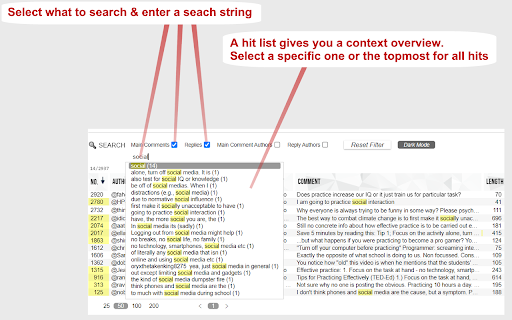
➤ Search main comments and/or replies by author and/or text content
  ...e.g. filter for an author's main comments and/or responses
  ...e.g. filter for comments and/or responses containing a specific text phrase
➤ Works in every language
➤ Works with YouTube Shorts as well
➤ Quickly navigate through comments and responses by (left, right, up, down) arrow keys
➤ Easily switch between light and dark mode

Instructions:
1. Open a YouTube video.
2. Click on the extension icon (in the chrome extensions toolbar, to the right of the address bar).
3. Wait for the extension popup to load a brief overview containing the YouTube channel, video title, total comments count etc.
4. In the info popup click on the Comment Reader icon. The Comment Reader opens in a new tab and starts loading comments (from newest to oldest).
5. Watch the progress while comments are loading.
6. Click OK to interrupt the loading process at any time to start reading the comments that has been loaded till then. When all comments are loaded, the progress view and interrupt button will disappear.
7. An interrupted loading process can be continued at any time if loading more comments is desired.

Tips:
Use (left, right, up, down) arrow keys to quickly navigate through comments and replies (although, of course, mouse clicks work as well).
➤ use up & down keys to go from one row to another
➤ use the right arrow key to dive into details (of a currently selected row)
➤ use the left arrow key to leave the details and return to parent list

➤ Quickly open any short video in a regular player (..so you can adjust the timeline, speed, volume etc.) by clicking the video description in the extension's popup

8. To reply to or upvote a comment you may click on the comment time (e.g. "6 hours ago") above the comment text. This will open a new regular YouTube window with the targeted comment (as the "highlighted comment") appearing immediately under the video player. That way you can interact via the regular YouTube user interface.
Technical
- Version
- 1.0.33
- Manifest
- V3
- Size
- 174KiB
- Min Chrome
- 88
- Languages
- 1
- Featured
- Yes
Metadata
- ID
- jbjbjeceipecokoeocnkcfjpanlipamf
- Developer ID
- ub37c92593ee4f19eb8a14c15247904a4
- Developer Email
- [email protected]
- Created
- Dec 2, 2023
- Last Updated (Store)
- Mar 3, 2026
- Last Scraped
- Jun 10, 2026
- Website
- —
- Support URL
- —
- Privacy Policy
- —
Similar extensions
Alternatives to YouTube Comment Reader, ranked by description similarity.

Enhanced Youtube
Making Youtube Better!
7
★ 5.0

Show YouTube comments while watching
Show YouTube comments on the right of the video. Read comments while you watch!
20.0K
★ 4.5

CommentStream for Youtube
CommentStream for Youtube: Live-style overlay of YouTube comments synced to timestamps.
26
★ 5.0

Youtube Right Side Comments
Easily toggle YouTube comments to the right or default left side with our Chrome extension for a more organized viewing experience.
2.0K
★ 4.2

commentu
A Chrome extension that allows you to view comments that indicate the current playback time on YouTube.
—

Youtube Timeline
Youtube comments on a timeline
169
★ 3.8

YT Replay Chat: Youtube Extension
Displays timestamped YouTube comments as a live chat replay.
24
★ 4.8

Creator Dashboard
A customizable dashboard and analysis tools for YouTubers.
791
★ 4.2
Data sourced from the Chrome Web Store · last verified Jun 10, 2026.