
GA4 Kangaroo
Save your GA4 comparisons for later and use them just like segments in good old Universal Analytics.
As of June 2026, GA4 Kangaroo has 46 users in the Productivity category.
Usersup 9.5 percent+9.5%
46
46
Ratingno change0%
—
— reviews
Reviewsno change0%
—
Version
1.0
Manifest V3
History
3 snapshotsTracking since Apr 1, 2026.
View as table
| Date | Users | Rating | Reviews | Version |
|---|---|---|---|---|
| Apr 1, 2026 | 42 | — | — | 1.0 |
| May 3, 2026 | 43 | — | — | 1.0 |
| Jun 2, 2026 | 47 | — | — | 1.0 |
| Now | 46 | — | — | 1.0 |
Permissions & access
- Permissions
- activeTabstorage
- Host access
- None declared
Screenshots


About
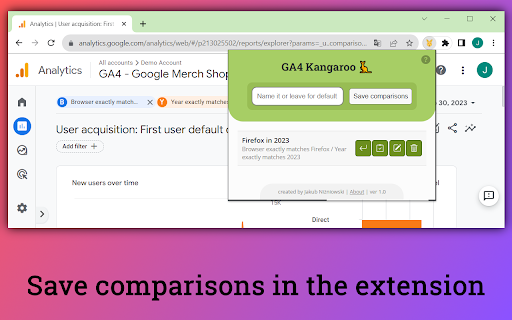
Save and reuse comparisons from standard reports in GA4.

If you've worked with Universal Analytics, you've likely used segments to compare data.

In GA4, we have comparisons that replicate that functionality. However, their major drawback is that they cannot be saved for later.

That's why the GA4 Kangaroo is here. Save, edit, and use GA4 comparisons - just like with segments in UA.

No workarounds, no wasting time!

### How to use it

1. Create a comparison (or many of them) in GA4 and add them to any report.
2. Open GA4 Kangaroo.
3. In a form at the top, write a custom name (or leave it empty for a default one), and click "Add a new set".
4. Voila! Your set is added to the list!

To apply a set, open a report and click the first button next to the set name.

### What else you can do with saved comparisons

- Edit the saved set
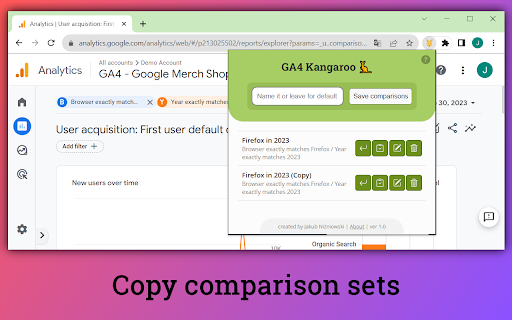
- Delete the set or create a copy
- Look across sets' contents by checking the titles of comparisons
- Recognize invalid sets (their description will be marked with red color)

### Privacy, security & responsibility

GA4 Kangaroo does not track you and does not send any data. It runs 100% locally in your browser and saves comparison sets in the Google Chrome storage. It means that I don't have access to them and when you remove the extension, you lose your saved sets.

You are using GA4 Kangaroo on your responsibility.

If you decide to contact me, I'll keep your message with your email address to be able to respond to you.
Technical
- Version
- 1.0
- Manifest
- V3
- Size
- 179KiB
- Min Chrome
- 88
- Languages
- 1
- Featured
- Yes
Metadata
- ID
- jbghcgdmjlkkoifnkfmhlhgolhionpjm
- Developer ID
- uc7a357f4f2fc260b21d228a5ba30373d
- Developer Email
- [email protected]
- Created
- Oct 3, 2023
- Last Updated (Store)
- Oct 3, 2023
- Last Scraped
- Jun 2, 2026
- Website
- —
- Support URL
- https://forms.gle/kGcxbbAow9VLDgEK8
- Privacy Policy
- —
Similar extensions
Alternatives to GA4 Kangaroo, ranked by description similarity.

GA4 Optimizer: Power Tools for Google Analytics
Fix GA4 & get the missing features you wish you had! Unlock on-the-fly custom metrics, 1-click YoY presets, Exit Reports & more.
511
★ 5.0

GA4 & GSC Date Shortcuts
Quick date comparison presets for Google Search Console & Google Analytics 4
8

QuickCopy for GA4
Say goodbye to the frustration of not being able to use ctrl + C. QuickCopy allows for instant copying with just a double-click.
36
★ 5.0

GA4 Copy Cat — Copy/Paste in GA4
Copy text and numbers within the GA4 Reports Library and GA4 Explorations with a single click.
1.0K
★ 5.0

GA4 Dashboard
Google Analytics 4 Dashboard Chrome Extension
24

UTM & URL Builder for GA4
Build GA4 campaign URLs easily
18

Google Search Console Enhanced Analytics
Google Search Console Enhanced Analytics is a simple, time-saving extension that enhances your analysis.
20.0K
★ 4.8

Aura In Page Analytics
Providing a sidepanel to easily view your GA4 data while you browse.
57
★ 5.0
Data sourced from the Chrome Web Store · last verified Jun 2, 2026.