
Flowly - Task Manager & Time Tracker
Quick-add tasks with natural language, run timers, and stay focused — all from your browser.
As of June 2026, Flowly - Task Manager & Time Tracker has 4 users and a 5.00/5 rating from 5 reviews in the Workflow & Planning category.
Usersno change0%
4
4
Ratingno change0%
5.00
5 reviews
Reviewsno change0%
5
Version
0.1.8
Manifest V3
90-day change · In the last 90 days this extension 3 version updates.
History
8 snapshotsTracking since Apr 18, 2026.
View as table
| Date | Users | Rating | Reviews | Version |
|---|---|---|---|---|
| Apr 18, 2026 | — | — | — | 0.1.1 |
| Apr 23, 2026 | — | — | — | 0.1.1 |
| Apr 28, 2026 | 1 | 5.00 | 3 | 0.1.6 |
| May 6, 2026 | 1 | 5.00 | 3 | 0.1.6 |
| May 11, 2026 | 2 | 5.00 | 5 | 0.1.6 |
| May 16, 2026 | 3 | 5.00 | 5 | 0.1.6 |
| May 23, 2026 | 3 | 5.00 | 5 | 0.1.7 |
| Jun 12, 2026 | 3 | 5.00 | 5 | 0.1.8 |
| Now | 4 | 5.00 | 5 | 0.1.8 |
Changelog
- May 16, 2026name
Flowly: Tasks & Timer
Flowly - Task Manager & Time Tracker
- Apr 23, 2026description
Flowly — Tasks, right in your browser

Capture tasks instantly without switching tabs.
Flowly brings your task manager directly into your browser, so you can stay focused and move faster.

⚡ Quick add with natural language

Type something like:

“call client tomorrow 3pm high #work”

Flowly automatically extracts:

due date
priority
tags

Just hit Enter — done.

⏱ Timers that follow you

Start a focus timer on any task.
See elapsed time прямо in your toolbar badge.

Stop it from the side panel or web app — everything stays perfectly in sync.

📊 Side panel dashboard

Get a full overview without leaving your tab:

Today’s tasks
Overdue items
Upcoming deadlines
Your streak

Everything is organized just like in the web app.

🔄 Sync with your Flowly account

Sign in at flowly.run once — that’s it.

Your tasks, projects, timers, and streak sync instantly across all devices.

🖱 Context menu capture

Right-click any page or text and select:

“Add to Flowly”

Save tasks with the source URL attached automatically.

⌨️ Keyboard shortcuts
Cmd + Shift + F (Mac) / Ctrl + Shift + F (Windows) — Quick add
Cmd + Shift + L (Mac) / Ctrl + Shift + L (Windows) — Open panel
🔒 Privacy-first
No tracking
No ads

Your data stays in your account.
The extension only communicates with api.flowly.run.
Every time you switch tabs to add a task, you break your focus. Flowly fixes that.

Flowly is the task manager and focus timer that lives inside your browser — always one shortcut away, never in the way. It's the browser companion to Flowly (https://flowly.run), your full productivity hub for tasks, projects, time tracking, and streaks.

✍️ NATURAL LANGUAGE QUICK-ADD
Type "review proposal Friday high #client" and Flowly figures out the rest: due date, priority, tags. No clicking through fields. No friction.

⏱ SEE YOUR TIMER WITHOUT SWITCHING TABS
Start a timer on any task. The running time appears on your browser icon — so you always know what you're supposed to be working on.

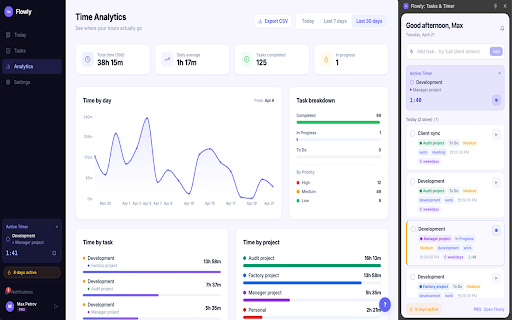
📊 SIDE PANEL — YOUR FULL TASK VIEW
Open a full-width panel alongside any webpage. Today's tasks, overdue items, upcoming deadlines, and your productivity streak. No new tab required.

🖱 ADD TASKS FROM ANYWHERE ON THE WEB
Right-click any page or highlighted text → "Add to Flowly". The URL is saved with the task automatically. Ideal for research, tickets, and anything you want to come back to.

🔄 ONE ACCOUNT, EVERY DEVICE
Sign in once at flowly.run — everything syncs instantly. Start a timer in the extension, check your progress in the web app, close tasks on your phone. It all stays in step.

⌨️ SHORTCUTS
Cmd/Ctrl + Shift + F — Add a task instantly
Cmd/Ctrl + Shift + L — Open your panel

🔒 PRIVATE BY DEFAULT
No ads. No analytics. No third-party scripts. The extension communicates only with api.flowly.run.
Permissions & access
- Permissions
- sidePanelstorageactiveTabcontextMenusnotificationsalarmsidle
- Host access
- https://api.flowly.run/*
Screenshots



About
Every time you switch tabs to add a task, you break your focus. Flowly fixes that.

Flowly is the task manager and focus timer that lives inside your browser — always one shortcut away, never in the way. It's the browser companion to Flowly (https://flowly.run), your full productivity hub for tasks, projects, time tracking, and streaks.

✍️ NATURAL LANGUAGE QUICK-ADD
Type "review proposal Friday high #client" and Flowly figures out the rest: due date, priority, tags. No clicking through fields. No friction.

⏱ SEE YOUR TIMER WITHOUT SWITCHING TABS
Start a timer on any task. The running time appears on your browser icon — so you always know what you're supposed to be working on.

📊 SIDE PANEL — YOUR FULL TASK VIEW
Open a full-width panel alongside any webpage. Today's tasks, overdue items, upcoming deadlines, and your productivity streak. No new tab required.

🖱 ADD TASKS FROM ANYWHERE ON THE WEB
Right-click any page or highlighted text → "Add to Flowly". The URL is saved with the task automatically. Ideal for research, tickets, and anything you want to come back to.

🔄 ONE ACCOUNT, EVERY DEVICE
Sign in once at flowly.run — everything syncs instantly. Start a timer in the extension, check your progress in the web app, close tasks on your phone. It all stays in step.

⌨️ SHORTCUTS
Cmd/Ctrl + Shift + F — Add a task instantly
Cmd/Ctrl + Shift + L — Open your panel

🔒 PRIVATE BY DEFAULT
No ads. No analytics. No third-party scripts. The extension communicates only with api.flowly.run.
Technical
- Version
- 0.1.8
- Manifest
- V3
- Size
- 130KiB
- Min Chrome
- 88
- Languages
- 1
- Featured
- No
Metadata
- ID
- jbbhikmmjpnldgcplimclkiggjbbcpja
- Developer ID
- ub426fe5ce4703e69cfc1afc9995bdebe
- Developer Email
- [email protected]
- Created
- Apr 17, 2026
- Last Updated (Store)
- May 17, 2026
- Last Scraped
- Jun 12, 2026
- Website
- flowly.run
- Support URL
- —
- Privacy Policy
- https://flowly.run/privacy
Data sourced from the Chrome Web Store · last verified Jun 12, 2026.