
Vs Code github
Extention chrome for adding vscode button in github
As of June 2026, Vs Code github has — users and a 4.00/5 rating from 1 reviews in the Developer Tools category.
Usersno change0%
—
—
Ratingno change0%
4.00
1 reviews
Reviewsno change0%
1
Version
0.1.0
Manifest V3
History
3 snapshotsTracking since Apr 1, 2026.
View as table
| Date | Users | Rating | Reviews | Version |
|---|---|---|---|---|
| Apr 1, 2026 | 131 | 4.00 | 1 | 0.1.0 |
| May 3, 2026 | 139 | 4.00 | 1 | 0.1.0 |
| Jun 2, 2026 | 137 | 4.00 | 1 | 0.1.0 |
| Now | — | 4.00 | 1 | 0.1.0 |
Permissions & access
- Permissions
- None declared
- Host access
- None declared
Screenshots
About
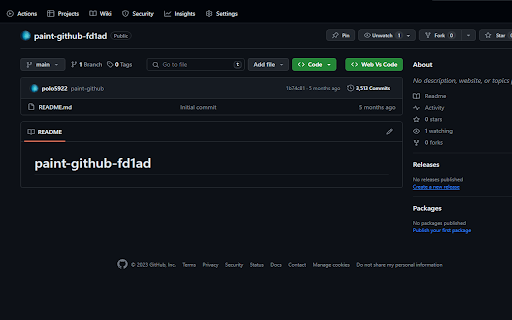
The GitHub Open Button for Chrome extension revolutionizes your workflow by seamlessly integrating Visual Studio Code Web (VS Code Web) with GitHub. This Chrome extension places an "Web Vs Code" button right on GitHub repositories, transforming your browsing experience into a coding journey.

Key Features:

Streamlined Workflow: Access your GitHub repositories in VS Code Web with a single click, eliminating the need for manual URL copying and pasting.

Productivity at Its Best: Stay within your coding environment to boost productivity and minimize distractions.

Open Source: This extension is open-source, empowering you to contribute to its development and tailor it to your unique needs.

How to Use:

Install the "Vs Code github for Chrome" extension from the Chrome Web Store.
Sign in to your GitHub account if prompted.
Visit any GitHub repository in your Chrome browser.
Look for the "Web Vs Code" button on the repository page.
Click the button to open the repository directly in Visual Studio Code Web.
Start coding immediately in a familiar and focused environment.
Stay Connected:

Elevate Your VS Code Web Experience:

With the Vs Code github for Chrome extension, simplify your interactions with GitHub and elevate your coding experience in the browser.
Technical
- Version
- 0.1.0
- Manifest
- V3
- Size
- 85.21KiB
- Min Chrome
- 88
- Languages
- 1
- Featured
- No
Metadata
- ID
- jajpeoodgnclcpkcldfieifkcinhcnmg
- Developer ID
- u0b50d5ce9fbb864735ee41b068cb480c
- Developer Email
- [email protected]
- Created
- Dec 14, 2023
- Last Updated (Store)
- Dec 14, 2023
- Last Scraped
- Jun 2, 2026
- Website
- —
- Support URL
- —
- Privacy Policy
- —
Similar extensions
Alternatives to Vs Code github, ranked by description similarity.

GitHub Clone with VS Code
Adds an 'Open with VS Code' button to GitHub repositories for direct cloning
16

VSCode Jumper
VSCode Jumper is a chrome extension that allows you to open your GitHub repositories in VSCode.dev with just one click.
21

GitHub Clone in VS Code
Adds a 'Clone in VS Code' button to GitHub repositories as if it were a native feature for instant one-click cloning.
114
★ 5.0

Open in VSCode
Open VSCode directly from GitHub
58

CodeView: VS Code plugin for Github
Check out your github repositories in IDE mode.
22

Git2Code
Open GitHub files directly in VSCode with one click
2

VS Code Web
An extension to open a GitHub repo in VS Code Web
4.0K
★ 4.5

GitHub Repo Code Stats
Elevate your GitHub browsing experience with the Github Repo Code Stats Chrome extension!
What does it do?
When you're viewing a…
29
Data sourced from the Chrome Web Store · last verified Jun 2, 2026.