
Sender
An extension to help you apply easily .
As of June 2026, Sender has 15 users and a 4.80/5 rating from 5 reviews in the Productivity category.
Usersup 7.1 percent+7.1%
15
15
Ratingno change0%
4.80
5 reviews
Reviewsno change0%
5
Version
1.0.1
Manifest V3
History
2 snapshotsTracking since May 3, 2026.
View as table
| Date | Users | Rating | Reviews | Version |
|---|---|---|---|---|
| May 3, 2026 | 14 | 4.80 | 5 | 1.0.1 |
| Jun 2, 2026 | 24 | 4.80 | 5 | 1.0.1 |
| Now | 15 | 4.80 | 5 | 1.0.1 |
Permissions & access
- Permissions
- activeTabstorageidentity
- Host access
- None declared
Screenshots



About
Sender - Send Emails Quickly with Custom Templates
Description:

Welcome to Sender, the ultimate solution for job seekers who want to streamline their email process. Job applicants often face the time-consuming task of composing emails for multiple job applications. With Sender, we make that easier by allowing you to send customized emails through Gmail using pre-saved templates.

How it Works:

The extension integrates seamlessly with Gmail, letting you send personalized emails with just a click.
Simply save your message templates, and they’ll be ready to use whenever you need them.
The extension requires Gmail authorization to send emails on your behalf, ensuring that your messages are sent directly from your Gmail account.
Why Gmail Authorization? The Gmail API enables us to send emails on your behalf securely and directly through your Gmail account. This integration simplifies the email process, making job applications quicker and more efficient.

User Manual:

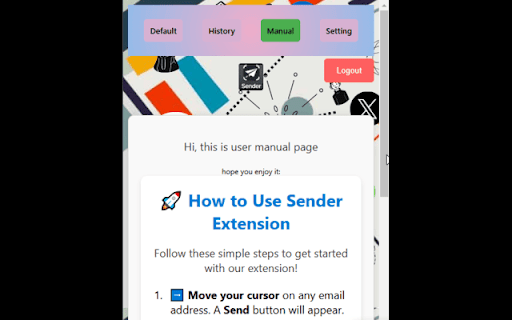
Hover over any email address and a Send button will appear.
Click the Send button to quickly send your email.
You must log in and authorize Gmail to use the extension.
Save your message templates and reuse them for multiple emails.
Your saved templates can be accessed and edited at any time.
now user can provide direct input .
Features and Benefits:

Send PDFs & Images: Attach files to your emails easily.
Text Formatting: Bold, underline, and format your message for a professional touch.
Your Data is Safe: We do not store or access your data. Your Gmail account handles everything securely.
Save Time: Reduce the time spent writing repetitive emails with saved templates.
Technical
- Version
- 1.0.1
- Manifest
- V3
- Size
- 342KiB
- Min Chrome
- 88
- Languages
- 1
- Featured
- No
Metadata
- ID
- jajcmmflohnabceihilchpeelikeakji
- Developer ID
- u10c2a214ae3c6ac048c7ef2d00873173
- Developer Email
- [email protected]
- Created
- Dec 24, 2024
- Last Updated (Store)
- Feb 13, 2025
- Last Scraped
- Jun 2, 2026
- Website
- https://www.truths.in/
- Support URL
- https://www.truths.in/
- Privacy Policy
- https://www.truths.in/policy.html
Similar extensions
Alternatives to Sender, ranked by description similarity.

Smartly Email — Save Templates, Reuse, Automate✅
Quickly save and insert email templates inside Gmail compose window.
12
★ 5.0

Gmail Template with Attachment
Save Gmail Template with Attachment! Easily create, manage, and reuse email templates with files, images, and docs in Gmail
633
★ 4.8

Bulk Send Gmail
Side panel helper for sending personalized template emails one by one in Gmail.
78
★ 5.0

One-Click Gmail Template
Insert pre-saved email templates into web-based email clients with one click or add templates from Gmail emails.
4
★ 2.0

Email Signature Templates
Use a professional email signature template or create your own — apply it instantly with one click
8
★ 5.0

ResuMailer
Send emails with your resume to recruiters using SMTP.
31
★ 5.0

Templates for Gmail
Save reusable email snippets and insert them into any Gmail compose window with a click or shortcut.
23
★ 1.0

Gmail Templates
Use Gmail Templates for creating messages in one second and boost your productivity with auto text expander and browser template
619
★ 5.0
Data sourced from the Chrome Web Store · last verified Jun 2, 2026.