
Pinora – Pinterest Board Pins Images Downloader
Extract Pinterest board images for Figma or download them as a ZIP.
As of June 2026, Pinora – Pinterest Board Pins Images Downloader has 9 users and a 5.00/5 rating from 11 reviews in the Productivity category.
Usersno change0%
9
9
Ratingno change0%
5.00
11 reviews
Reviewsno change0%
11
Version
1.0.5
Manifest V3
History
6 snapshotsTracking since May 2, 2026.
View as table
| Date | Users | Rating | Reviews | Version |
|---|---|---|---|---|
| May 2, 2026 | — | — | — | 1.0.5 |
| May 8, 2026 | — | — | — | 1.0.5 |
| May 13, 2026 | 13 | 5.00 | 3 | 1.0.5 |
| May 19, 2026 | 16 | 5.00 | 11 | 1.0.5 |
| May 25, 2026 | — | 5.00 | 11 | 1.0.5 |
| Jun 1, 2026 | 10 | 5.00 | 11 | 1.0.5 |
| Now | 9 | 5.00 | 11 | 1.0.5 |
Permissions & access
- Permissions
- activeTabscriptingstorageclipboardWritenotifications
- Host access
- None declared
Screenshots
About
🌈 Pinora — Give Your Pinterest Boards the Freedom They Deserve
If you live inside Pinterest — saving ideas, collecting inspiration, building boards for every mood and every project — Pinora is the tool that finally treats your boards the way you do.

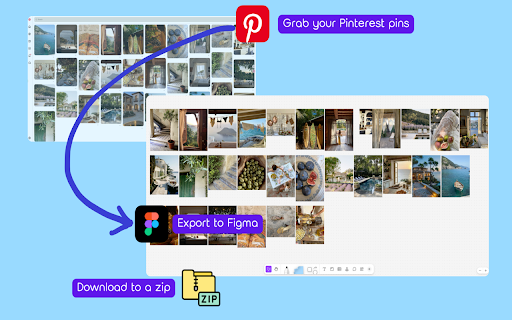
Paired with the Pinora Figma Plug‑in, Pinora extracts your Pinterest images and prepares them for instant use in Figma or download as a .zip file.
No more saving pins one by one.

💖 Your Pinterest Boards, Unlocked
Download your entire board — every pin, every section, every idea — with a single click.
Perfect for moodboards, reference collections, and creative projects.


🆓 Try It Free — Feel the Difference

✔ Process up to 30 pins
✔ Download 20 images as a .zip
✔ Import 30 pins into Figma
✔ Upgrade for unlimited access


🌟 What Pinterest Lovers Adore About Pinora

📥 Full Board Downloads — Save everything in one clean .zip
⚡ Instant Pin Grab — Capture a whole board instantly
🎨 Figma‑Ready — Paste pins directly into Figma or FigJam
🖼️ High‑Quality Images — Crisp 736px downloads
🗂️ Section‑Friendly — Works perfectly with organized boards


🎨 Perfect For Pinterest Power Users

🎨 Moodboard creators
🌈 Aesthetic collectors
🖌️ Artists gathering references
💡 Designers building inspiration libraries
🌍 Anyone who wants to save Pinterest images in bulk


🚀 How It Works

1️⃣ Open any Pinterest board
2️⃣ Click the Pinora extension
3️⃣ Choose Download or Copy to Figma
4️⃣ Done — your board is yours


✨ Why Choose Pinora

⏱️ Save Time: Skip pin‑by‑pin saving
📁 Stay Organized: Export full boards in one batch
⚡ Work Faster: Bring Pinterest inspiration straight into your design tools

🔗 Learn more: https://pinora.extensionlibs.com
Technical
- Version
- 1.0.5
- Manifest
- V3
- Size
- 489KiB
- Min Chrome
- 88
- Languages
- 1
- Featured
- No
Metadata
- ID
- jaigianhiodhgjhkpienelddmelkhbli
- Developer ID
- u2c9544994e00fdb25e5edafdb6b05b1b
- Developer Email
- [email protected]
- Created
- May 1, 2026
- Last Updated (Store)
- May 1, 2026
- Last Scraped
- Jun 7, 2026
- Website
- extensionlibs.com
- Support URL
- —
- Privacy Policy
- —
Data sourced from the Chrome Web Store · last verified Jun 7, 2026.