
Audio editor online X-Audacity
Audio editor online to edit your audios, remove noise, cut and combine clips, and apply special audio effects
As of June 2026, Audio editor online X-Audacity has 400,000 users and a 2.84/5 rating from 193 reviews in the Workflow & Planning category.
Usersdown 20.0 percent−20.0%
400.0K
400,000
Ratingno change0%
2.84
193 reviews
Reviewsno change0%
193
Version
2.15.5
Manifest V3
90-day change · In the last 90 days this extension lost 100.0K users.
History
7 snapshotsTracking since Apr 5, 2026.
View as table
| Date | Users | Rating | Reviews | Version |
|---|---|---|---|---|
| Apr 5, 2026 | 500.0K | 2.84 | 193 | 2.15.5 |
| Apr 16, 2026 | 400.0K | 2.84 | 193 | 2.15.5 |
| Apr 20, 2026 | 500.0K | 2.84 | 193 | 2.15.5 |
| May 7, 2026 | 600.0K | 2.84 | 193 | 2.15.5 |
| May 11, 2026 | 500.0K | 2.84 | 193 | 2.15.5 |
| Jun 1, 2026 | 600.0K | 2.84 | 193 | 2.15.5 |
| Jun 20, 2026 | 500.0K | 2.84 | 193 | 2.15.5 |
| Now | 400.0K | 2.84 | 193 | 2.15.5 |
Permissions & access
- Permissions
- storagetabs
- Host access
- None declared
Screenshots

About
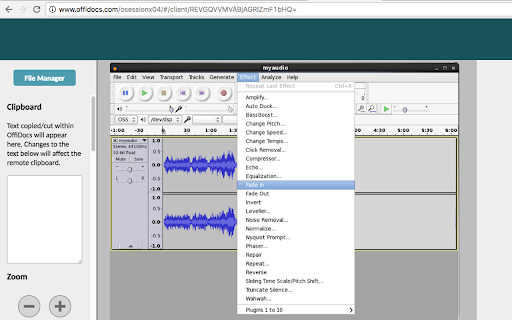
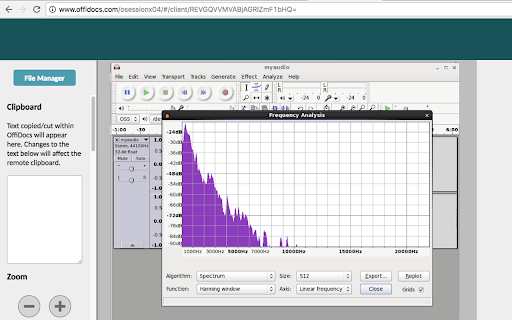
X-Audacity is a browser extension that gives you access to a remotely hosted Audacity instance directly from your web browser. You can import audio files, reduce noise, cut and merge clips, apply effects, and edit audio online with professional-quality results. It is ideal for music, podcasts, audiobooks, interviews, and other audio projects, and it is integrated with our file manager for convenient audio file management. We do not modify Audacity in any way and provide it in its original, unmodified form. This remote-access model is designed to align with GPLv3 requirements, since the software is accessed over a network rather than distributed as a modified local copy through the extension. Its main features are: - Import sound files, edit them, and combine them with other files: * Import and export WAV, AIFF, AU, FLAC and Ogg Vorbis files. * Import and export all formats supported by libsndfile Such as GSM 6.10, 32-bit and 64-bit float WAV and U / A-Law. * Import MPEG audio (including MP2 and MP3 files) using libmad . * Import raw (headerless) audio files using the “Import Raw” command. * Create WAV or AIFF files. * Export MP3 Files with the optional LAME encoder library . * Import and export AC3, M4A/M4R (AAC) and WMA with the optional FFmpeg library. - Sound Quality: * Supports 16-bit, 24-bit and 32-bit (floating point) samples (Latter preserves the samples in excess of full scale). * Sample rates and formats are converted using high-quality resampling and dithering. * Tracks with different sample rates or formats are converted Automatically in real time. - Audio Editing online: * Easy Editing with Cut, Copy, Paste and Delete. * Unlimited Undo (and Redo) to go back any number of steps. * Edit and mix large numbers of tracks. * Multiple clips per track are allowed. * Label tracks. * Envelope Tool to fade the volume up or down smoothly. - Audio effects: * Change the pitch without altering the tempo (or vice-versa). * Remove static, hiss, hum or other constant background noises. * Alter frequencies with Equalization, Bass Boost, High / Low Pass and Notch Filter effects. * Adjust volume with Compressor, Amplify, Normalize, Fade In / Fade Out. * Remove Vocals from Suitable stereo tracks. * Create voice-overs for podcasts or DJ sets using Auto Duck effect. * Echo * Phaser * Reverse * Truncate Silence - Audio online Analysis: * Spectrogram view modes for visualizing frequencies. * “Plot Spectrum” command for detailed frequency analysis. * “Sample Data Export” for exporting to file Containing amplitude values for each sample in the selection. * Contrast Analysis for analyzing volume average rms Differences Between foreground speech and background music. This extension is available for free online users but it also allows the integration with premium users and on-premises OffiDocs deployments where the OffiDocs Audacity is installed. IMPORTANT: This extension scans the URLs browsed in order to detect audio files. The audio files detected appear in a file list located in the extension popup that are retrieved from our servers. The scanning is performed from our servers so your URL are reported to our system. No personal data is collected. This scan can be disabled with a checkbox that appears in the extension popup. If you disable this scanning, this functionality is not available so then the extension functionality is very limited.
Technical
- Version
- 2.15.5
- Manifest
- V3
- Size
- 416KiB
- Min Chrome
- 88
- Languages
- 18
- Featured
- No
Metadata
- ID
- jaembmdeobjibglbnnefpalabeohjpnj
- Developer ID
- ue9deed8b46b1d6087401a43f7731745b
- Developer Email
- [email protected]
- Created
- Mar 4, 2017
- Last Updated (Store)
- Mar 25, 2026
- Last Scraped
- Jun 20, 2026
- Website
- offidocs.com
- Support URL
- —
- Privacy Policy
- http://www.offidocs.com/index.php/desktop-apps-policy
Similar extensions
Alternatives to Audio editor online X-Audacity, ranked by description similarity.

Audio editor & music editor AudioStudio
AudioStudio to create and edit audio and music online
50.0K
★ 3.4

Audio Editor for Google Chrome™
You can edit audio for free
10.0K
★ 3.0
Video editor OpenShot online
Create and edit videos with OpenShot online
50.0K
★ 2.5
LibreOffice Editor
Create and edit documents with LibreOffice Online.
50.0K
★ 3.4

Document Editor for doc & docx
Create and edit documents doc, docx or odt
40.0K
★ 3.1
OpenOffice Writer online for Word documents
Create and edit doc and docx documents with OpenOffice Writer online
50.0K
★ 3.2

AudioBridge
Turning audio into a first-class citizen in your personal knowledge workflow.
27

Audio to Text – Transcribe Voice & Files
Transcribe audio and voice recordings instantly. Upload files or record and convert speech to text in seconds.
224
★ 3.0
Data sourced from the Chrome Web Store · last verified Jun 20, 2026.