
McLecture
McLecture lets McGill students download lecture recordings from myCourses for offline viewing and study. While browsing myCourses,…
As of June 2026, McLecture has 66 users and a 5.00/5 rating from 1 reviews in the Education category.
Usersup 1.5 percent+1.5%
66
66
Ratingno change0%
5.00
1 reviews
Reviewsno change0%
1
Version
2.0.6
Manifest V3
90-day change · In the last 90 days this extension 1 version update.
History
11 snapshotsTracking since Apr 1, 2026.
View as table
| Date | Users | Rating | Reviews | Version |
|---|---|---|---|---|
| Apr 1, 2026 | 65 | — | — | 2.0.5 |
| Apr 17, 2026 | 64 | — | — | 2.0.5 |
| Apr 22, 2026 | 69 | — | — | 2.0.5 |
| Apr 27, 2026 | 74 | 5.00 | 1 | 2.0.5 |
| May 4, 2026 | 73 | 5.00 | 1 | 2.0.6 |
| May 10, 2026 | 70 | 5.00 | 1 | 2.0.6 |
| May 15, 2026 | 68 | 5.00 | 1 | 2.0.6 |
| May 21, 2026 | 67 | 5.00 | 1 | 2.0.6 |
| May 28, 2026 | 62 | 5.00 | 1 | 2.0.6 |
| Jun 4, 2026 | 68 | 5.00 | 1 | 2.0.6 |
| Jun 10, 2026 | 69 | 5.00 | 1 | 2.0.6 |
| Now | 66 | 5.00 | 1 | 2.0.6 |
Changelog
- Apr 27, 2026description
McLecture helps McGill students save lecture recordings from myCourses for offline study.

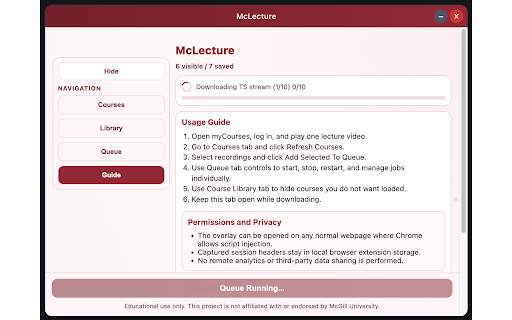
Open the extension as an overlay while browsing, refresh your course list, pick recordings, and download selected lectures to MP4.

Session data needed for downloads is stored locally in your browser extension storage.
No analytics or third-party tracking is required for core functionality.
Use responsibly and only for educational/personal access to content you are authorized to view.
McLecture lets McGill students download lecture recordings from myCourses for offline viewing and study.

While browsing myCourses, open the extension overlay, refresh your course list, select the recordings you want, and download them as MP4 files.

McLecture stores the session data needed for downloads locally in your browser extension storage. It does not require analytics or third-party tracking for core functionality.

Use responsibly and only to access course content you are authorized to view for educational or personal use.
- Apr 27, 2026short_description
McLecture helps McGill students save lecture recordings from myCourses for offline study.

Open the extension as an overlay while…
McLecture lets McGill students download lecture recordings from myCourses for offline viewing and study.

While browsing myCourses,…
Permissions & access
- Permissions
- webRequeststoragescriptingactiveTabpower
- Host access
- <all_urls>
Screenshots


About
McLecture lets McGill students download lecture recordings from myCourses for offline viewing and study.

While browsing myCourses, open the extension overlay, refresh your course list, select the recordings you want, and download them as MP4 files.

McLecture stores the session data needed for downloads locally in your browser extension storage. It does not require analytics or third-party tracking for core functionality.

Use responsibly and only to access course content you are authorized to view for educational or personal use.
Technical
- Version
- 2.0.6
- Manifest
- V3
- Size
- 9.64MiB
- Min Chrome
- 88
- Languages
- 1
- Featured
- No
Metadata
- ID
- ipnhkfogmlokecmpgjhdkkibomgbjmlb
- Developer ID
- u9293960e9295b2bd7865dce614afea7e
- Developer Email
- [email protected]
- Created
- Jan 23, 2025
- Last Updated (Store)
- Apr 23, 2026
- Last Scraped
- Jun 10, 2026
- Website
- —
- Support URL
- —
- Privacy Policy
- —
Similar extensions
Alternatives to McLecture, ranked by description similarity.

Canvas Course Downloader & Exporter
Download, export, and back up Canvas LMS course files, pages, assignments, grades, and more into organized folders.
1.0K
★ 4.6

Minerva Course Auto-Register
Automate course registration on McGill's Minerva platform during Add/Drop period. Save time by automating the registration process.
209
★ 5.0

Echo360 Download Manager
A Download Manager for the Echo360 Lecture System
125

Learnmy.ai
Upload content directly from your browser to learnmy.ai to build questions and revision material
5

Panopto Captions and Video Downloader
Download captions (transcripts) and video streams from Panopto lectures for offline study.
333

LectureSnap Sidekick
Capture YouTube video frames instantly with Shift+S. Perfect for taking notes from online lectures without pausing.
5
★ 5.0

LectureNotes - Smart Lecture Notes
AI-powered lecture transcription and smart note generation. Capture any online lecture, get instant notes, flashcards, and quizzes.
19

Canvas One-Click Downloader
Download Canvas course materials into organized folders
45
★ 5.0
Data sourced from the Chrome Web Store · last verified Jun 10, 2026.