
Gradescope DueDates Planner
A Gradescope side-panel planner with synced Todo and Calendar views, smart refresh, and automatic opening on Gradescope tabs.
As of June 2026, Gradescope DueDates Planner has 15 users and a 5.00/5 rating from 6 reviews in the Education category.
Usersno change0%
15
15
Ratingno change0%
5.00
6 reviews
Reviewsno change0%
6
Version
1.1.0
Manifest V3
90-day change · In the last 90 days this extension 1 version update.
History
7 snapshotsTracking since Apr 23, 2026.
View as table
| Date | Users | Rating | Reviews | Version |
|---|---|---|---|---|
| Apr 23, 2026 | — | — | — | 1.0.0 |
| Apr 28, 2026 | — | — | — | 1.0.0 |
| May 5, 2026 | 1 | — | — | 1.0.0 |
| May 11, 2026 | 13 | 5.00 | 6 | 1.1.0 |
| May 16, 2026 | 15 | 5.00 | 6 | 1.1.0 |
| May 22, 2026 | 12 | 5.00 | 6 | 1.1.0 |
| May 29, 2026 | 14 | 5.00 | 6 | 1.1.0 |
| Now | 15 | 5.00 | 6 | 1.1.0 |
Permissions & access
- Permissions
- storagetabssidePanel
- Host access
- https://www.gradescope.com/*
Screenshots

About
Gradescope Planner

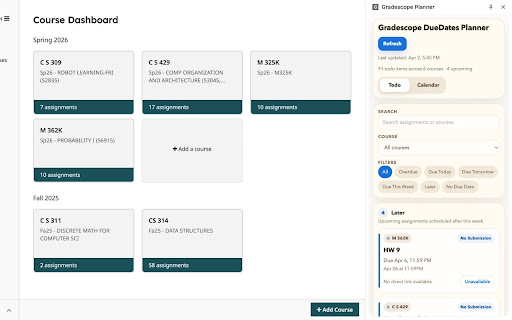
- Turn Gradescope into a cleaner, more useful planning workspace. Instead of checking each course one by one, Gradescope Planner scans your courses, gathers all assignments and due dates, and displays everything in a compact side panel — with both Todo and Calendar views.

- The side panel opens automatically when you switch to a Gradescope tab and closes when you leave, so it's always available when you need it and out of the way when you don't.


Features

- Unified assignment view — See upcoming work from all your Gradescope courses in one place.
Todo view — Focuses on incomplete assignments grouped by urgency: Overdue, Due Today, Due Tomorrow, Due This Week, Later, and No Due Date.

- Calendar view — Maps assignments onto a monthly calendar. Search, course filters, and urgency chips stay in sync with the Todo view.

- Quick assignment access — Open assignment links directly from the planner when a URL is available.
- Automatic & manual refresh — Refreshes when data becomes stale, or trigger a manual refresh anytime from the side panel.

- Compact layout — Designed to fit smaller laptop screens while working comfortably on larger monitors.


How It Works

- When you open Gradescope, the extension detects your courses, visits assignment pages in the background, and normalizes data (title, course, due date, status, points, URL) into a cached local snapshot. That cache powers the side panel for fast load times while staying up to date.


Permissions

- tabs — Opens Gradescope pages in the background during refresh and opens assignment links when requested
- sidePanel — Displays the planner in Chrome's built-in side panel
- https://www.gradescope.com/* — Reads Gradescope pages while you're signed in
Technical
- Version
- 1.1.0
- Manifest
- V3
- Size
- 67.03KiB
- Min Chrome
- 88
- Languages
- 1
- Featured
- No
Metadata
- ID
- ipndjgphgcmihejedagfmhdlgjjkdhli
- Developer ID
- u07f506e53f49dae1f435a7a4d2a4f676
- Developer Email
- [email protected]
- Created
- Apr 22, 2026
- Last Updated (Store)
- Apr 28, 2026
- Last Scraped
- Jun 11, 2026
- Website
- —
- Support URL
- —
Data sourced from the Chrome Web Store · last verified Jun 11, 2026.