
SwiftRead - read faster, learn more
Read three times faster, with SwiftRead. Absorb knowledge and learn more.
As of June 2026, SwiftRead - read faster, learn more has 200,000 users and a 4.46/5 rating from 1,194 reviews in the Workflow & Planning category.
Usersno change0%
200.0K
200,000
Ratingdown 0.2 percent−0.2%
4.46
1.2K reviews
Reviewsup 1.0 percent+1.0%
1.2K
Version
6.7.2+09301c2de
Manifest V3
90-day change · In the last 90 days this extension 7 version updates, changed permissions.
History
12 snapshotsTracking since Apr 1, 2026.
View as table
| Date | Users | Rating | Reviews | Version |
|---|---|---|---|---|
| Apr 1, 2026 | 200.0K | 4.47 | 1.2K | 6.3.0+9e5418b3f |
| Apr 5, 2026 | 200.0K | 4.47 | 1.2K | 6.5.0+8938dbdc5 |
| Apr 9, 2026 | 200.0K | 4.47 | 1.2K | 6.5.0+8938dbdc5 |
| Apr 16, 2026 | 200.0K | 4.47 | 1.2K | 6.5.1+dfa7a9dda |
| Apr 23, 2026 | 200.0K | 4.47 | 1.2K | 6.5.1+dfa7a9dda |
| Apr 26, 2026 | 200.0K | 4.47 | 1.2K | 6.5.1+dfa7a9dda |
| Apr 29, 2026 | 200.0K | 4.47 | 1.2K | 6.5.1+dfa7a9dda |
| May 2, 2026 | 200.0K | 4.47 | 1.2K | 6.6.1+444771a78 |
| May 5, 2026 | 200.0K | 4.47 | 1.2K | 6.6.3+678a8e3c2 |
| May 20, 2026 | 200.0K | 4.47 | 1.2K | 6.7.0+df45ab795 |
| May 23, 2026 | 200.0K | 4.47 | 1.2K | 6.7.1+8dda8d622 |
| Jun 15, 2026 | 200.0K | 4.46 | 1.2K | 6.7.2+09301c2de |
| Now | 200.0K | 4.46 | 1.2K | 6.7.2+09301c2de |
Changelog
- Apr 1, 2026host_permissions
https://libbyapp.com/*, https://read.amazon.com/*
https://libbyapp.com/*
Permissions & access
- Permissions
- contextMenusactiveTabstoragescripting
- Host access
- https://libbyapp.com/*
Screenshots



About
SwiftRead helps you finish more reading on the web with speed-reading focus modes and natural narration.

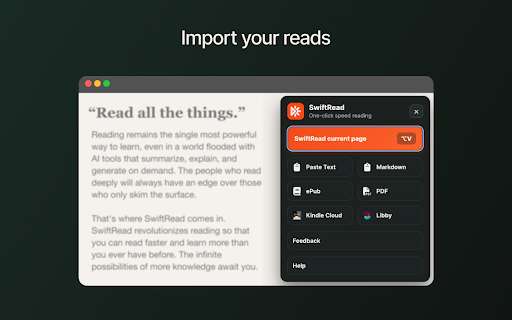
Use it on web pages, PDFs, and many web-based readers you already use (for example: Kindle Cloud Reader and Libby).

KEY FEATURES
• Start SwiftRead on the current page from the toolbar (or a shortcut)
• Read visually with focus modes — RSVP, paced highlighting, and guided word display
• Listen while you read — follow along with synced highlighting
• Natural TTS voices — 90+ languages with human-like narration
• SwiftRead selected text from the right-click menu
• Open PDFs with SwiftRead from your browser
• Customize your experience — fonts, themes, spacing, and speed

HOW IT WORKS
1) Open the page (or PDF) you want to read
2) Click the SwiftRead extension (or use a keyboard shortcut you set)
3) SwiftRead opens the content in its reader so you can read and/or listen

PERMISSIONS (PLAIN ENGLISH)
• SwiftRead needs access to the active tab to extract text from the page you choose.
• The extension only runs when you activate it (click the icon, use the shortcut, or use the context menu).
• Settings are stored in your browser so your preferences persist.

Support: swiftread.com/help
Privacy Policy: swiftread.com/privacy

Note: SwiftRead is not affiliated with Amazon, OverDrive, or any third-party reader.
Technical
- Version
- 6.7.2+09301c2de
- Manifest
- V3
- Size
- 12.62MiB
- Min Chrome
- 88
- Languages
- 3
- Featured
- Yes
Metadata
- ID
- ipikiaejjblmdopojhpejjmbedhlibno
- Developer ID
- u110aa80020f4247f072512a686a76adf
- Developer Email
- [email protected]
- Created
- Oct 22, 2012
- Last Updated (Store)
- May 21, 2026
- Last Scraped
- Jun 22, 2026
- Website
- swiftread.com
- Support URL
- https://swiftread.com/help
- Privacy Policy
- https://swiftread.com/privacy-policy
Similar extensions
Alternatives to SwiftRead - read faster, learn more, ranked by description similarity.

The Read Time: Speed Reading & Listening Software
Enhance your reading & learning efficiency with adjustable speed controls
4.0K
★ 4.7

ReadSoFast - Speed Reading with Voice
Play text at sprint speed - RSVP reading with voice. Video-player controls, TTS, teleprompter, keyboard shortcuts, customisable.
6

Speed Reader
Word-by-word speed reading with ORP focus point and dark mode
1.0K
★ 4.3

Quick Read: RSVP Speed Reader & Cloud OCR
Boost reading speed using RSVP. Auto-extract web articles, scan images/PDFs with OCR, and read distraction-free.
2

Fast Reader
Unleash Fast Reader to be a speed reader. Improve your reading wpm and concentration with this fast reading app.
261
★ 4.6

ReadOut: The Ultimate Text-to-Speech Voice Reader
100% Free Text-to-Speech. No Ads. 10+ languages. Customize highlights & navigation. Ideal for students, researchers & readers.
98
★ 2.0

Readima
Readima simulates many reading techniques such as Meta Guiding, or RSVP to help you read faster with high comprehension.
769
★ 4.4

Read Zone: Speed Reading & Focus Trainer
Distraction-free reading tool with guided speed reader, focus mode & page customizations for faster, easier & more focused reading.
25
★ 5.0
Data sourced from the Chrome Web Store · last verified Jun 22, 2026.