
Smart Tabs for Gemini
Adds smart navigation tabs to Gemini conversations.
As of June 2026, Smart Tabs for Gemini has — users in the Productivity category.
Usersno change0%
—
—
Ratingno change0%
—
— reviews
Reviewsno change0%
—
Version
0.2.0
Manifest V3
History
1 snapshotsTracking since May 26, 2026.
Not enough history yet for this metric — the chart fills in as we collect more snapshots.
View as table
| Date | Users | Rating | Reviews | Version |
|---|---|---|---|---|
| May 26, 2026 | — | — | — | 0.2.0 |
| Now | — | — | — | 0.2.0 |
Permissions & access
- Permissions
- storage
- Host access
- https://gemini.google.com/*
Screenshots


About
SmartTabs adds a smart navigation sidebar to your Gemini
conversations — so you can jump to any message instantly
instead of endless scrolling.

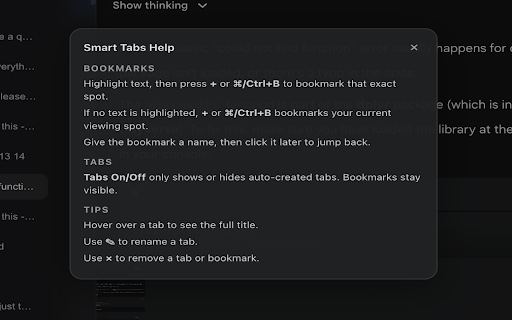
FEATURES

- Auto Tabs — every message in your conversation becomes
  a clickable tab. One click teleports you straight to it.

- Bookmarks — mark any moment in a conversation with
  Cmd/Ctrl+B or the + button. Named, renameable, and
  saved per conversation.

- Stays in sync — new messages are detected automatically
  as your conversation grows.

- Minimal design — dark frosted glass UI that blends
  naturally with Gemini's interface.

- Per-conversation memory — bookmarks are saved separately
  for each chat and restored when you come back.

PERFECT FOR

- Long research sessions
- Multi-step coding help
- Conversations you need to reference repeatedly
- Anyone who hates scrolling

No account needed. No data leaves your browser.
Works entirely locally.
Technical
- Version
- 0.2.0
- Manifest
- V3
- Size
- 17.4KiB
- Min Chrome
- 88
- Languages
- 1
- Featured
- No
Metadata
- ID
- ipgheoednmbjoambigkdefoacpdfcnkm
- Developer ID
- u23846654ca607dc84af3e3ff2f17c4dd
- Developer Email
- [email protected]
- Created
- May 25, 2026
- Last Updated (Store)
- May 25, 2026
- Last Scraped
- Jun 8, 2026
- Website
- —
- Support URL
- —
- Privacy Policy
- —
Data sourced from the Chrome Web Store · last verified Jun 8, 2026.