
Browy
The AI agent that lives in your browser. Drives real tabs through chat. Side panel + DevTools REPL.
As of June 2026, Browy has 1 users in the Developer Tools category.
Usersno change0%
1
1
Ratingno change0%
—
— reviews
Reviewsno change0%
—
Version
0.1.4
Manifest V3
90-day change · In the last 90 days this extension 1 version update.
History
2 snapshotsTracking since May 15, 2026.
Not enough history yet for this metric — the chart fills in as we collect more snapshots.
View as table
| Date | Users | Rating | Reviews | Version |
|---|---|---|---|---|
| May 15, 2026 | — | — | — | 0.1.2 |
| Jun 3, 2026 | — | — | — | 0.1.2 |
| Now | 1 | — | — | 0.1.4 |
Changelog
- Jun 3, 2026description
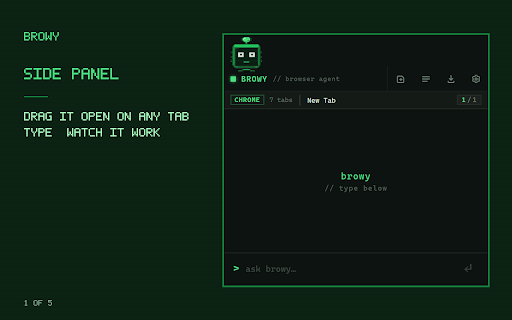
Browy is a Chrome extension that drives your browser through chat. Open the side panel or the DevTools panel, type what you want, and Browy clicks through pages, fills forms, runs JavaScript, and reads network and console output for you.


IN YOUR BROWSER

Chat with Browy from the side panel while you browse. Drag the mascot anywhere on the page when you want it out of the way.

- Summarize pages and pull out specific information
- Navigate, click, type, and fill forms across multiple tabs
- Run multi-step workflows that span tabs and reload pages
- Evaluate JavaScript in the page from a chat prompt
- Read network requests and console output without opening DevTools


FOR DEVELOPERS

A REPL lives next to your inspector in the DevTools panel. Terminal-style, no chat bubbles.

- Slash commands: /help, /model, /clear, /login, /js
- 19 frontier models on a live picker (Claude Opus, Sonnet, Haiku, GPT-5 family, Codex)
- Keyboard shortcuts (Ctrl+L to clear, Esc to cancel a run)
- /js evaluates page-context JavaScript and pipes the result back into the conversation

If you spend time in `gh copilot` or `claude code`, this fits.


YOU ARE IN CONTROL

- Pick which Chrome tools the agent can use, per tool, in Settings. 41 built-in tools grouped by inspect, navigate, interact, devtools.
- Host-side tools (shell, filesystem) are off by default and opt in per tool. Browy will not touch your machine outside the browser unless you flip the toggle.
- Chrome's debugger disclosure banner shows whenever a session is active, so you always know when Browy is driving.
- No background crawling. Browy only acts on the tab you point it at.


OPEN SOURCE

Apache 2.0. Audit the agent loop, fork it, swap models.

- Source: github.com/BrowyHQ/browy
- Docs:   browyhq.github.io/docs


GETTING STARTED

1. Subscribe to any GitHub Copilot tier (Individual, Business, or Enterprise). Same login you already use in your editor.
2. Install this extension.
3. Run the one-line install for the Browy native messaging host. The exact command appears in the side panel the first time you open it.
4. Open the side panel or the Browy DevTools panel and start typing.


REQUIREMENTS

- A GitHub Copilot subscription
- Chrome, Edge, or Brave on Windows, macOS, or Linux


LINKS

- Source:  https://github.com/BrowyHQ/browy
- Docs:    https://browyhq.github.io/docs/
- Privacy: https://browyhq.github.io/docs/privacy/
- Issues:  https://github.com/BrowyHQ/browy/issues
Browy is a Chrome extension that drives your browser through chat.
Open the side panel or the DevTools panel, type what you want, and
Browy clicks through pages, fills forms, runs JavaScript, and reads
network and console output for you.


IN YOUR BROWSER

The side panel sits next to your tabs and stays quiet until you
ask it to do something.

- Summarize a page and pull out specific information
- Navigate, click, type, and fill forms across multiple tabs
- Run multi-step workflows that span tabs and reload pages
- Run JavaScript in the page from a chat prompt
- Read network requests and console output without opening DevTools


FOR DEVELOPERS

A terminal-style REPL lives next to the inspector in the DevTools
panel.

- Slash commands: /help, /model, /clear, /login, /js
- A live model picker covers the frontier Copilot models (Claude
  Opus, Sonnet, Haiku; GPT-5 family; Codex; and more)
- Keyboard shortcuts (Ctrl+L to clear, Esc to cancel a run)
- /js evaluates page-context JavaScript and pipes the result back
  into the conversation

If you live in `gh copilot` or `claude code`, this should feel familiar.


YOU ARE IN CONTROL

- Turn individual browser tools on or off in Settings. The 30+
  built-in tools are grouped by inspect, navigate, interact, and
  devtools.
- Host-side tools (shell, filesystem, web fetch) are off by default.
  Enable them one at a time. Browy does not touch your machine
  outside the browser unless you opt in.
- Chrome's debugger disclosure banner shows whenever a session is
  active. You always know when Browy is driving.
- No background crawling. Browy only acts on the tab you point it at.


OPEN SOURCE

Apache 2.0. Audit the agent loop, fork it, change the prompts.

- Source: github.com/BrowyHQ/browy
- Docs:   browyhq.github.io


GETTING STARTED

1. Subscribe to any GitHub Copilot tier (Individual, Business, or
   Enterprise). The same account you already use in your editor.
2. Install this extension.
3. Run the one-line install for the Browy native messaging host.
   The exact command appears in the side panel the first time you
   open it.
4. Open the side panel or the Browy DevTools panel and start typing.


REQUIREMENTS

- A GitHub Copilot subscription
- Chrome, Edge, or Brave on Windows, macOS, or Linux
- Browy ships in two parts: this extension plus a small native
  messaging host that runs on your machine and talks to Copilot.
  Step 3 above installs the host with one command.


LINKS

- Source:  https://github.com/BrowyHQ/browy
- Docs:    https://browyhq.github.io/
- Privacy: https://browyhq.github.io/privacy/
- Issues:  https://github.com/BrowyHQ/browy/issues
- Jun 3, 2026short_description
AI agent in your browser. Drives tabs, reads pages, writes code.
The AI agent that lives in your browser. Drives real tabs through chat. Side panel + DevTools REPL.
Permissions & access
- Permissions
- sidePaneldebuggertabsactiveTabscriptingstoragenativeMessagingnotificationsdownloadsalarms
- Host access
- <all_urls>
Screenshots


About
Browy is a Chrome extension that drives your browser through chat.
Open the side panel or the DevTools panel, type what you want, and
Browy clicks through pages, fills forms, runs JavaScript, and reads
network and console output for you.


IN YOUR BROWSER

The side panel sits next to your tabs and stays quiet until you
ask it to do something.

- Summarize a page and pull out specific information
- Navigate, click, type, and fill forms across multiple tabs
- Run multi-step workflows that span tabs and reload pages
- Run JavaScript in the page from a chat prompt
- Read network requests and console output without opening DevTools


FOR DEVELOPERS

A terminal-style REPL lives next to the inspector in the DevTools
panel.

- Slash commands: /help, /model, /clear, /login, /js
- A live model picker covers the frontier Copilot models (Claude
  Opus, Sonnet, Haiku; GPT-5 family; Codex; and more)
- Keyboard shortcuts (Ctrl+L to clear, Esc to cancel a run)
- /js evaluates page-context JavaScript and pipes the result back
  into the conversation

If you live in `gh copilot` or `claude code`, this should feel familiar.


YOU ARE IN CONTROL

- Turn individual browser tools on or off in Settings. The 30+
  built-in tools are grouped by inspect, navigate, interact, and
  devtools.
- Host-side tools (shell, filesystem, web fetch) are off by default.
  Enable them one at a time. Browy does not touch your machine
  outside the browser unless you opt in.
- Chrome's debugger disclosure banner shows whenever a session is
  active. You always know when Browy is driving.
- No background crawling. Browy only acts on the tab you point it at.


OPEN SOURCE

Apache 2.0. Audit the agent loop, fork it, change the prompts.

- Source: github.com/BrowyHQ/browy
- Docs:   browyhq.github.io


GETTING STARTED

1. Subscribe to any GitHub Copilot tier (Individual, Business, or
   Enterprise). The same account you already use in your editor.
2. Install this extension.
3. Run the one-line install for the Browy native messaging host.
   The exact command appears in the side panel the first time you
   open it.
4. Open the side panel or the Browy DevTools panel and start typing.


REQUIREMENTS

- A GitHub Copilot subscription
- Chrome, Edge, or Brave on Windows, macOS, or Linux
- Browy ships in two parts: this extension plus a small native
  messaging host that runs on your machine and talks to Copilot.
  Step 3 above installs the host with one command.


LINKS

- Source:  https://github.com/BrowyHQ/browy
- Docs:    https://browyhq.github.io/
- Privacy: https://browyhq.github.io/privacy/
- Issues:  https://github.com/BrowyHQ/browy/issues
Technical
- Version
- 0.1.4
- Manifest
- V3
- Size
- 82.66KiB
- Min Chrome
- 114
- Languages
- 1
- Featured
- No
Metadata
- ID
- iondecjdokngnlkfpipgolgkfegpmjca
- Developer ID
- u5c93dc778a51d95982558c3cd7485598
- Developer Email
- [email protected]
- Created
- May 14, 2026
- Last Updated (Store)
- Jun 3, 2026
- Last Scraped
- Jun 9, 2026
- Website
- —
- Support URL
- https://github.com/BrowyHQ/browy/issues
- Privacy Policy
- https://browyhq.github.io/docs/privacy/
Data sourced from the Chrome Web Store · last verified Jun 9, 2026.