
Audio Splitter Max™ Helper
Captures Chrome tab audio and sends it to Audio Splitter Max™ desktop app for multi-device Bluetooth playback.
As of June 2026, Audio Splitter Max™ Helper has 34 users in the Accessibility category.
Usersup 1033.3 percent+1033.3%
34
34
Ratingno change0%
—
— reviews
Reviewsno change0%
—
Version
1.4.0
Manifest V3
History
11 snapshotsTracking since Apr 1, 2026.
View as table
| Date | Users | Rating | Reviews | Version |
|---|---|---|---|---|
| Apr 1, 2026 | 3 | — | — | 1.4.0 |
| Apr 17, 2026 | 3 | — | — | 1.4.0 |
| Apr 22, 2026 | — | — | — | 1.4.0 |
| Apr 27, 2026 | 8 | — | — | 1.4.0 |
| May 4, 2026 | 10 | — | — | 1.4.0 |
| May 10, 2026 | 17 | — | — | 1.4.0 |
| May 15, 2026 | 23 | — | — | 1.4.0 |
| May 22, 2026 | 27 | — | — | 1.4.0 |
| May 28, 2026 | 30 | — | — | 1.4.0 |
| Jun 4, 2026 | 33 | — | — | 1.4.0 |
| Jun 10, 2026 | 29 | — | — | 1.4.0 |
| Now | 34 | — | — | 1.4.0 |
Permissions & access
- Permissions
- tabCaptureoffscreentabs
- Host access
- None declared
Screenshots

About
🔊 Audio Splitter Max™ Helper — Companion extension for the Audio Splitter Max™ desktop app

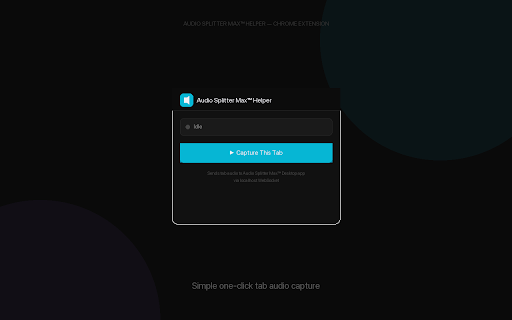
This extension captures audio from your active Chrome tab and sends it to the Audio Splitter Max™ desktop application, which routes it to multiple Bluetooth speakers and headphones simultaneously.

━━━━━━━━━━━━━━━━━━━━━
📋 REQUIREMENTS
━━━━━━━━━━━━━━━━━━━━━

• Audio Splitter Max™ desktop app (macOS / Windows / Linux)
  Download from: https://gigade.us/labs/audio-splitter/extension#pricing
• Google Chrome browser

━━━━━━━━━━━━━━━━━━━━━
✨ WHAT IT DOES
━━━━━━━━━━━━━━━━━━━━━

This is a lightweight companion extension that:
• Captures audio from any Chrome tab (YouTube, Netflix, Spotify, etc.)
• Streams raw audio to the desktop app via local WebSocket (localhost only)
• Shows a blinking red "REC" badge while capturing

All audio routing, volume control, EQ, and device management happens in the desktop app.

━━━━━━━━━━━━━━━━━━━━━
🎯 HOW TO USE
━━━━━━━━━━━━━━━━━━━━━

1. Install and launch Audio Splitter Max™ desktop app
2. Play audio in a Chrome tab (YouTube, Netflix, Spotify, etc.)
3. Click the Audio Splitter Max™ Helper icon in your Chrome toolbar
4. Click "▶ Capture This Tab"
5. The desktop app receives the audio and routes it to your speakers!

━━━━━━━━━━━━━━━━━━━━━
🎛️ DESKTOP APP FEATURES
━━━━━━━━━━━━━━━━━━━━━

• Unlimited Bluetooth/USB output devices
• Per-device volume control (up to 1000%)
• 5-band parametric EQ per device
• Per-device delay for multi-room sync (0–1000ms)
• Channel modes: Stereo, Left, Right, Bass, Vocals, Instruments
• Real-time level meters

━━━━━━━━━━━━━━━━━━━━━
🔒 PRIVACY
━━━━━━━━━━━━━━━━━━━━━

• 100% local processing — audio never leaves your computer
• Audio is streamed only to localhost (127.0.0.1) — never to the internet
• No data collection, no analytics, no tracking, no accounts
• No audio is recorded or stored

━━━━━━━━━━━━━━━━━━━━━
⚠️ IMPORTANT NOTES
━━━━━━━━━━━━━━━━━━━━━

• This extension requires the Audio Splitter Max™ desktop app to function
• Some DRM-protected content may not capture audio due to content protection
• Works on macOS, Windows, and ChromeOS (with desktop app)

━━━━━━━━━━━━━━━━━━━━━

Made with ♥ by GK Works Labs
© 2026 GK Works Labs. All rights reserved.
Technical
- Version
- 1.4.0
- Manifest
- V3
- Size
- 14.69KiB
- Min Chrome
- 88
- Languages
- 1
- Featured
- No
Metadata
- ID
- iokfpcblphkkkjnldncljbeleemefafd
- Developer ID
- ub21cfd8bd084dfdb64baecf6dc52c5ab
- Developer Email
- [email protected]
- Created
- Mar 27, 2026
- Last Updated (Store)
- Mar 27, 2026
- Last Scraped
- Jun 10, 2026
- Website
- gigade.us
- Support URL
- https://gigade.us/
- Privacy Policy
- https://gigade.us/labs/audio-splitter/privacy
Data sourced from the Chrome Web Store · last verified Jun 10, 2026.