
slack-xport
Copy Slack search results as Markdown-formatted YAML, ready to paste into LLM prompts.
As of June 2026, slack-xport has 12 users and a 5.00/5 rating from 1 reviews in the Productivity category.
Usersno change0%
12
12
Ratingno change0%
5.00
1 reviews
Reviewsno change0%
1
Version
1.0.0
Manifest V3
History
5 snapshotsTracking since May 7, 2026.
View as table
| Date | Users | Rating | Reviews | Version |
|---|---|---|---|---|
| May 7, 2026 | — | — | — | 1.0.0 |
| May 11, 2026 | — | — | — | 1.0.0 |
| May 23, 2026 | 5 | 5.00 | 1 | 1.0.0 |
| May 30, 2026 | 10 | 5.00 | 1 | 1.0.0 |
| Jun 13, 2026 | 11 | 5.00 | 1 | 1.0.0 |
| Now | 12 | 5.00 | 1 | 1.0.0 |
Permissions & access
- Permissions
- activeTab
- Host access
- https://app.slack.com/*
Screenshots


About
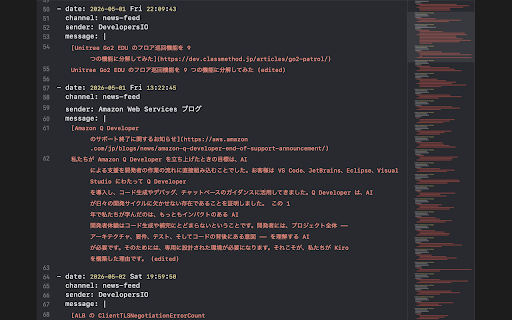
slack-xport turns a Slack search result page into LLM-ready context with one click.

Pasting Slack threads into ChatGPT, Claude, or any LLM as context is common — but copying messages by hand is tedious, loses formatting, and breaks across pagination. slack-xport automates the entire flow so you can focus on the prompt instead of the copying.

WHAT IT DOES
- Walks every page of a Slack search result automatically
- Expands "Show more" truncations, including those nested inside quoted blocks
- Preserves Markdown formatting: bold, italic, strikethrough, inline code, code blocks, bullet/ordered lists, links, blockquotes
- Captures file/image attachments as Markdown image syntax
- Strips Slack tracking parameters from attachment URLs to keep token count low
- Outputs YAML with block scalars, so multi-line messages stay readable
- Auto-copies the result to your clipboard

HOW TO USE
1. Open Slack at app.slack.com and run a message search
2. Click the slack-xport toolbar icon
3. Click "Export & Copy"

The popup shows a status pill so it is clear when the extension is ready, when it is collecting messages, and when the result has been copied. If the result is over 1 MB you will be asked to confirm before copying. A "Download as YAML file" link is available as a fallback.

PRIVACY
Everything runs locally in your browser. No data is sent to any external server. No analytics, no tracking. Required permissions are limited to activeTab and host permission for https://app.slack.com/* — the minimum needed to read the search result DOM and copy text to your clipboard.

ACKNOWLEDGEMENTS
Built on top of the DOM scraping logic from xshoji/slack-search-result-exporter (MIT-licensed bookmarklet), extended into a packaged extension with richer formatting and an LLM-oriented output.

OPEN SOURCE
https://github.com/snaka/slack-xport
Technical
- Version
- 1.0.0
- Manifest
- V3
- Size
- 20.75KiB
- Min Chrome
- 88
- Languages
- 1
- Featured
- No
Metadata
- ID
- ioiggohbcddedjcdcknnjgfdgdfbfcch
- Developer ID
- ub0a687dbf9d754afe6c35a5dd8a4b33d
- Developer Email
- [email protected]
- Created
- May 6, 2026
- Last Updated (Store)
- May 6, 2026
- Last Scraped
- Jun 13, 2026
- Website
- —
- Support URL
- —
- Privacy Policy
- —
Data sourced from the Chrome Web Store · last verified Jun 13, 2026.