
Point-Click-Comment
Collect quick, contextual stakeholder feedback and send it to your webhook as a single annotated screenshot.
As of June 2026, Point-Click-Comment has 3 users and a 5.00/5 rating from 1 reviews in the Communication category.
Usersno change0%
3
3
Ratingno change0%
5.00
1 reviews
Reviewsno change0%
1
Version
0.1.2
Manifest V3
History
2 snapshotsTracking since Apr 18, 2026.
View as table
| Date | Users | Rating | Reviews | Version |
|---|---|---|---|---|
| Apr 18, 2026 | 3 | 5.00 | 1 | 0.1.2 |
| Apr 27, 2026 | 3 | 5.00 | 1 | 0.1.2 |
| Now | 3 | 5.00 | 1 | 0.1.2 |
Permissions & access
- Permissions
- storageactiveTabscriptingtabs
- Host access
- <all_urls>
Screenshots

About
Point‑Click‑Comment

Give busy stakeholders a single button to drop crystal‑clear visual feedback into your team’s Slack channel. PCC turns any webpage into a feedback canvas: click the extension, hover with the neon crosshair, lock onto an element, and type a note. The extension grabs the visible viewport, highlights the selected element, overlays a stylish sticky note with the stakeholder’s comment, and sends the composite screenshot to your Slack webhook (classic /services or Workflow Builder /triggers). Screens live on ImgBB so the workflow stays serverless—no accounts, no new tools, just instant context in the tools your team already uses.

Why teams love PCC
- One-click feedback mode with live DOM highlighting and crosshair cursor.
- Modern in-page modal for comments; reminders ensure webhook/ImgBB setup is complete.
- Annotated screenshots composed entirely in-browser via OffscreenCanvas.
- Automatic ImgBB upload and Slack message (blocks or workflow variables).
- Works with Workflow Builder: send imageUrl, commentText, and pageUrl into your custom flows.
- Zero external metadata collection—only webhook + ImgBB key stored locally in Chrome storage.

Perfect for
Design reviews, exec approvals, stakeholder QA, or any moment when “Can you screenshot that?” slows down real work. Load the extension, configure Slack + ImgBB once, and let your leadership point, click, and comment.

---

Setup in seconds

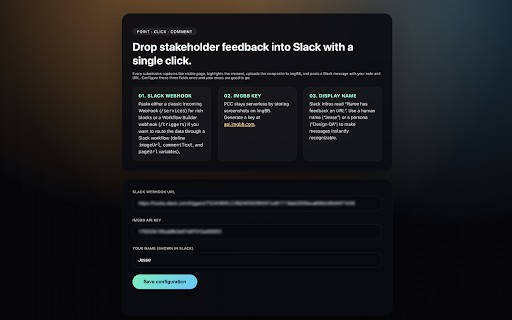
Point‑Click‑Comment needs two values the first time you open the Options page:
1. Slack Webhook URL – either a classic Incoming Webhook (https://hooks.slack.com/services/...) or a Slack Workflow Builder webhook (https://hooks.slack.com/triggers/...).
2. ImgBB API Key – PCC uploads screenshots to ImgBB so everything stays serverless. Create a free key at https://api.imgbb.com/ .

Paste both into the extension’s Options screen, add the display name you want shown in Slack, and you’re ready to collect feedback.

Using Slack Workflow Builder webhooks

Prefer to run PCC through a Slack workflow?

1. Open Workflow Builder → Create → From a webhook.
2. Add three text variables: imageUrl, commentText, pageUrl. PCC automatically sends these each time someone submits feedback (with the intro “Name has feedback on URL” already prefixed).
3. Add your workflow steps (e.g., “Send a message”) and insert the variables wherever you want the screenshot link, comment, or page URL to appear.
4. Copy the generated https://hooks.slack.com/triggers/... URL and paste it into PCC’s Options page.

That’s it—every note your stakeholders leave is captured, annotated, uploaded to ImgBB, and piped through Slack via the webhook you choose.
Technical
- Version
- 0.1.2
- Manifest
- V3
- Size
- 1012KiB
- Min Chrome
- 88
- Languages
- 1
- Featured
- No
Metadata
- ID
- iodolmagjcadmjoiappejipmjhhmiieo
- Developer ID
- u93a29546b78f5adf3022db0e478cfd0e
- Developer Email
- [email protected]
- Created
- Nov 18, 2025
- Last Updated (Store)
- Nov 21, 2025
- Last Scraped
- Jun 5, 2026
- Website
- —
- Support URL
- https://emptycan.com/
- Privacy Policy
- https://emptycan.com/pcc-policy
Similar extensions
Alternatives to Point-Click-Comment, ranked by description similarity.

SuperFeedback
Add visual feedback and comments to any website. Perfect for client reviews and team collaboration.
6

Copy Tab URL for Slack, Teams, Email
Copies the current tab URL and title to the clipboard for sharing in Slack, Teams, and Email.
227
★ 4.0

Beavo
Collaborative in-page annotations for product teams
5

Screenshot Editor for Social Media - LumaStack
Turn screenshots into viral posts instantly. Auto-beautify designs, generate catchy captions, and one-click publish.
5
★ 5.0

SideChat - Chatrooms for ChatGPT
Real-time chat with others currently using ChatGPT. Ephemeral rooms based on your current chat topics and context.
144
★ 3.6

LinkedIn Comment Assistant
Suggests human-like, relevant LinkedIn comments based on post text, tone, and length.
15

Lumoshot - Screenshot Capture & Annotation
Capture, annotate, redact, and copy polished screenshots locally. No account, no upload.
16
★ 5.0

Slack Thread Reminder
Adds a 'Reply in Thread' button to Slack messages to encourage thread usage
3
Data sourced from the Chrome Web Store · last verified Jun 5, 2026.