
Screenshot-er
Screenshot & recording with annotations, beautify export, device frames, color presets, and presentation export
As of June 2026, Screenshot-er has 8 users in the Workflow & Planning category.
Usersdown 11.1 percent−11.1%
8
8
Ratingno change0%
—
— reviews
Reviewsno change0%
—
Version
1.5.1
Manifest V3
90-day change · In the last 90 days this extension 2 version updates.
History
7 snapshotsTracking since Apr 17, 2026.
View as table
| Date | Users | Rating | Reviews | Version |
|---|---|---|---|---|
| Apr 17, 2026 | 9 | — | — | 1.3.0 |
| Apr 27, 2026 | 9 | — | — | 1.3.0 |
| May 11, 2026 | 8 | — | — | 1.3.0 |
| May 17, 2026 | 9 | — | — | 1.4.0 |
| May 23, 2026 | 10 | — | — | 1.4.0 |
| May 30, 2026 | 9 | — | — | 1.5.1 |
| Jun 13, 2026 | 6 | — | — | 1.5.1 |
| Now | 8 | — | — | 1.5.1 |
Permissions & access
- Permissions
- activeTabstoragescriptingdesktopCapturetabsnotificationsunlimitedStorage
- Host access
- <all_urls>
Screenshots


About
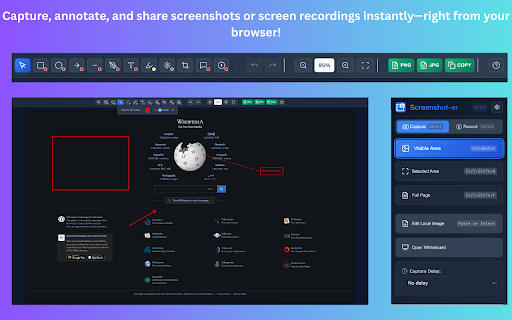
Screenshot-er is your ultimate Chrome extension for capturing and editing screenshots effortlessly. With just one click, you can grab full-page or selected area screenshots from any webpage. Instantly annotate your captures with powerful tools—highlight important sections, blur sensitive information, and crop with precision.

Designed for speed and simplicity, Screenshot-er lets you save or share your screenshots in seconds—perfect for work, study, or everyday browsing. Whether you’re reporting bugs, creating tutorials, or just saving visual notes, Screenshot-er makes the job quick, clear, and hassle-free.

Now with screen recording capabilities! Capture high-quality video recordings of your current tab, entire window, or full desktop.

Start capturing smarter—install Screenshot-er and streamline your screenshot workflow today!
Technical
- Version
- 1.5.1
- Manifest
- V3
- Size
- 1.17MiB
- Min Chrome
- 88
- Languages
- 1
- Featured
- No
Metadata
- ID
- ioblkmicnaiiibghocmbakloodioikdn
- Developer ID
- u9749ea36bbdfc77fd45f8eef64ed04ec
- Developer Email
- [email protected]
- Created
- Jun 28, 2025
- Last Updated (Store)
- May 20, 2026
- Last Scraped
- Jun 13, 2026
- Website
- —
- Support URL
- —
- Privacy Policy
- —
Similar extensions
Alternatives to Screenshot-er, ranked by description similarity.

Free Snipping Tool
Professional snipping tool with full page, selection, and scrolling capture capabilities
40.0K
★ 3.9

Screenshot and screen video recording - Screeny
The #1 screen recorder and screenshot tool! Full capture and video recording of your screen.
80.0K
★ 4.7

Recorder & Screenshot | Sitespedia - Screen Video Recorder & Screenshot
Take screenshots entirely or partially of websites, annotate them, and manage them in a centralized place.
6

Simple Screen Capture: Full Page Screenshot
Simple Screen Capture is a handy Chrome Extension that allows you to effortlessly capture full page screenshots with just a click.
5.0K
★ 4.3

ClickShot
ClickShot: Click to capture.
14
★ 5.0

Screenety - Screen Recorder & Annotation Tool
Screenshot tool
154
★ 5.0

Easy Screenshot
Capture parts of the screen
19
★ 1.0

Easy Screenshot
Capture full-page screenshots instantly. Manually select any part of the page to capture exactly what you need.
4
Data sourced from the Chrome Web Store · last verified Jun 13, 2026.