
Safeguard (SafeBrowse AI)
Privacy-first web safety — blocklist + SafeSearch + on-device heuristics; PIN-locked overrides, HTTPS alerts, encrypted logs.
As of June 2026, Safeguard (SafeBrowse AI) has 4 users and a 5.00/5 rating from 2 reviews in the Education category.
Usersno change0%
4
4
Ratingno change0%
5.00
2 reviews
Reviewsno change0%
2
Version
0.3.4
Manifest V3
History
6 snapshotsTracking since Apr 17, 2026.
View as table
| Date | Users | Rating | Reviews | Version |
|---|---|---|---|---|
| Apr 17, 2026 | 4 | 5.00 | 2 | 0.3.4 |
| Apr 27, 2026 | 5 | 5.00 | 2 | 0.3.4 |
| May 7, 2026 | — | 5.00 | 2 | 0.3.4 |
| May 14, 2026 | 10 | 5.00 | 2 | 0.3.4 |
| May 23, 2026 | 14 | 5.00 | 2 | 0.3.4 |
| Jun 2, 2026 | 6 | 5.00 | 2 | 0.3.4 |
| Now | 4 | 5.00 | 2 | 0.3.4 |
Permissions & access
- Permissions
- storagedeclarativeNetRequesttabsalarms
- Host access
- None declared
Screenshots



About
Safeguard (SafeBrowse AI)

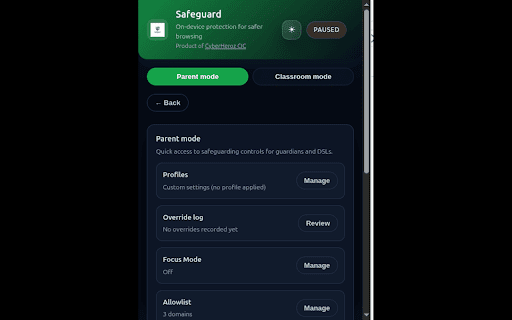
Safeguard (SafeBrowse AI) is built for parents, schools, and teams who want safer browsing without giving up privacy. It helps prevent accidental exposure to harmful content using on-device protection—so your browsing data stays on your computer, not on a server.

Why you’ll want it:

For families: pick an age profile in seconds, lock changes with a PIN, and keep kids safer while they explore.
For classrooms: enable a lockdown mode to keep lessons on track and reduce risky or distracting content.
For workplaces/teams: use Focus Mode to cut distractions and keep browsing aligned with policy and productivity goals.
Unlike “cloud” filters, Safeguard doesn’t require accounts or telemetry. It enforces SafeSearch, supports blocklists/allowlists, and keeps override activity encrypted locally (no full URLs stored).

How to use:
1) Install and open the popup; toggle Enable (badge shows ON)
2) Optional: toggle Aggressive mode and adjust Sensitivity
3) Optional: paste domains (one per line) into Blocklist → Import/Replace; use Allowlist to override

Notes:
- Very large blocklists may exceed Chrome’s dynamic DNR capacity; core heuristics still protect
- Cross-origin videos may block pixel reads; visual sampling is skipped in those cases
Technical
- Version
- 0.3.4
- Manifest
- V3
- Size
- 328KiB
- Min Chrome
- 100
- Languages
- 1
- Featured
- No
Metadata
- ID
- iobhgfobljjbooffdeeeloplokcakgla
- Developer ID
- ufd45017b5b37e25dc00c28e8ad29b841
- Developer Email
- [email protected]
- Created
- Nov 4, 2025
- Last Updated (Store)
- Dec 26, 2025
- Last Scraped
- Jun 10, 2026
- Website
- —
- Support URL
- —
Similar extensions
Alternatives to Safeguard (SafeBrowse AI), ranked by description similarity.

Kids Safe Browser - Parental Control & Web Filter
Professional parental control. Restrict website access, manage screen time, and ensure safe browsing with PIN protection.
30

Blocksi AI Web Filter
The free Blocksi AI Web Filter for Chrome ensures safe browsing by blocking sites, apps, and content—all in the cloud.
3.0K
★ 2.3

EducaXD Safe Browser
Content filter for safe browsing. Blocks inappropriate websites to protect children online.
22
★ 5.0

StudyShield - Stay Productive, Stay Safe
Block distracting websites, set focus timers, and boost productivity. Automatic adult content protection included. Stay focused!
1

EduGuard
Declutter YouTube and transform it into an educational platform with Education mode
13
★ 5.0

AR SafeTube - YouTube Keyword Filter
Filter YouTube videos by keywords with secure, password-protected parental controls. Has both whitelisting & blacklisting options.
23

KyberGate — K-12 Web Filter
K-12 web filtering and classroom management: blocks harmful content, enforces SafeSearch, and monitors student activity.
—
★ 1.0

FamilyGuard
Advanced parental control,and safe search enforcer.
1
Data sourced from the Chrome Web Store · last verified Jun 10, 2026.