
Clockk
Automatically track your work activity across all web applications to build accurate Clockk timesheets.
As of June 2026, Clockk has 932 users and a 5.00/5 rating from 5 reviews in the Productivity category.
Usersup 2.0 percent+2.0%
932
932
Ratingno change0%
5.00
5 reviews
Reviewsno change0%
5
Version
26.2.1
Manifest V3
History
14 snapshotsTracking since Apr 1, 2026.
View as table
| Date | Users | Rating | Reviews | Version |
|---|---|---|---|---|
| Apr 1, 2026 | 914 | 5.00 | 5 | 26.2.1 |
| Apr 17, 2026 | 908 | 5.00 | 5 | 26.2.1 |
| Apr 22, 2026 | 960 | 5.00 | 5 | 26.2.1 |
| Apr 27, 2026 | 962 | 5.00 | 5 | 26.2.1 |
| May 2, 2026 | 926 | 5.00 | 5 | 26.2.1 |
| May 7, 2026 | 912 | 5.00 | 5 | 26.2.1 |
| May 11, 2026 | 920 | 5.00 | 5 | 26.2.1 |
| May 14, 2026 | 930 | 5.00 | 5 | 26.2.1 |
| May 19, 2026 | 987 | 5.00 | 5 | 26.2.1 |
| May 23, 2026 | 985 | 5.00 | 5 | 26.2.1 |
| May 28, 2026 | 916 | 5.00 | 5 | 26.2.1 |
| Jun 2, 2026 | 922 | 5.00 | 5 | 26.2.1 |
| Jun 6, 2026 | 910 | 5.00 | 5 | 26.2.1 |
| Jun 10, 2026 | 925 | 5.00 | 5 | 26.2.1 |
| Now | 932 | 5.00 | 5 | 26.2.1 |
Permissions & access
- Permissions
- tabsstorageactiveTabscriptingalarms
- Host access
- https://*/*, http://*/*
Screenshots


About
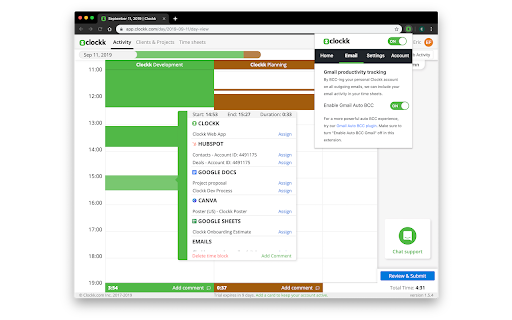
Clockk automatically builds accurate timesheets by tracking your work activity across web applications. You don’t need to start or stop timers — Clockk records the work you do throughout your day.

Clockk observes which websites you are actively using during your workday in order to automatically capture time spent on projects and tasks.

For most websites, Clockk collects the website address and page title to record your activity.

When you are working within a supported work application, Clockk may also access additional information displayed on the page, such as project identifiers, to associate your work more accurately with the correct project in your automated timesheet.

Examples of supported work applications:

• Identifying a project from a GitHub repository page
• Detecting a ticket from a project management tool
• Associating activity with a client record in an accounting platform

Clockk also interacts with the Clockk web application to authenticate your account automatically when the extension is installed or to reload an existing session. This ensures your tracked work activity is synced and displayed in your account.

All collected information is used solely to provide automated time tracking functionality within your Clockk account.

Clockk does not sell or share your browsing data with third parties.

An active Clockk account is required to use this extension.
Technical
- Version
- 26.2.1
- Manifest
- V3
- Size
- 1.65MiB
- Min Chrome
- 88
- Languages
- 1
- Featured
- Yes
Metadata
- ID
- inpnfpglfklplkhnpggbomjdfjlnldhg
- Developer ID
- ua67df5af917efb807ee279a52e4732fb
- Developer Email
- [email protected]
- Created
- Jul 11, 2019
- Last Updated (Store)
- Mar 11, 2026
- Last Scraped
- Jun 10, 2026
- Website
- —
- Support URL
- —
- Privacy Policy
- https://clockk.com/privacy-policy
Similar extensions
Alternatives to Clockk, ranked by description similarity.

FocusClock – Time Tracker
Track time on every website automatically. Set daily budgets, get overtime alerts, run Pomodoro sessions, and review weekly reports.
6

K'tracktime
Privacy-first AI-powered time tracking. Automatically categorize websites with on-device machine learning.
2

Time Supervisor – Activity Logger
Tracks browser tab URLs & durations
2

Clockdiary Time Tracker
ClockDiary Time Tracker Extension
93
★ 5.0

ZChrono Plugin
Seamlessly integrate ZChrono time tracking into your browser. Track time, manage tasks, and boost productivity with real-time sync.
3

ttime Webtime Tracker — Automatic Browser Activity Tracking
Automatic browser activity tracking. See where your webtime goes, spot productivity patterns, and review daily reports — no signup.
3
★ 5.0

KarmaOps Time Tracker
Track working time, breaks, and idle time for employees
—
★ 5.0

Usage Tracker
📝 Website Time Tracker
Website Time Tracker helps you understand and manage your browsing habits by tracking the time you spend…
3
Data sourced from the Chrome Web Store · last verified Jun 10, 2026.