
ChatGPT Prompt Plus
ChatGPT with Prompt curated template. Quickly save and reuse prompt instant anytime.
As of June 2026, ChatGPT Prompt Plus has 5,000 users and a 3.83/5 rating from 36 reviews in the Workflow & Planning category.
Usersno change0%
5.0K
5,000
Ratingdown 2.0 percent−2.0%
3.83
36 reviews
Reviewsup 2.9 percent+2.9%
36
Version
1.5.1.3
Manifest V3
History
1 snapshotsTracking since Apr 23, 2026.
View as table
| Date | Users | Rating | Reviews | Version |
|---|---|---|---|---|
| Apr 23, 2026 | 5.0K | 3.91 | 35 | 1.5.1.3 |
| Now | 5.0K | 3.83 | 36 | 1.5.1.3 |
Permissions & access
- Permissions
- storageunlimitedStorage
- Host access
- None declared
Screenshots


About
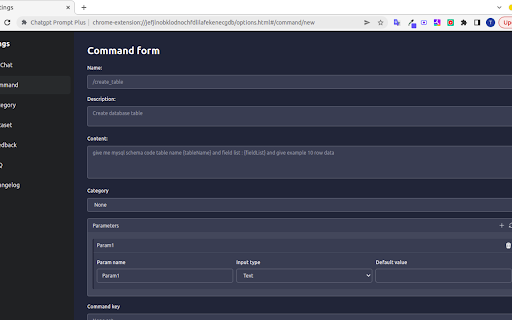
ChatGPT Prompt Plus is an extension that allows you to save and manage your prompt library, making it easy to call. You can create your prompt template with great flexibility, such as adding parameters to the template. Additionally, you can set each parameter's details, including default value and input type, enabling you to create high-quality and adaptable prompts.

🔥 Key Features:
💾 Manage prompt library and reuse it easy
🎹 Set your own hotkeys to your prompts
🗃️ Prebuilt Prompt template from awesome prompt
📂 Organize your prompts with categories and custom icons
🔍 Easy find prompt with Popup search
🧰 Bind Parameters with Prompt
🎨 Many Variant parameter type
💻 Simple and easy-to-use interface

How it works:

1. Go to the prompt setting page by clicking on the hamburger icon near chat input of ChatGPT to access the main menu. Click on 'Prompt' to begin creating a new prompt template.
2. Add your prompt in prompt setting and fill your prompt detail.
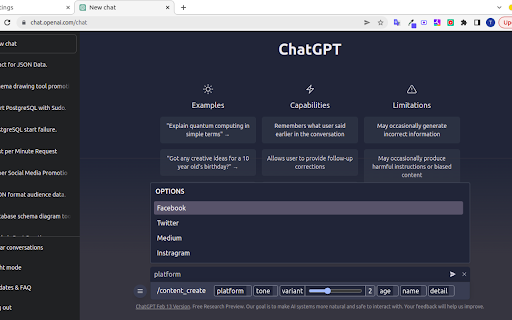
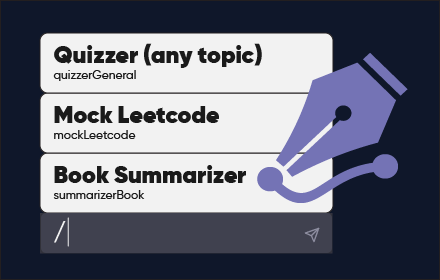
3. Type a forward slash (/) in the chat input to open the prompts list menu. Select the prompt you want from the list. Click on the chosen prompt to proceed.
4. If the selected prompt is linked to a parameter, fill in the required parameter data. Enter the data into the parameter fields. Click on the 'Send icon' button to proceed and finish the process.
Technical
- Version
- 1.5.1.3
- Manifest
- V3
- Size
- 295KiB
- Min Chrome
- 88
- Languages
- 11
- Featured
- Yes
Metadata
- ID
- innfdmnoafmheolkkhajdcgmefamkndp
- Developer ID
- uabe11c38e0b7ec1aba85930827e5fe05
- Developer Email
- [email protected]
- Created
- Feb 1, 2023
- Last Updated (Store)
- May 13, 2023
- Last Scraped
- Jun 8, 2026
- Website
- promptplus.org
- Support URL
- https://prompt-plus.canny.io/bug-report
- Privacy Policy
- —
Similar extensions
Alternatives to ChatGPT Prompt Plus, ranked by description similarity.
PromptGPT: Prompts for ChatGPT
Save your most used prompts in ChatGPT!
402
★ 3.5

ChatGPT Prompt Library
Built-in prompt manager for ChatGPT — quick, clean, and always at your fingertips.
5

Prompts Library
Chrome extension for chat.openai.com to show a Prompts Library
19

Promptbook: Inline Prompt Manager for ChatGPT
Save and access your prompts from ChatGPT.
7
★ 3.0

PromptGum - AI Prompt Manager, Sidebar, and 1Password-Like Management
A browser extension for managing AI prompts with tags, search, favorites, and quick access from any webpage.
11
★ 5.0

ChatGPT Bookmark & Prompt Manager
ChatGPT Bookmark & Prompt Manager gives you control so you can find anything instantly, save what matters, reuse and share prompts.
75
★ 4.9

ChatGPT Enhancer
Add a floating bubble to jump between your prompts and enhance ChatGPT with color-coded backgrounds and typography options.
2
★ 5.0

Prompti
Elevate your ChatGPT conversations with Prompti, a robust Chrome extension that aids in the construction of superior prompts.
330
★ 5.0
Data sourced from the Chrome Web Store · last verified Jun 8, 2026.