
QBO Theme Switcher Pro
Transform QuickBooks Online with 14 stunning themes including dark mode. Reduce eye strain instantly!
As of June 2026, QBO Theme Switcher Pro has 40 users in the Functionality & UI category.
Usersup 53.8 percent+53.8%
40
40
Ratingno change0%
—
— reviews
Reviewsno change0%
—
Version
1.0.0
Manifest V3
History
9 snapshotsTracking since Apr 1, 2026.
View as table
| Date | Users | Rating | Reviews | Version |
|---|---|---|---|---|
| Apr 1, 2026 | 26 | — | — | 1.0.0 |
| Apr 16, 2026 | 25 | — | — | 1.0.0 |
| Apr 22, 2026 | 29 | — | — | 1.0.0 |
| Apr 27, 2026 | 27 | — | — | 1.0.0 |
| May 7, 2026 | 33 | — | — | 1.0.0 |
| May 14, 2026 | 36 | — | — | 1.0.0 |
| May 23, 2026 | 38 | — | — | 1.0.0 |
| Jun 2, 2026 | 36 | — | — | 1.0.0 |
| Jun 10, 2026 | 42 | — | — | 1.0.0 |
| Now | 40 | — | — | 1.0.0 |
Permissions & access
- Permissions
- storageactiveTabscripting
- Host access
- *://*.intuit.com/*, *://*.qbo.intuit.com/*, *://sandbox.qbo.intuit.com/*
Screenshots


About
Tired of staring at bright white screens during long accounting sessions?
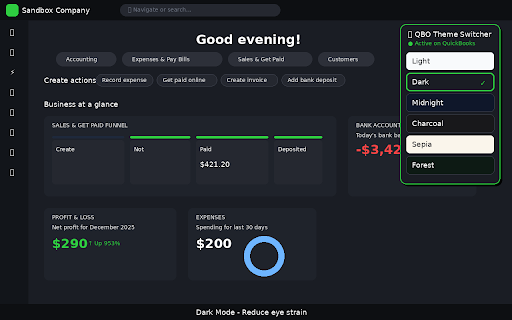
QBO Theme Switcher Pro brings beautiful dark mode and 13 additional themes to QuickBooks Online. One click transforms your entire QBO interface into an eye-friendly workspace.
What it does:

Instantly applies dark mode or any of 14 professionally designed themes to QuickBooks Online
Changes backgrounds, text, cards, sidebar, and all interface elements
Remembers your choice and applies it automatically on every visit
Syncs across all your QBO tabs in real-time

Why install it:

Reduce eye strain during late-night bookkeeping and month-end closes
Work comfortably in low-light environments
Match your QBO interface to your personal style
The Low Blue Light theme is perfect for evening work
High Contrast theme improves readability for accessibility needs

Themes included:
Dark, Midnight Blue, Charcoal, Slate Gray, Corporate Navy, Sepia (warm light theme), Warm Sunset, High Contrast, Low Blue Light, Forest Green, Ocean Breeze, Purple Haze, Rose Gold, and the original Light theme.
Simple to use:
Click the extension icon, pick a theme, done. No account needed, no configuration required.
Privacy focused:
Works 100% locally in your browser. No data collection, no external servers, no tracking.
Made for accountants, bookkeepers, and business owners who spend hours in QuickBooks Online.
Technical
- Version
- 1.0.0
- Manifest
- V3
- Size
- 29.84KiB
- Min Chrome
- 88
- Languages
- 1
- Featured
- No
Metadata
- ID
- inmbfoblofebfjgcgejliobhcbjfbckl
- Developer ID
- u45b01f90c95a204d9228adb7c4b1704a
- Developer Email
- [email protected]
- Created
- Jan 18, 2026
- Last Updated (Store)
- Jan 23, 2026
- Last Scraped
- Jun 10, 2026
- Website
- —
- Support URL
- —
- Privacy Policy
- https://sites.google.com/view/qbps-privacy-policy/
Similar extensions
Alternatives to QBO Theme Switcher Pro, ranked by description similarity.

HubSpot Theme Changer
Customize HubSpot's appearance with dark mode, light mode, and custom themes
135
★ 5.0

Stripe Dark Mode
Transform your Stripe Dashboard with beautiful dark themes
286
★ 5.0

ShadeSurfer Dark Mode
Turn any webpage into a comfortable, easy-to-read dark theme with precise controls.
—

Business Central Dark Mode
Modo oscuro avanzado y configurable para Business Central.
56
★ 5.0

Dark Mode for HubSpot
Take care of your eyes day and night using dark theme for HubSpot tools and services.
1.0K
★ 2.6

Dark Mode Toggle (Polished Bottom Right)
Dark mode with solid styled button, smooth animation, and bottom-right toggle.
11
★ 5.0

Onshape Dark Mode
Dark mode and colour themes for Onshape. Toggle dark mode. Pick from our themes or pick your own colour.
316
★ 4.7

Website Theme Personalizer
Apply beautiful color palettes or fine-tune individual elements with expert tools.
3
Data sourced from the Chrome Web Store · last verified Jun 10, 2026.