
Nemilia — Send to Workspace
Capture pages and selections, run multi-agent AI workflows, and compose prompts — all without leaving your current tab.
As of June 2026, Nemilia — Send to Workspace has 25 users in the Workflow & Planning category.
Usersno change0%
25
25
Ratingno change0%
—
— reviews
Reviewsno change0%
—
Version
2.2.0
Manifest V3
90-day change · In the last 90 days this extension 1 version update, changed permissions.
History
9 snapshotsTracking since Apr 1, 2026.
View as table
| Date | Users | Rating | Reviews | Version |
|---|---|---|---|---|
| Apr 1, 2026 | — | — | — | 2.1.0 |
| Apr 17, 2026 | — | — | — | 2.1.0 |
| Apr 22, 2026 | 1 | — | — | 2.1.0 |
| Apr 27, 2026 | 2 | — | — | 2.1.0 |
| May 4, 2026 | 2 | — | — | 2.1.0 |
| May 10, 2026 | 3 | — | — | 2.2.0 |
| May 15, 2026 | 4 | — | — | 2.2.0 |
| May 28, 2026 | 5 | — | — | 2.2.0 |
| Jun 4, 2026 | 6 | — | — | 2.2.0 |
| Now | 25 | — | — | 2.2.0 |
Changelog
- May 4, 2026description
Nemilia — Send to Workspace is the Chrome extension companion for Nemilia AI Workspace, a single-file multi-agent AI production environment that runs entirely in your browser with no server and no install.
What this extension does:
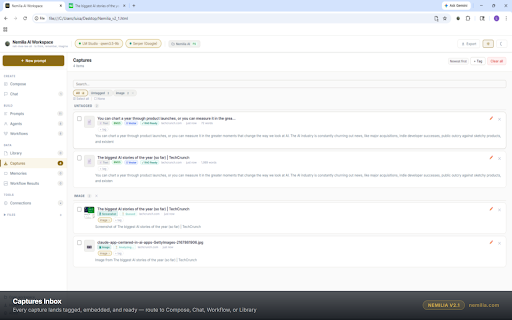
Right-click any page to capture full text, a selection, a screenshot, or an image and send it directly to your Nemilia workspace — without leaving your current tab. Captured items land in the Captures inbox where they are automatically tagged, analyzed, and embedded for immediate use in AI workflows.

Capture full pages — extracts and sends the readable text content of any page
Capture selections — highlight any text and send just that portion
Capture screenshots — takes a screenshot of the visible tab and sends it for vision analysis
Capture images — right-click any image on a page to send it directly to Nemilia
Run workflows — right-click any page to trigger one of your saved AI workflows against it instantly
Open in Compose — send a page directly to Nemilia's Compose view with the content pre-attached

Requires Nemilia AI Workspace
This extension only works alongside the Nemilia AI Workspace application. Nemilia is a free, open-source single HTML file — no account, no subscription, no server required. Download free at nemilia.com or from GitHub.
Privacy
This extension does not collect, transmit, or store any personal data on external servers. Captured content is sent only to the Nemilia tab open in your browser — it never leaves your machine. No analytics, no tracking, no third-party data sharing of any kind.
Nemilia — Send to Workspace is the Chrome extension companion for Nemilia AI Workspace, a single-file multi-agent AI production environment that runs entirely in your browser with no server and no install.

What this extension does:
Right-click any page to capture full text, a selection, a screenshot, or an image and send it directly to your Nemilia workspace — without leaving your current tab. Captured items land in the Captures inbox where they are automatically tagged, analyzed, and embedded for immediate use in AI workflows. The extension also relays MCP tool calls and AI provider API requests through its service worker, bypassing browser CORS restrictions so Nemilia can connect to external tools and models when running as a local file.

Capture full pages — extracts and sends the readable text content of any page
Capture selections — highlight any text and send just that portion
Capture screenshots — takes a screenshot of the visible tab and sends it for vision analysis
Capture images — right-click any image on a page to send it directly to Nemilia
Run workflows — right-click any page to trigger one of your saved AI workflows against it instantly
Open in Compose — send a page directly to Nemilia's Compose view with the content pre-attached
MCP relay — routes MCP server tool calls through the extension service worker, bypassing file:// CORS restrictions with no configuration required
AI provider relay — streams LLM API requests through the service worker so AI providers work correctly when Nemilia runs as a local file

Requires Nemilia AI Workspace
This extension only works alongside the Nemilia AI Workspace application. Nemilia is a free, open-source single HTML file — no account, no subscription, no server required. Download free at nemilia.com or from GitHub.

Privacy
This extension does not collect, transmit, or store any personal data on external servers. Captured content is sent only to the Nemilia tab open in your browser — it never leaves your machine. The MCP and AI provider relays forward only the requests your Nemilia workspace initiates, to servers you have personally configured, and return the responses directly to your browser. No data passes through or is retained by Nemilia's servers. No analytics, no telemetry, no tracking, no third-party data sharing of any kind.
What's new / release notes

v2.2.0
New: MCP server relay — routes MCP tool calls through the extension service worker to bypass file:// CORS restrictions. Activates automatically when Nemilia runs as a local file; no configuration required.
New: AI provider stream relay — LLM API requests stream through the service worker, enabling provider connectivity from local file context without CORS errors.
Fixed: queue drain timing — captured items no longer lost; queue now delivers only after the app is fully initialized and ready to receive.
Fixed: tab re-identification after navigation; tab lookup is now cached and throttled.
No analytics or telemetry in this release or any prior release. Captured data never leaves the user's machine.
- May 4, 2026host_permissions
file://*/*, *://*/*
file://*/*, <all_urls>, http://localhost/*, http://127.0.0.1/*, http://0.0.0.0/*
Permissions & access
- Permissions
- activeTabstoragescriptingtabscontextMenus
- Host access
- file://*/*, <all_urls>, http://localhost/*, http://127.0.0.1/*, http://0.0.0.0/*
Screenshots




About
Nemilia — Send to Workspace is the Chrome extension companion for Nemilia AI Workspace, a single-file multi-agent AI production environment that runs entirely in your browser with no server and no install.

What this extension does:
Right-click any page to capture full text, a selection, a screenshot, or an image and send it directly to your Nemilia workspace — without leaving your current tab. Captured items land in the Captures inbox where they are automatically tagged, analyzed, and embedded for immediate use in AI workflows. The extension also relays MCP tool calls and AI provider API requests through its service worker, bypassing browser CORS restrictions so Nemilia can connect to external tools and models when running as a local file.

Capture full pages — extracts and sends the readable text content of any page
Capture selections — highlight any text and send just that portion
Capture screenshots — takes a screenshot of the visible tab and sends it for vision analysis
Capture images — right-click any image on a page to send it directly to Nemilia
Run workflows — right-click any page to trigger one of your saved AI workflows against it instantly
Open in Compose — send a page directly to Nemilia's Compose view with the content pre-attached
MCP relay — routes MCP server tool calls through the extension service worker, bypassing file:// CORS restrictions with no configuration required
AI provider relay — streams LLM API requests through the service worker so AI providers work correctly when Nemilia runs as a local file

Requires Nemilia AI Workspace
This extension only works alongside the Nemilia AI Workspace application. Nemilia is a free, open-source single HTML file — no account, no subscription, no server required. Download free at nemilia.com or from GitHub.

Privacy
This extension does not collect, transmit, or store any personal data on external servers. Captured content is sent only to the Nemilia tab open in your browser — it never leaves your machine. The MCP and AI provider relays forward only the requests your Nemilia workspace initiates, to servers you have personally configured, and return the responses directly to your browser. No data passes through or is retained by Nemilia's servers. No analytics, no telemetry, no tracking, no third-party data sharing of any kind.
What's new / release notes

v2.2.0
New: MCP server relay — routes MCP tool calls through the extension service worker to bypass file:// CORS restrictions. Activates automatically when Nemilia runs as a local file; no configuration required.
New: AI provider stream relay — LLM API requests stream through the service worker, enabling provider connectivity from local file context without CORS errors.
Fixed: queue drain timing — captured items no longer lost; queue now delivers only after the app is fully initialized and ready to receive.
Fixed: tab re-identification after navigation; tab lookup is now cached and throttled.
No analytics or telemetry in this release or any prior release. Captured data never leaves the user's machine.
Technical
- Version
- 2.2.0
- Manifest
- V3
- Size
- 48.87KiB
- Min Chrome
- 88
- Languages
- 1
- Featured
- No
Metadata
- ID
- inkhagbajnhcnedmjhppgloeamfmhkfl
- Developer ID
- ub086842fc4ac0a655c0ae4071f33b4c4
- Developer Email
- [email protected]
- Created
- Mar 24, 2026
- Last Updated (Store)
- May 1, 2026
- Last Scraped
- Jun 10, 2026
- Website
- nemilia.com
- Support URL
- github.com/luislopez1212/Nemilia
- Privacy Policy
- https://nemilia.com/privacy
Data sourced from the Chrome Web Store · last verified Jun 10, 2026.