
Bookmarks Homepage
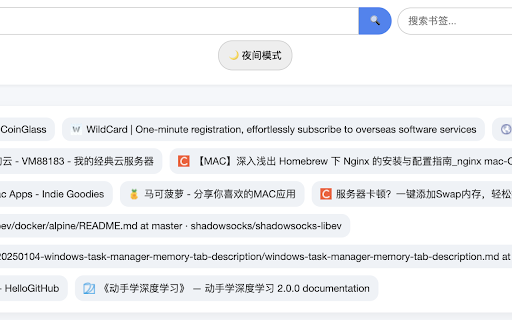
Display your Chrome bookmarks in card format and support search, night mode, and icons.
As of May 2026, Bookmarks Homepage has 4 users in the Functionality & UI category.
Usersup 33.3 percent+33.3%
4
4
Ratingno change0%
—
— reviews
Reviewsno change0%
—
Version
1.0
Manifest V3
History
4 snapshotsTracking since Apr 21, 2026.
View as table
| Date | Users | Rating | Reviews | Version |
|---|---|---|---|---|
| Apr 21, 2026 | 3 | — | — | 1.0 |
| May 6, 2026 | 3 | — | — | 1.0 |
| May 17, 2026 | 4 | — | — | 1.0 |
| May 31, 2026 | 3 | — | — | 1.0 |
| Now | 4 | — | — | 1.0 |
Permissions & access
- Permissions
- bookmarks
- Host access
- None declared
Screenshots
About
Use your favorite bookmarks as the Chrome browser homepage.

📚 Turn Your Bookmarks into a Beautiful New Tab Homepage!

This extension transforms your Chrome new tab page into a visually organized homepage powered by your bookmarks. Your bookmark folders appear as separate sections, and each bookmark is displayed as a clean, modern card with the website icon.

✨ Key Features:

Replace the default new tab page with your bookmark homepage

Search through all your bookmarks quickly

Toggle between dark mode and light mode

Clean layout with horizontal bookmark cards and favicon display

🧠 Who is it for?

Users who rely heavily on bookmarks to navigate the web

Anyone who wants a visually organized and productive new tab page

Chrome users who want both beauty and function in their start page

Install this extension to create a fast, clean, and bookmark-centric new tab experience!
Technical
- Version
- 1.0
- Manifest
- V3
- Size
- 12.34KiB
- Min Chrome
- 88
- Languages
- 1
- Featured
- No
Metadata
- ID
- indmjkbakfnedgngmemgcjdgneklfonh
- Developer ID
- ue06b0dd2f20f1f4c49f276b55e1d6b6a
- Developer Email
- [email protected]
- Created
- Jun 29, 2025
- Last Updated (Store)
- Jun 29, 2025
- Last Scraped
- May 31, 2026
- Website
- mgface.com
- Support URL
- —
Similar extensions
Alternatives to Bookmarks Homepage, ranked by description similarity.

Better New Tab
A clean, modern, and personalized new tab page for your browser.
25
★ 5.0

Fusion - New Tab
🚀 Transform your new tab into a personalized hub for bookmarks, themes & widgets — simple, customizable and completely private
8
★ 5.0

Minimalist New Tab
Replace your new tab with a clean, minimal design featuring bookmarks, clock, and Chrome shortcuts with dark mode support.
9

Bookmark Hub: Advanced New Tab Page
Quickly access all your bookmarks on the new tab page. Automatically reflect changes made in Bookmark Manager.
20
★ 5.0

Custom New Tab
A personalized new tab page with customizable shortcuts, clock, profile picture, and productivity tools
11
★ 5.0

Bookmarks New Tab
Replace your new tab page with a beautiful bookmarks grid featuring folder navigation, favicons, dark theme, and system fonts.
3

myRoom
Transform your new tab into a beautiful, personalized dashboard with glassmorphism style and instant bookmark access.
32
★ 5.0

Baya Extension
Personal dashboard that replaces your new tab page with customizable widgets and bookmarks
2
Data sourced from the Chrome Web Store · last verified May 31, 2026.