
ALT 2FA: Authenticator for Chrome
Generate and securely store two-factor authentication codes directly in your browser. Local-first, no account required.
As of June 2026, ALT 2FA: Authenticator for Chrome has — users in the Privacy & Security category.
Usersno change0%
—
—
Ratingno change0%
—
— reviews
Reviewsno change0%
—
Version
1.0.1
Manifest V3
History
1 snapshotsTracking since Jun 20, 2026.
Not enough history yet for this metric — the chart fills in as we collect more snapshots.
View as table
| Date | Users | Rating | Reviews | Version |
|---|---|---|---|---|
| Jun 20, 2026 | — | — | — | 1.0.1 |
| Now | — | — | — | 1.0.1 |
Permissions & access
- Permissions
- storageactiveTabscriptingclipboardWritealarms
- Host access
- None declared
Screenshots


About
ALT 2FA is a local authenticator for Chrome that generates two-factor authentication codes directly in your browser.

Use it to save your 2FA accounts, generate time-based one-time passwords, and quickly copy codes when signing in. Your authenticator vault is encrypted and stored locally in Chrome, so your codes stay on your device.

Features:

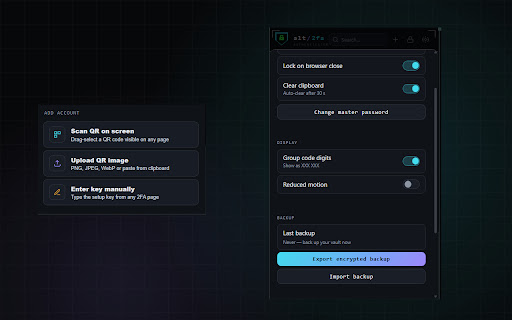
• Generate standard 6-digit TOTP codes
• Store authenticator entries in an encrypted local vault
• Add accounts manually with setup keys
• Scan QR codes from your screen or uploaded images
• Organize entries with issuer and account labels
• Copy codes quickly when signing in
• Lock and unlock your vault with a master password
• Import and export encrypted backups
• Works directly inside Chrome

Privacy:

ALT 2FA does not collect your authenticator secrets, setup keys, QR-code contents, generated codes, or saved account entries. Your vault is stored locally in your browser and is not sent anywhere by the extension.

Important:

ALT 2FA stores your authenticator vault locally in this browser.

If the extension data is deleted, the saved entries are deleted with it. Export a backup before removing the extension, resetting Chrome, clearing extension data, or moving to another device.

Backups are encrypted, and restoring them requires the vault password. There is no recovery option for a forgotten password.
Technical
- Version
- 1.0.1
- Manifest
- V3
- Size
- 118KiB
- Min Chrome
- 88
- Languages
- 1
- Featured
- No
Metadata
- ID
- inbnimpbdhlnlbjplodonakndkbpcdip
- Developer ID
- u9cbd329f8abe506a15eb77bf4821326d
- Developer Email
- [email protected]
- Created
- Jun 19, 2026
- Last Updated (Store)
- Jun 19, 2026
- Last Scraped
- Jun 20, 2026
- Website
- altrepo.net
- Support URL
- https://altrepo.net/info/contact.html
- Privacy Policy
- —
Data sourced from the Chrome Web Store · last verified Jun 20, 2026.