
Canvas Sync
Integrated deadline timeline and notifications for Canvas LMS.
As of June 2026, Canvas Sync has — users and a 5.00/5 rating from 1 reviews in the Productivity category.
Usersno change0%
—
—
Ratingno change0%
5.00
1 reviews
Reviewsno change0%
1
Version
1.0.0
Manifest V3
History
5 snapshotsTracking since Apr 16, 2026.
View as table
| Date | Users | Rating | Reviews | Version |
|---|---|---|---|---|
| Apr 16, 2026 | 2 | 5.00 | 1 | 1.0.0 |
| Apr 26, 2026 | 2 | 5.00 | 1 | 1.0.0 |
| May 9, 2026 | 2 | 5.00 | 1 | 1.0.0 |
| May 21, 2026 | 1 | 5.00 | 1 | 1.0.0 |
| Jun 3, 2026 | 2 | 5.00 | 1 | 1.0.0 |
| Now | — | 5.00 | 1 | 1.0.0 |
Permissions & access
- Permissions
- storagealarmsnotificationstabs
- Host access
- https://*.instructure.com/*, https://*/*
Screenshots


About
Canvas Sync is the ultimate companion for students using the Canvas LMS. Stop switching between tabs to check your deadlines.

    **Key Features:**
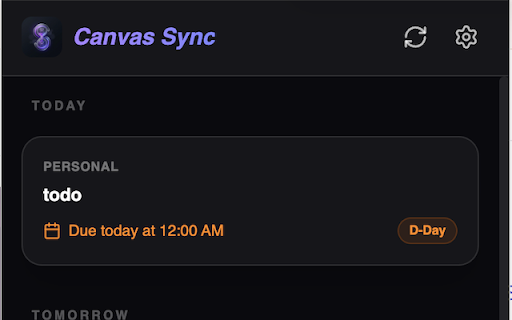
    - **Unified Timeline**: Course assignments and personal calendar events in one sleek view.
    - **Smart Sorting**: Automatically categorizes tasks into Today, Tomorrow, and Upcoming.
    - **Personal Calendar Integration**: Syncs your personal Canvas calendar entries seamlessly.
    - **Quick Actions**: Dismiss past events or visit the assignment page with one click.
    - **Premium Aesthetics**: A stunning, modern UI that makes managing tasks a pleasure.
    - **Multi-language Support**: Full English and Korean localization.

    Get organized and never miss a deadline again with Canvas Sync.

Canvas Sync는 Canvas LMS를 사용하는 학생들을 위한 최고의 도구입니다. 더 이상 마감일을 확인하기 위해 여러 탭을 헤매지 마세요.

    **주요 기능:**
    - **통합 타임라인**: 강의 과제와 개인 일정을 하나의 세련된 뷰로 통합합니다.
    - **스마트 정렬**: 오늘, 내일, 그리고 예정된 일정을 자동으로 분류합니다.
    - **개인 캘린더 연동**: Canvas 개인 일정까지 완벽하게 동기화합니다.
    - **퀵 액션**: 지난 일정을 숨기거나 과제 페이지로 즉시 이동할 수 있습니다.
    - **프리미엄 디자인**: 작업을 즐겁게 관리할 수 있는 현대적이고 아름다운 UI.
    - **다국어 지원**: 한국어와 영어를 완벽하게 지원합니다.

    Canvas Sync와 함께라면 더 이상 마감일을 놓치지 않습니다. 지금 바로 시작하세요!
Technical
- Version
- 1.0.0
- Manifest
- V3
- Size
- 1.76MiB
- Min Chrome
- 88
- Languages
- 1
- Featured
- No
Metadata
- ID
- inbkbgggdjajapchnhnjcjebegfkbjoh
- Developer ID
- u5d066a963346aef39e60f6deb4cf4933
- Developer Email
- [email protected]
- Created
- Apr 11, 2026
- Last Updated (Store)
- Apr 11, 2026
- Last Scraped
- Jun 9, 2026
- Website
- visionexperiencedeveloper.com
- Support URL
- —
Data sourced from the Chrome Web Store · last verified Jun 9, 2026.