Coolors to Power BI Theme
Extracts color codes from Coolors palette pages and saves them as Power BI Theme JSON file - Developed by Vahid Doustimajd
As of May 2026, Coolors to Power BI Theme has 1,000 users and a 5.00/5 rating from 4 reviews in the Productivity category.
Usersno change0%
1.0K
1,000
Ratingno change0%
5.00
4 reviews
Reviewsno change0%
4
Version
1.1.0
Manifest V3
Permissions & access
- Permissions
- activeTabdownloadsnotifications
- Host access
- None declared
Screenshots

About
"Coolors to Power BI Theme" is a powerful extension that helps you to extract a Power BI theme from Coolors.co . With this extension, you can effortlessly extract color hex codes from Coolors palettes and create beautiful Power BI themes in just a few clicks.

Here's what you can do with "Coolors to Power BI Theme":
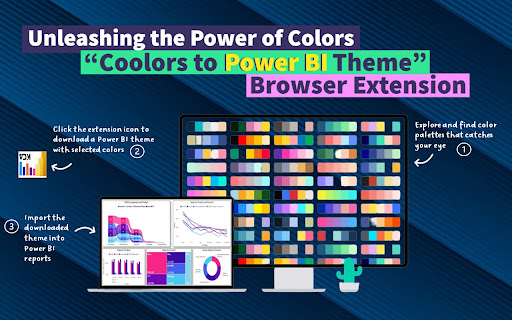
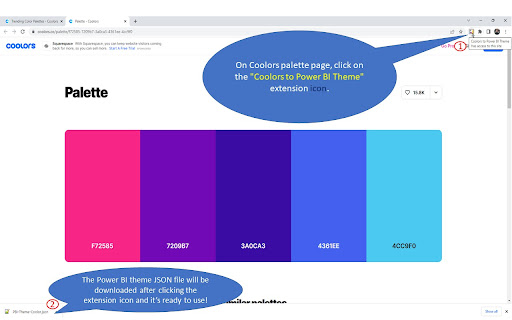
1. Easy Palette Extraction: Browse Coolors.co to discover an endless array of stunning color palettes. When you find one that catches your eye, simply open the palette page.
2. Automatic Theme Generation: With a single click on the extension button, "Coolors to Power BI Theme" instantly downloads a Power BI theme JSON file based on the colors from your selected Coolors palette.
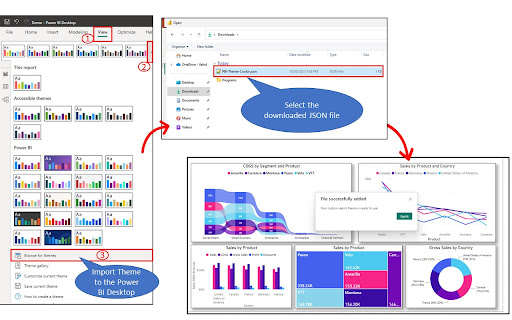
3. Ready to Use: Your Power BI JSON theme file is ready and you can import it into Power BI to check your reports and visualizations in your chosen color palette.
4. Customization Options: The generated theme JSON file is fully customizable, allowing you to fine-tune the color scheme to perfectly match your design preferences. Tailor your Power BI themes with ease and precision.
5. Time-saving Efficiency: Say goodbye to manual color selection and tedious theme creation. "Coolors to Power BI Theme" streamlines the process, saving you valuable time and effort.
6. Availability: The JSON theme file can be used in any report you have and it can be stored for future use
Unleash your creativity and enhance your Power BI visualizations with the vibrant color palettes from Coolors.co. Download "Coolors to Power BI Theme" now and transform the way you design and present data in Power BI!

◦•◦•◦•◦•◦•◦•◦•◦•◦•◦•◦•◦•◦•◦•◦•◦•◦•◦•◦•◦•◦•◦•◦•◦•◦•◦•◦•◦•◦•◦
Version History:
Version 1.1.0

In this new version, I have added exciting new functionality to enhance your experience. Now, our extension not only supports Coolors palette pages but also supports the 'Palette Generator' page. This means you can effortlessly extract color codes and create Power BI theme files from both Coolors palette pages and the dedicated creation page. Whether you're browsing existing palettes or designing your own, our extension has got you covered. Upgrade now and enjoy a seamless workflow with our improved compatibility and enhanced features!"
Technical
- Version
- 1.1.0
- Manifest
- V3
- Size
- 13.67KiB
- Min Chrome
- 88
- Languages
- 1
- Featured
- No
Metadata
- ID
- inaklpdkfopgakhpkfdopaoaiagebofd
- Developer ID
- uf297a34101a0611d78428fabc1cea523
- Developer Email
- [email protected]
- Created
- May 18, 2023
- Last Updated (Store)
- Sep 19, 2023
- Last Scraped
- May 19, 2026
- Website
- vahiddm.com
- Privacy Policy
- —
Similar extensions
Alternatives to Coolors to Power BI Theme, ranked by description similarity.

PBI Palette Pro
Extract color palettes from websites and export Power BI-compatible theme files
11

Get Color Palette from Website
Try to get color palette from website using our new color picker combined with enhanced color palette extractor from website.
4.0K
★ 5.0

Color Palette Creator
Use this extension to instantly create and export color palettes from any image on a webpage for your design work.
—

Color Palette Generator
Extract and save color schemes from any webpage
1

AI Color Palette Extractor
AI-powered color extraction from any webpage with one click
7
★ 5.0

Color Palette from Image
Use Color Palette from Image app to get color palette from image instantly. Palette generator from uploaded or web page images.
49

Element Fusion
Introducing a cutting-edge Chrome extension designed for creative professionals, web developers, and color enthusiasts. This…
5

Image Color Picker
Color Picker for desktop.
6
Data sourced from the Chrome Web Store · last verified May 19, 2026.