
MATH Keys - Equation & Formula Editor
Free online equation editor that utilises LaTeX to allow users to write mathematical equations, formulas, and symbols online
As of May 2026, MATH Keys - Equation & Formula Editor has 90,000 users and a 4.83/5 rating from 309 reviews in the Education category.
Usersup 28.6 percent+28.6%
90.0K
90,000
Ratingno change0%
4.83
309 reviews
Reviewsup 2.0 percent+2.0%
309
Version
4.0.9
Manifest V3
90-day change · In the last 90 days this extension gained 20.0K users.
History
2 snapshotsTracking since Apr 24, 2026.
View as table
| Date | Users | Rating | Reviews | Version |
|---|---|---|---|---|
| Apr 24, 2026 | 70.0K | 4.83 | 303 | 4.0.9 |
| May 19, 2026 | 90.0K | 4.82 | 305 | 4.0.9 |
| Now | 90.0K | 4.83 | 309 | 4.0.9 |
Permissions & access
- Permissions
- storage
- Host access
- https://mathkeyboards-347222.web.app/*
Screenshots


About
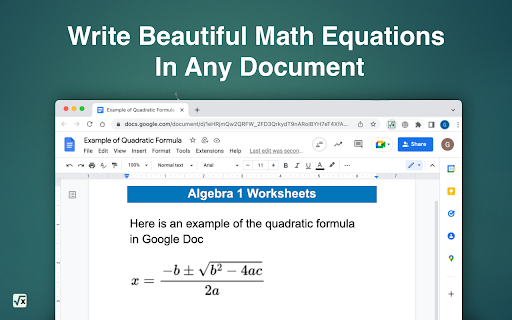
MATH Keys is a completely free online equation editor that allows users to write mathematical equations, formulas, and symbols online! Our mission is to boost productivity in academic life whether that is for teachers, graduates, or students.

Type out anything you want with your regular keyboard, and press the buttons on our MATH Keys to access mathematical symbols and operations.

With the latex notation tools, you can copy whatever formula, equation, or symbol you just created anywhere you want.

How to use:

 - Use your computer keyboard to type your equation. You can use numbers,
   letters, or any other symbol on your computer keyboard
 - Use the extension MATH Keys to click on symbols, such as integrals,
   sigma, fraction, etc..
 - Navigate around using your mouse or use the arrows keys as follows:
 - Right Arrow: move the cursor forward. This is useful to get out of operation.
    - For example, if you are inside square root, forward arrow will move the
      cursor out of it
 - Left Arrow: move the cursor back
 - Up Arrow: create exponent
 - Down Arrow: create subscript

Use the buttons as follows:

 - Copy Button: copy the formula as image to the clipboard — paste it wherever
   you'd like
 - New Button: delete the formula and start a new one

Features and formulas for:
 - Calculus
    - Finite and infinite Integrals
    - Derivatives
    - Limits
    - Sigma symbol
    - Combinatorics
 - Algebra
    - Logs
    - Exponents
    - Radicals
    - Fractions
    - Inequalities
    - matrix
 - Trigonometry
    - Trigonometric functions
    - Common greek symbols: pi, alpha, beta, theta

You can you use the math extension same as a math latex online editor, math equation online editor, or MathQuill editor.

New in version 4.0.0:
You can now create custom buttons — see instructions here: https://www.mathkeyboards.com/custom-buttons.

New in version 3.0.0:
You can now write multi-line equations. Press 'Enter' for a new line.

New in version 2.1.2:
You can now write matrices using MATH Keys.

New in version 2.1.1:
You can now change the font color by clicking the settings icon.

New in version 2.1.0:
Added history feature — you can now access and edit your old equations.

New in version 2.0.0:
You can now use your mouse to navigate around math keys!
Technical
- Version
- 4.0.9
- Manifest
- V3
- Size
- 447KiB
- Min Chrome
- 88
- Languages
- 52
- Featured
- No
Metadata
- ID
- imcaiokpoocfeplmgemffhmdokiaallo
- Developer ID
- u9c277f6dfda59746a716b9c7bfc639db
- Developer Email
- [email protected]
- Created
- Jul 17, 2022
- Last Updated (Store)
- Dec 6, 2024
- Last Scraped
- May 19, 2026
- Website
- mathkeyboards.com
- Support URL
- https://www.mathkeyboards.com/help
- Privacy Policy
- https://www.mathkeyboards.com/privacy-policy
Similar extensions
Alternatives to MATH Keys - Equation & Formula Editor, ranked by description similarity.

Equatio - Math made digital
Easily create mathematical equations, formulas and quizzes. Intuitively type or handwrite, with no tricky math code to learn.
2.0M
★ 3.9

Equation Editor
Use Equation Editor to easily type mathematical formulas and convert LaTeX to PNG online with our LaTeX math equation writer.
2.0K
★ 4.9

moment.of.math - Write math and check your work- BETA
Free and easy-to-use math scratchpad. Write math equations, paste anywhere, check your work. THIS EXTENSION IS FOR BETA TESTING.
83
★ 5.0

MathKit — Fast Equations for Google Slides
Insert sharp math equations in seconds. No account, no code, no clunky popups. Just type and go.
347
★ 4.7

MathPad
AI math workspace: equation editor, step-by-step solver, OCR, handwriting recognition, AI tutor, CAS verification. Works everywhere.
3.0K
★ 5.0

Math Symbol Keyboard
Quick access to math symbols - click to copy and insert into any text field. Great for ChatGPT, Gemini, and other AI chatbots!
96
★ 5.0

LatexToCalc
Translate LaTeX text to calculator format. Now with MathJax to LaTeX conversion!
94
★ 3.0

Gemini + ChatGPT Math Bar
Math formula toolbar with live WYSIWYG editor for Gemini and ChatGPT.
16
Data sourced from the Chrome Web Store · last verified May 19, 2026.