
Snake Classic
A classic snake game that plays in a popup.
As of June 2026, Snake Classic has 7,000 users and a 5.00/5 rating from 7 reviews in the Games category.
Usersdown 22.2 percent−22.2%
7.0K
7,000
Ratingno change0%
5.00
7 reviews
Reviewsup 16.7 percent+16.7%
7
Version
0.3.5
Manifest V3
90-day change · In the last 90 days this extension lost 2.0K users, 1 version update.
History
8 snapshotsTracking since Apr 5, 2026.
View as table
| Date | Users | Rating | Reviews | Version |
|---|---|---|---|---|
| Apr 5, 2026 | 9.0K | 5.00 | 6 | 0.3.4 |
| Apr 16, 2026 | 8.0K | 5.00 | 6 | 0.3.4 |
| Apr 22, 2026 | 8.0K | 5.00 | 7 | 0.3.4 |
| May 14, 2026 | 9.0K | 5.00 | 7 | 0.3.4 |
| May 23, 2026 | 10.0K | 5.00 | 7 | 0.3.4 |
| May 27, 2026 | 9.0K | 5.00 | 7 | 0.3.4 |
| Jun 10, 2026 | 9.0K | 5.00 | 7 | 0.3.5 |
| Jun 21, 2026 | 8.0K | 5.00 | 7 | 0.3.5 |
| Now | 7.0K | 5.00 | 7 | 0.3.5 |
Changelog
- May 27, 2026description
This chrome extension allows you to play the snake game anytime and anywhere.

The rule of the snake game is simple:
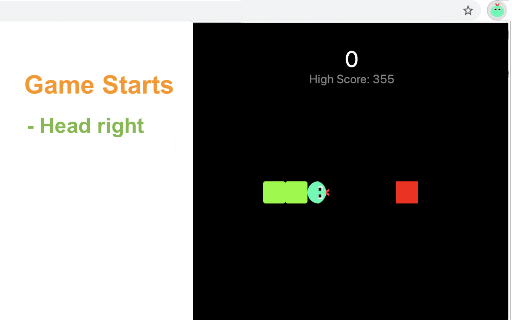
- Try to touch the target (a red box) with snake head by changing the snake direction.
- Once touched, the target will disappear and then randomly occur in a new location.
- For each touch, both the snake body and the game score will increase.
- As the score increases to higher levels, the snake will be accelerated.

How to play?
1) Click the extension icon in the top right corner of the browser to open the game window.
2) Press Arrow keys (Arrow left/right/up/bottom) to start the game or change snake direction.
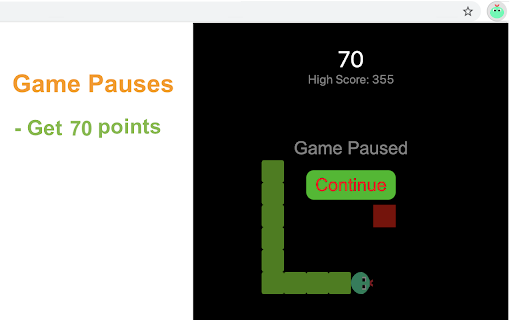
3) Press the Space key to pause or continue the game.
4) Click anywhere on your screen except game window to exit the game.
5) Press the Restart button (or Space/Enter key) to start a new game when the game is over.

Have fun with the snake game! If you'd like to play the next level, simply click the corresponding links below the 'Restart' button. Plus, we've added some of our featured game extensions after game over, offering more fun options.

CHANGELOG
==========
Version 0.2.2 - 0.3.4
- Display featured games after game over
- Update game next level link
- Rename the game to snake classic
- Dynamic update of featured game list
- Prettify code and styles

Version 0.1.8 - 0.2.1
- Add the section on new games
- Update the game list with time
- Update google analytics

Version 0.1.5 - 0.1.7
- Optimize snake size and speed
- Rename the game
- Add google analytics

Version 0.1.3 & 0.1.4
- Update user interface and operation

Version 0.1.2 - 2022-02-25
- Simplify the method of starting game

Version 0.1.1 - 2022-01-24
- Increase snake size for easy operation

Version 0.1.0 - 2021-12-12
- Initial release of snake game
This chrome extension allows you to play the snake game anytime and anywhere.

The rule of the snake game is simple:
- Try to touch the target (a red box) with snake head by changing the snake direction.
- Once touched, the target will disappear and then randomly occur in a new location.
- For each touch, both the snake body and the game score will increase.
- As the score increases to higher levels, the snake will be accelerated.

How to play?
1) Click the extension icon in the top right corner of the browser to open the game window.
2) Press Arrow keys (Arrow left/right/up/bottom) to start the game or change snake direction.
3) Press the Space key to pause or continue the game.
4) Click anywhere on your screen except game window to exit the game.
5) Press the Restart button (or Space/Enter key) to start a new game when the game is over.

Have fun with the snake game! If you'd like to play the next level, simply click the corresponding links below the 'Restart' button. Plus, we've added some of our featured game extensions after game over, offering more fun options.

CHANGELOG
==========
Version 0.2.2 - 0.3.5
- Display featured games after game over
- Update game next level link
- Rename the game to snake classic
- Dynamic update of featured game list
- Prettify code and styles
- Update google analytics

Version 0.1.8 - 0.2.1
- Add the section on new games
- Update the game list with time
- Update google analytics

Version 0.1.5 - 0.1.7
- Optimize snake size and speed
- Rename the game
- Add google analytics

Version 0.1.3 & 0.1.4
- Update user interface and operation

Version 0.1.2 - 2022-02-25
- Simplify the method of starting game

Version 0.1.1 - 2022-01-24
- Increase snake size for easy operation

Version 0.1.0 - 2021-12-12
- Initial release of snake game
Permissions & access
- Permissions
- storage
- Host access
- None declared
Screenshots


About
This chrome extension allows you to play the snake game anytime and anywhere.

The rule of the snake game is simple:
- Try to touch the target (a red box) with snake head by changing the snake direction.
- Once touched, the target will disappear and then randomly occur in a new location.
- For each touch, both the snake body and the game score will increase.
- As the score increases to higher levels, the snake will be accelerated.

How to play?
1) Click the extension icon in the top right corner of the browser to open the game window.
2) Press Arrow keys (Arrow left/right/up/bottom) to start the game or change snake direction.
3) Press the Space key to pause or continue the game.
4) Click anywhere on your screen except game window to exit the game.
5) Press the Restart button (or Space/Enter key) to start a new game when the game is over.

Have fun with the snake game! If you'd like to play the next level, simply click the corresponding links below the 'Restart' button. Plus, we've added some of our featured game extensions after game over, offering more fun options.

CHANGELOG
==========
Version 0.2.2 - 0.3.5
- Display featured games after game over
- Update game next level link
- Rename the game to snake classic
- Dynamic update of featured game list
- Prettify code and styles
- Update google analytics

Version 0.1.8 - 0.2.1
- Add the section on new games
- Update the game list with time
- Update google analytics

Version 0.1.5 - 0.1.7
- Optimize snake size and speed
- Rename the game
- Add google analytics

Version 0.1.3 & 0.1.4
- Update user interface and operation

Version 0.1.2 - 2022-02-25
- Simplify the method of starting game

Version 0.1.1 - 2022-01-24
- Increase snake size for easy operation

Version 0.1.0 - 2021-12-12
- Initial release of snake game
Technical
- Version
- 0.3.5
- Manifest
- V3
- Size
- 88.18KiB
- Min Chrome
- 88
- Languages
- 1
- Featured
- Yes
Metadata
- ID
- imbekfggapiajedeigimmglfgfpmlicf
- Developer ID
- u3952fcc08b61d98f7d353fb5e3778f13
- Developer Email
- [email protected]
- Created
- Dec 14, 2021
- Last Updated (Store)
- May 25, 2026
- Last Scraped
- Jun 21, 2026
- Website
- gameanything.com
- Support URL
- https://www.gameanything.com/contact-us/
- Privacy Policy
- https://www.gameanything.com/privacy-policy/
Similar extensions
Alternatives to Snake Classic, ranked by description similarity.

Puppy Snake Game
Play fun snake-like game with puppy head!
607
★ 3.0

Snake
Snake for Chrome™ version! Now you can play Snake game on your Browser! Popup and Offline!
125

Number Snake Game
Guide the snake to consume numbers in sequential order.
331
★ 5.0

Google Snake. New Version
Google Snake New for Chrome™ version! Now you can play Snake game on your Browser! Popup and Offline!
70
★ 5.0

Snake Game
Super Snake 3D for Chrome™ version! Now you can play Snake game on your Browser! Popup and Offline!
143
Snake - Snake Games
Play Snake as a Chrome extension - Try it now!
5.0K
★ 3.0

Color Snake Game
Navigate a snake that changes colors to gather items of the same color.
737

Snake — Classic Arcade Game
A sleek, modern take on the classic Snake game. Click, play, and chase high scores.
40
★ 5.0
Data sourced from the Chrome Web Store · last verified Jun 21, 2026.