
RemindTab
Save pages, organize them, and get reminded when it's time to read.
As of June 2026, RemindTab has 3 users and a 5.00/5 rating from 2 reviews in the Productivity category.
Usersno change0%
3
3
Ratingno change0%
5.00
2 reviews
Reviewsno change0%
2
Version
1.0.1
Manifest V3
History
6 snapshotsTracking since May 5, 2026.
View as table
| Date | Users | Rating | Reviews | Version |
|---|---|---|---|---|
| May 5, 2026 | — | — | — | 1.0.1 |
| May 10, 2026 | — | — | — | 1.0.1 |
| May 16, 2026 | 2 | 5.00 | 2 | 1.0.1 |
| May 22, 2026 | 4 | 5.00 | 2 | 1.0.1 |
| Jun 4, 2026 | 5 | 5.00 | 2 | 1.0.1 |
| Jun 10, 2026 | 4 | 5.00 | 2 | 1.0.1 |
| Now | 3 | 5.00 | 2 | 1.0.1 |
Permissions & access
- Permissions
- storagealarmsnotificationscontextMenustabs
- Host access
- https://extensionpay.com/*
Screenshots


About
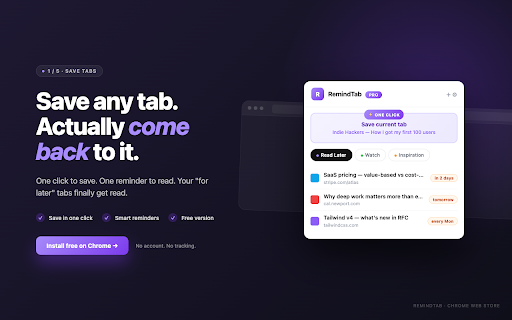
RemindTab — Save what matters. Come back at the right time.

Do you leave tabs open "for later" and they stay open for three weeks?
RemindTab turns that intention into an actual system: one-click save,
organization by category, and a reminder at the moment *you* choose.

🟢 ONE-CLICK SAVE
• Click the RemindTab icon → "Save current tab" and you're done.
• Right-click anywhere on a page → "Save this page to RemindTab".
• Keyboard shortcut Alt+Shift+S for power users.
• Tab picker: save multiple open tabs in one go.

🎨 ORGANIZE BY CATEGORY
• Group your saves into "Read Later", "To Watch", "Inspiration"…
• Create your own categories with their own color.
• Free-form notes, search by title / URL / note / category.
• Drag & drop to recategorize, multi-select (Shift/Cmd-click) for bulk
  actions: move, archive, open all.

⏰ REMINDERS THAT ACTUALLY WORK
• Exact time, recurring (daily, weekly, monthly, weekdays…),
  or "next time you open Chrome".
• Choose HOW the reminder shows up: extension popup, floating window,
  or full-screen tab.
• Snooze 1h / tomorrow / next week in one click.
• No email, no spam, no tracker.

🗂️ FULL PAGE VIEW (Pro)
• "All my saved tabs" dashboard, 3-column grid.
• Sort by Recent / Alphabetical / Most clicked.
• Category sidebar, storage gauge, `/` shortcut to focus search.
• Drag & drop between categories, large-scale bulk actions.

🌍 16 LANGUAGES
English, French, German, Spanish, Italian, Portuguese (BR), Dutch,
Polish, Turkish, Russian, Arabic, Hindi, Japanese, Korean, Simplified
and Traditional Chinese.

🔒 PRIVACY FIRST
• All your data lives in `chrome.storage.sync` — synced across your
  Chrome devices through your Google account, never on our servers.
• No telemetry, no pixels, no behavioral analytics.
• No account required to use the free version.

💎 FREE VS PRO
The free version is fully functional: save, categories, exact-time
reminders, search, 30-day archive.

Pro unlocks:
• Unlimited categories with color-coded URLs
• Recurring reminders (daily, weekly, monthly, custom)
• Full page view (dashboard, sort, gauge, advanced drag & drop)
• Large-scale bulk actions
• Active support for development

Try Pro free for 7 days — no credit card. Cancel instantly from inside
the extension.

Lifetime purchase available (one-time payment, no subscription).

A question? A bug? Reach us from Settings → Help. We read everything.
Technical
- Version
- 1.0.1
- Manifest
- V3
- Size
- 266KiB
- Min Chrome
- 88
- Languages
- 16
- Featured
- No
Metadata
- ID
- ilpiobpfpfkoondckjglhpbbcebcagdn
- Developer ID
- uafbdb131f1c0ca58e245abf380cd7fac
- Developer Email
- [email protected]
- Created
- May 4, 2026
- Last Updated (Store)
- May 16, 2026
- Last Scraped
- Jun 10, 2026
- Website
- onyri-strategy.com
- Support URL
- https://www.onyri-strategy.com/contact
- Privacy Policy
- https://www.onyri-strategy.com/privacy-policy/remindtab
Data sourced from the Chrome Web Store · last verified Jun 10, 2026.