
Auto Refresh by LH
Automatically and securely refreshes the page at a customisable interval.
As of May 2026, Auto Refresh by LH has 1 users in the Productivity category.
Usersno change0%
1
1
Ratingno change0%
—
— reviews
Reviewsno change0%
—
Version
1.2
Manifest V3
Permissions & access
- Permissions
- activeTabscriptingtabsstorage
- Host access
- None declared
Screenshots
About
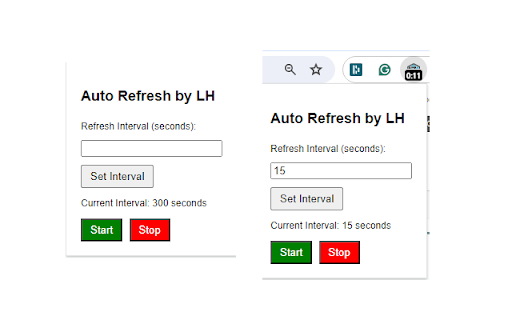
Auto Refresh by LH is a Chrome extension that allows users to automatically refresh a web page at customizable intervals. This tool is perfect for monitoring updates on web pages that frequently change, such as news sites, social media feeds, or stock market pages.

Key Features:

Automatically refreshes the current tab at a user-defined interval.
Simple and intuitive interface for setting refresh intervals.
Start and stop the auto-refresh functionality with ease.
Visual countdown timer displayed on the extension icon.
Lightweight and efficient background script ensures minimal resource usage.

Detailed Description:
Auto Refresh by LH enhances your browsing experience by automatically refreshing web pages at intervals you set. Whether you are waiting for an important update or keeping an eye on frequently changing content, this extension provides a convenient and reliable solution.

How to Use:

Set the Refresh Interval: Click on the extension icon, enter the desired refresh interval in seconds, and click 'Set Interval'.
Start Auto Refresh: Click the 'Start' button to begin automatically refreshing the current tab at the specified interval.
Stop Auto Refresh: Click the 'Stop' button to stop the auto-refresh function at any time.

Privacy and Security:

The extension does not collect any personal data or track your browsing activity.
Auto Refresh operates entirely within your browser and does not require any external server communication.
The extension requests minimal permissions, ensuring your browsing security and privacy.

Installation:

Add the extension to your Chrome browser from the Chrome Web Store.
Click on the extension icon in the toolbar to open the settings popup.
Set your desired refresh interval and start auto-refreshing.

Changelog:

Version 1.0:
Initial release with core auto-refresh functionality.

Version1.2
Per Tab user-defined interval settings
Simple and intuitive UI for ease of use.
Technical
- Version
- 1.2
- Manifest
- V3
- Size
- 39.18KiB
- Min Chrome
- 88
- Languages
- 1
- Featured
- No
Metadata
- ID
- iloifmgfddiebnejmhfdmgpahhcefdba
- Developer ID
- u0f141cb5bebf568065391ac4d01ed96a
- Developer Email
- [email protected]
- Created
- Jun 21, 2024
- Last Updated (Store)
- Jun 21, 2024
- Last Scraped
- May 19, 2026
- Website
- —
- Support URL
- —
- Privacy Policy
- https://ozconsultants.com.au/privacy-policy-2/
Similar extensions
Alternatives to Auto Refresh by LH, ranked by description similarity.

Auto Refresh Extension for Chrome
Auto Refresh Extension for Chrome reloads tabs automatically at custom intervals to keep content up-to-date.
55

Auto Refresh PRO
Automatically refreshes the current page at a user-specified interval.
345
★ 3.7

Refresher
Automatically refresh web pages at specified intervals.
3

Auto Refresh
Auto Reload Chrome – Effortless Tab & Page Auto Refresh Extension
997
★ 5.0

Custom Auto Refresher
Extension that automatically refreshes a tab on a fully customizable interval.
453
★ 5.0

Auto Reload
Automatically reload webpages at custom intervals.
8
★ 4.7

Auto Refresh Extension
Automatically refresh a specific web page based on user input.
17

NewKit: Auto Refresh
Auto refresh current tab with customizable interval
15
Data sourced from the Chrome Web Store · last verified May 19, 2026.