
Prevent Duplicate Tabs - Open Source
DUPLICATE TAB DETECTOR: This open source extension helps manage your browsing by alerting you when you’re about to open a tab…
As of June 2026, Prevent Duplicate Tabs - Open Source has 8 users in the Functionality & UI category.
Usersup 33.3 percent+33.3%
8
8
Ratingno change0%
—
— reviews
Reviewsno change0%
—
Version
1.1
Manifest V3
History
8 snapshotsTracking since Apr 17, 2026.
View as table
| Date | Users | Rating | Reviews | Version |
|---|---|---|---|---|
| Apr 17, 2026 | 6 | — | — | 1.1 |
| Apr 23, 2026 | 6 | — | — | 1.1 |
| Apr 28, 2026 | 9 | — | — | 1.1 |
| May 5, 2026 | 9 | — | — | 1.1 |
| May 11, 2026 | 10 | — | — | 1.1 |
| May 16, 2026 | 8 | — | — | 1.1 |
| May 22, 2026 | 10 | — | — | 1.1 |
| Jun 5, 2026 | 9 | — | — | 1.1 |
| Now | 8 | — | — | 1.1 |
Permissions & access
- Permissions
- tabs
- Host access
- None declared
Screenshots
About
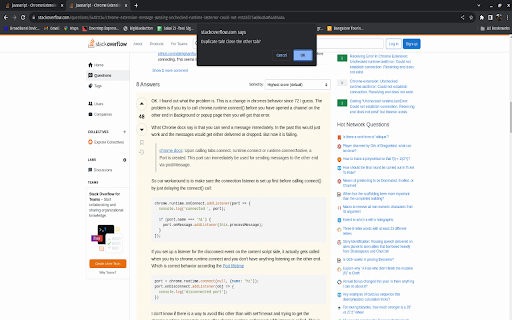
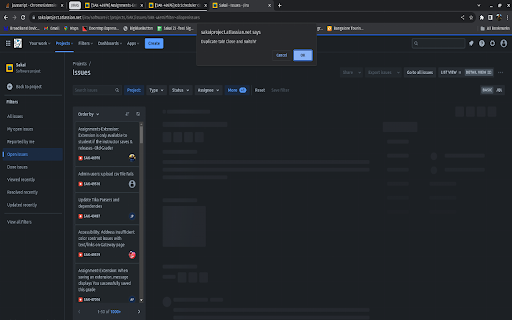
DUPLICATE TAB DETECTOR: This open source extension helps manage your browsing by alerting you when you’re about to open a tab that’s already open. Originally inspired by my habit of opening the same links from emails or Slack, it efficiently closes new duplicate tabs, keeping the browser tidy and uncluttered.
Technical
- Version
- 1.1
- Manifest
- V3
- Size
- 523KiB
- Min Chrome
- 88
- Languages
- 1
- Featured
- No
Metadata
- ID
- ilnmljeceddiodghbgohocfbmlbmagga
- Developer ID
- ucda9b7fcb0d921d48cf9cfa04b8cec54
- Developer Email
- [email protected]
- Created
- Dec 2, 2023
- Last Updated (Store)
- Mar 6, 2026
- Last Scraped
- Jun 5, 2026
- Website
- —
- Support URL
- —
- Privacy Policy
- —
Similar extensions
Alternatives to Prevent Duplicate Tabs - Open Source, ranked by description similarity.

Duplicate Tab Alert
Detects duplicate tabs in the current window and lets you quickly focus or close duplicates.
2

Duplicate Tab Closer
Duplicate Tab Closer: Close duplicate tabs.
4

Tab Duplicator
Duplicate the current tab using customizable keyboard shortcuts
7
★ 5.0

The Tabfather
Effortlessly manage your tabs by closing idle ones and keeping a record of your closed URLs.
3
★ 5.0

One-click Tab Group
Manage browser tabs with one click and automatically group them according to domain names. The default shortcut key is Ctrl+Shift+1.
13

Tab Reuser
Specify websites and URLs to always open in an existing tab with the same matching URL.
16

Tab Glance
View and manage all open tabs by window.
6
★ 5.0

My Tab Manager
Organize tabs by root domain, highlight duplicates, and close them easily.
3
★ 5.0
Data sourced from the Chrome Web Store · last verified Jun 5, 2026.