
Imify - Powerful Image Toolkit
A privacy-first, powerful image toolkit. Save image directly from your context menu, and even more. Supports ICO, AVIF, JPEG XL.
As of June 2026, Imify - Powerful Image Toolkit has 218 users in the Productivity category.
Usersno change0%
218
218
Ratingno change0%
—
— reviews
Reviewsno change0%
—
Version
2.1.2
Manifest V3
90-day change · In the last 90 days this extension 1 version update, changed permissions.
History
11 snapshotsTracking since Apr 3, 2026.
View as table
| Date | Users | Rating | Reviews | Version |
|---|---|---|---|---|
| Apr 3, 2026 | — | — | — | 1.5.0 |
| Apr 17, 2026 | — | — | — | 1.5.0 |
| Apr 23, 2026 | 204 | — | — | 1.5.0 |
| Apr 27, 2026 | 237 | — | — | 1.5.0 |
| May 5, 2026 | 232 | — | — | 1.5.0 |
| May 10, 2026 | 234 | — | — | 2.1.2 |
| May 16, 2026 | 1.0K | — | — | 2.1.2 |
| May 20, 2026 | 2.0K | — | — | 2.1.2 |
| May 27, 2026 | — | — | — | 2.1.2 |
| Jun 3, 2026 | 327 | — | — | 2.1.2 |
| Jun 9, 2026 | 235 | — | — | 2.1.2 |
| Now | 218 | — | — | 2.1.2 |
Changelog
- May 5, 2026description
Imify: Powerful Image Toolkit, Converter & Local Processor

Ever tried to save an image from a website, only to realize it’s a WEBP or AVIF file you can't use? Or needed to quickly check image metadata without uploading it to a shady online tool? Imify fixes all of that instantly.

Convert, resize, inspect, and splice images blazingly fast directly in your browser. Whether you want to right-click and save a web image as a standard JPG, batch process hundreds of local files, or analyze pixel-perfect differences, Imify does it all securely on your device — no cloud uploads, no privacy risks.

🖱️ THE ULTIMATE RIGHT-CLICK MAGIC
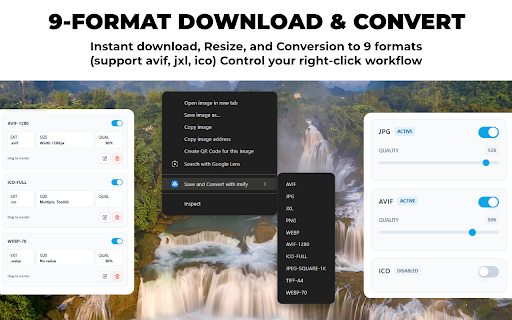
- Convert on the Fly: Right-click any image on any webpage, hover over "Imify," and instantly download it in your preferred format.
- Total Menu Control: Customize your context menu! You decide which formats appear, in what order, and hide the ones you never use.
- 1-Click Custom Presets: Set your ideal output size and format once. Every time you right-click, Imify applies your exact settings automatically.

🚀 COMPLETE IMAGE WORKFLOW (NEW IN V1.5.0)
- 🧩 Image Splicing: Combine multiple images into stunning Bento layouts, grids, or vertical scrolls in seconds. Customize gaps, padding, and borders with ease.
- 🔍 Image Inspector (X-Ray): Deep dive into any image. Extract dominant color palettes (HEX/RGB/HSL), audit sensitive EXIF metadata (GPS, camera info), and verify exact dimensions.
- ⚖️ Difference Checker: Compare two images with surgical precision. Get structural SSIM scores and visualize pixel deviations with detailed heatmaps.
- ⚡ Powerful Batch Processing: Drop a folder full of heavy images into the dashboard and convert/resize them all in a single click.

💻 DESKTOP-GRADE PERFORMANCE
Powered by WebAssembly (WASM) and multi-threading (Web Workers), Imify utilizes your computer's CPU to process heavy tasks locally without freezing your browser.

🔒 ZERO-DATA PRIVACY
Your images are yours. Imify operates 100% offline and client-side. We do not track, store, or send your files to any external servers. Protect your EXIF data with our built-in Privacy Mode.

📦 NATIVE FORMAT SUPPORT
Seamlessly convert and save images across next-generation web standards (AVIF, JXL, WebP) and traditional formats (JPG, PNG, BMP, ICO, TIFF). Always have the right file type for your specific needs.

Imify is free, open-source, and built for a frictionless web experience. Check out the source code on our GitHub repository!
Imify: The Ultimate Image Toolkit & Local Processor

Tired of struggling with incompatible web formats, clunky online tools, and privacy-invading converters? Meet Imify: the most comprehensive, professional-grade image toolkit ever built for your browser.

Imify is more than just a converter - it's a high-performance workstation that lives in your context menu and sidebar. Whether you need to audit page SEO, design seamless patterns, split assets for social media, or batch-process high-res images, Imify delivers desktop-level performance with zero cloud uploads. Your images never leave your device, ensuring total privacy while you design, inspect, and optimize at the speed of thought.

🎨 CREATIVE WORKSPACES (NEW IN V2.1.2)
- Image Filling Designer: Design stunning shape-filled images (polygons, stars, circles) with professional layer management and symmetric grids.
- Advanced Image Splitter: Multi-method slicing engine for social media carousels or extracting individual icons from sprite sheets.
- Pattern Generator: Create seamless repeating patterns from any image asset or manual strokes in seconds.

🔍 SMART INTELLIGENCE & DIAGNOSTICS (NEW IN V2.1.2)
- SEO Audit (Chrome & Edge): Run live in-page diagnostics to identify missing alt text, oversized assets, and performance bottlenecks directly on the webpage.
- Extension Command Center: A new quick-access popup for instant Page Scans and Lite Image Inspection without opening the main dashboard.
- Smart Concurrency Advisor: Hardware-aware engine that auto-optimizes processing speed based on your CPU power.

🖱️ THE ULTIMATE RIGHT-CLICK MAGIC
- Convert on the Fly: Right-click any image, hover over "Imify," and instantly download it in your preferred format.
- Total Menu Control: Customize your context menu! Decide which formats appear, in what order, and hide the ones you never use.
- 1-Click Custom Presets: Set your ideal output size and format once. Every time you right-click, Imify applies your exact settings automatically.

🚀 PROFESSIONAL IMAGE WORKFLOW
- Image Inspector (X-Ray): Deep dive into any image. Extract dominant HEX/RGB palettes, audit sensitive EXIF metadata, and verify exact dimensions.
- Difference Checker: Compare two images with surgical precision using structural SSIM scores and detailed pixel heatmaps.
- Image Splicing: Combine multiple images into stunning Bento layouts, grids, or vertical scrolls in seconds.
- Powerful Batch Processing: Drop a folder of heavy images into the dashboard and process hundreds of files in a single click.

💻 DESKTOP-GRADE PERFORMANCE
Powered by WebAssembly (WASM) and multi-threading, Imify utilizes your computer's local hardware for heavy tasks without freezing your browser. Now featuring MozJPEG for superior quality-to-size compression ratios.

🔒 ZERO-DATA PRIVACY
Your images are yours. Imify operates 100% offline and client-side. We do not track, store, or send your files to any external servers. Protect your EXIF data with our built-in Privacy Mode.

📦 NATIVE FORMAT SUPPORT
Seamlessly convert across next-generation standards (AVIF, JXL, WebP) and traditional formats (JPG, PNG, BMP, ICO, TIFF). Always have the right file type for your specific needs.

Imify is free, open-source, and built for a frictionless web experience. Check out the source code on our GitHub repository!
- May 5, 2026permissions
storage, contextMenus, downloads, offscreen
storage, sidePanel, contextMenus, downloads, offscreen
Permissions & access
- Permissions
- storagesidePanelcontextMenusdownloadsoffscreen
- Host access
- http://*/*, https://*/*
Screenshots



About
Imify: The Ultimate Image Toolkit & Local Processor

Tired of struggling with incompatible web formats, clunky online tools, and privacy-invading converters? Meet Imify: the most comprehensive, professional-grade image toolkit ever built for your browser.

Imify is more than just a converter - it's a high-performance workstation that lives in your context menu and sidebar. Whether you need to audit page SEO, design seamless patterns, split assets for social media, or batch-process high-res images, Imify delivers desktop-level performance with zero cloud uploads. Your images never leave your device, ensuring total privacy while you design, inspect, and optimize at the speed of thought.

🎨 CREATIVE WORKSPACES (NEW IN V2.1.2)
- Image Filling Designer: Design stunning shape-filled images (polygons, stars, circles) with professional layer management and symmetric grids.
- Advanced Image Splitter: Multi-method slicing engine for social media carousels or extracting individual icons from sprite sheets.
- Pattern Generator: Create seamless repeating patterns from any image asset or manual strokes in seconds.

🔍 SMART INTELLIGENCE & DIAGNOSTICS (NEW IN V2.1.2)
- SEO Audit (Chrome & Edge): Run live in-page diagnostics to identify missing alt text, oversized assets, and performance bottlenecks directly on the webpage.
- Extension Command Center: A new quick-access popup for instant Page Scans and Lite Image Inspection without opening the main dashboard.
- Smart Concurrency Advisor: Hardware-aware engine that auto-optimizes processing speed based on your CPU power.

🖱️ THE ULTIMATE RIGHT-CLICK MAGIC
- Convert on the Fly: Right-click any image, hover over "Imify," and instantly download it in your preferred format.
- Total Menu Control: Customize your context menu! Decide which formats appear, in what order, and hide the ones you never use.
- 1-Click Custom Presets: Set your ideal output size and format once. Every time you right-click, Imify applies your exact settings automatically.

🚀 PROFESSIONAL IMAGE WORKFLOW
- Image Inspector (X-Ray): Deep dive into any image. Extract dominant HEX/RGB palettes, audit sensitive EXIF metadata, and verify exact dimensions.
- Difference Checker: Compare two images with surgical precision using structural SSIM scores and detailed pixel heatmaps.
- Image Splicing: Combine multiple images into stunning Bento layouts, grids, or vertical scrolls in seconds.
- Powerful Batch Processing: Drop a folder of heavy images into the dashboard and process hundreds of files in a single click.

💻 DESKTOP-GRADE PERFORMANCE
Powered by WebAssembly (WASM) and multi-threading, Imify utilizes your computer's local hardware for heavy tasks without freezing your browser. Now featuring MozJPEG for superior quality-to-size compression ratios.

🔒 ZERO-DATA PRIVACY
Your images are yours. Imify operates 100% offline and client-side. We do not track, store, or send your files to any external servers. Protect your EXIF data with our built-in Privacy Mode.

📦 NATIVE FORMAT SUPPORT
Seamlessly convert across next-generation standards (AVIF, JXL, WebP) and traditional formats (JPG, PNG, BMP, ICO, TIFF). Always have the right file type for your specific needs.

Imify is free, open-source, and built for a frictionless web experience. Check out the source code on our GitHub repository!
Technical
- Version
- 2.1.2
- Manifest
- V3
- Size
- 8.68MiB
- Min Chrome
- 88
- Languages
- 1
- Featured
- No
Metadata
- ID
- ilhbmbkcakhlelcifilnlcmpklkafabg
- Developer ID
- u508f0480ba29b5f5430e1633f473f2d3
- Developer Email
- [email protected]
- Created
- Apr 2, 2026
- Last Updated (Store)
- May 1, 2026
- Last Scraped
- Jun 9, 2026
- Website
- https://imify.trongajtt.com/
- Support URL
- https://github.com/TrongAJTT/imify/issues
- Privacy Policy
- https://www.trongajtt.com/apps/imify/policy/
Data sourced from the Chrome Web Store · last verified Jun 9, 2026.