
OpenComments
Post public comments on any site. Own the Web. Let your voice be heard.
As of May 2026, OpenComments has 198 users and a 4.80/5 rating from 5 reviews in the Communication category.
Usersup 7.6 percent+7.6%
198
198
Ratingno change0%
4.80
5 reviews
Reviewsno change0%
5
Version
3.0.36
Manifest V3
History
2 snapshotsTracking since Apr 24, 2026.
View as table
| Date | Users | Rating | Reviews | Version |
|---|---|---|---|---|
| Apr 24, 2026 | 184 | 4.80 | 5 | 3.0.36 |
| May 19, 2026 | 194 | 4.80 | 5 | 3.0.36 |
| Now | 198 | 4.80 | 5 | 3.0.36 |
Permissions & access
- Permissions
- scriptingactiveTabtabsstoragenotificationscontextMenusidentityidentity.email
- Host access
- <all_urls>
Screenshots



About
OpenComments enables you to write public comments on any Web page. Why would anyone want to do that? Here are some possible use cases:

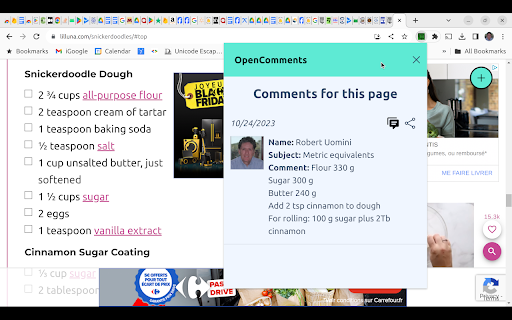
1. Online recipe notes. How many times have you found a recipe on the Internet that looked promising but didn't quite turn out the way you expected? You experimented with it and made some improvements, but how can you write your notes on the Web page as a reference for the next time you prepare the dish? Or maybe you're baking cookies or a cake. The flour, sugar and butter in the recipe are listed in cups and you prefer, as I do, to weigh the ingredients? You can post your changes on the recipe page, so they will be there whenever you navigate to the page.

2. Overcome product review censorship. Have you ever posted a negative review of a product or service on the site where you made a purchase, only to find your review removed shortly thereafter? The next time you post a review on one of these sites, crosspost your review on the same page using OpenComments.

3. Get notified about possible scam Web sites. Whenever you visit a site for the first time with OpenComments, the app will automatically scour the Internet for information that could indicate that the site is a scam and warn you immediately. Additionally, other OpenComments users may post their own experiences with the site.

4. Calling out fake news. You may have information about a site that you believe needs to be noted as a rebuttal to what the site is claiming. What better way to get the word out to visitors to the site than to post your comment directly on the front page?

And remember: the more people who use OpenComments, the more powerful everyone's voice becomes, so be sure to tell everyone you know about it.

OpenComments empowers you in a way that's totally unprecedented. Get it today. Learn more at https://www.opencomments.com. If you have any questions or suggestions for improving OpenComments, please write to us at [email protected].


Post public comments on any site. Own the Web. Let your voice be heard.
Technical
- Version
- 3.0.36
- Manifest
- V3
- Size
- 658KiB
- Min Chrome
- 88
- Languages
- 5
- Featured
- Yes
Metadata
- ID
- ilgkjamobnhjoopmjiigbgilcmapodda
- Developer ID
- ubfbdc28570f5552a56b935bc748e7b84
- Developer Email
- [email protected]
- Created
- Jun 7, 2022
- Last Updated (Store)
- Mar 20, 2025
- Last Scraped
- May 19, 2026
- Website
- opencomments.com
- Privacy Policy
- https://www.opencomments.com/privacy
Similar extensions
Alternatives to OpenComments, ranked by description similarity.

CommentAnywhere
Free speech comments section anywhere on the web.
7

VOXUS - SpeakUp - Be the Voice of the Web
Comment on any website, rate it, and be the free voice of the internet.
1

Free Comments
Use Free Comments to leave anonymous comments on social networks and websites and effectively bypass internet censorship for free
2

Zinger
Add comments to any webpage and join discussions happening across the web.
11
★ 5.0

Clamor - Comment Anywhere
Comment Anywhere with Clamor: Anonymous Web Layer. Comment websites, comment webpages, comment everywhere, your voice on every page
112
★ 4.8

Grapevine
Offers a comment section for every url on the web
32
★ 5.0

Ocean Park
Independent comments for every URL. No more comments disabled/ narrative-controlled environments.
—

Cat in a bag
Inspected an item and found something bad or hidden? Leave a comment.
4
Data sourced from the Chrome Web Store · last verified May 19, 2026.