
WhatsDesk – Audio, Video & Screen Recorder for Gmail
Record audio, video, or screen in Gmail and share instantly with a shareable link and auto-transcription.
As of June 2026, WhatsDesk – Audio, Video & Screen Recorder for Gmail has 8 users and a 5.00/5 rating from 4 reviews in the Productivity category.
Usersno change0%
8
8
Ratingno change0%
5.00
4 reviews
Reviewsno change0%
4
Version
1.0.0
Manifest V3
90-day change · In the last 90 days this extension 1 version update.
History
8 snapshotsTracking since Apr 24, 2026.
View as table
| Date | Users | Rating | Reviews | Version |
|---|---|---|---|---|
| Apr 24, 2026 | — | — | — | 0.1.0 |
| May 1, 2026 | — | — | — | 0.1.0 |
| May 7, 2026 | 1 | — | — | 0.1.0 |
| May 12, 2026 | 7 | 5.00 | 2 | 1.0.0 |
| May 17, 2026 | — | 5.00 | 2 | 1.0.0 |
| May 24, 2026 | 9 | 5.00 | 4 | 1.0.0 |
| May 31, 2026 | 8 | 5.00 | 4 | 1.0.0 |
| Jun 6, 2026 | 6 | 5.00 | 4 | 1.0.0 |
| Now | 8 | 5.00 | 4 | 1.0.0 |
Permissions & access
- Permissions
- storage
- Host access
- https://mail.google.com/*
Screenshots


About
WhatsDesk brings the power of audio, video, and screen recording directly into your Gmail compose window — no extra apps, no switching tabs. Just hit record, and your message is ready to share in seconds.

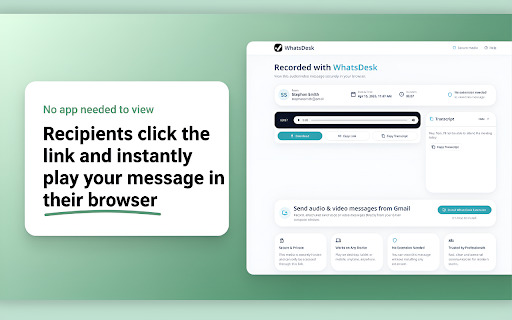
Whether you're explaining a complex idea, giving feedback on a design, onboarding a new teammate, or just want to communicate more personally than plain text allows — WhatsDesk makes it effortless. After recording, a shareable link and an auto-generated transcription are automatically inserted into your email body. Your recipient simply clicks the link to watch or listen, right in their browser.

Key Features:

🎙️ Audio Recording — Record voice messages directly from Gmail compose and insert a shareable audio link with one click.
🎥 Video Recording — Record yourself on camera and share a video note with your email recipient — no file attachments needed.
🖥️ Screen Recording — Capture your screen to walk recipients through anything visually, and share instantly via link.
📝 Auto Transcription — Every audio and video recording automatically generates a text transcription pasted into the email, so recipients can read or listen.
🔗 Instant Shareable Links — Recordings are uploaded and a secure shareable link is embedded in your email automatically.
▶️ In-browser Playback — Recipients open a dedicated playback page in a new tab — no downloads, no apps required.
✉️ Built right into Gmail — Record icons appear directly in the Gmail compose toolbar, so your workflow never leaves your inbox.

Perfect for: remote teams, sales outreach, customer support, educators, recruiters, product feedback, and anyone who wants richer communication than plain text.
Technical
- Version
- 1.0.0
- Manifest
- V3
- Size
- 81.85KiB
- Min Chrome
- 88
- Languages
- 1
- Featured
- No
Metadata
- ID
- ilflijmnmkibdedabgidldfkipjcfljf
- Developer ID
- ua65d5ef51c5918ccff7cd68fa5595c9e
- Developer Email
- [email protected]
- Created
- Apr 23, 2026
- Last Updated (Store)
- May 1, 2026
- Last Scraped
- Jun 6, 2026
- Website
- —
- Support URL
- https://www.whatsdesk.com/
- Privacy Policy
- https://www.whatsdesk.com/privacypolicy
Data sourced from the Chrome Web Store · last verified Jun 6, 2026.