
Decrypt Notes for Evernote™
Decrypt encrypted strings in Evernote's 'enex' file and optionally encrypt in new format
As of May 2026, Decrypt Notes for Evernote™ has 27 users in the Productivity category.
Usersup 35.0 percent+35.0%
27
27
Ratingno change0%
—
— reviews
Reviewsno change0%
—
Version
0.1.0
Manifest V3
History
2 snapshotsTracking since Apr 24, 2026.
View as table
| Date | Users | Rating | Reviews | Version |
|---|---|---|---|---|
| Apr 24, 2026 | 20 | — | — | 0.1.0 |
| May 19, 2026 | 22 | — | — | 0.1.0 |
| Now | 27 | — | — | 0.1.0 |
Permissions & access
- Permissions
- storage
- Host access
- None declared
Screenshots
About
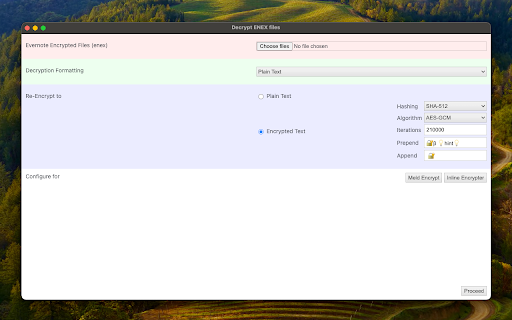
If you're considering transitioning from Evernote to a new note-taking application, it's essential to decrypt encrypted blocks in Evernote to make your notes accessible in the new application. This extension is designed to read one or multiple "enex" files and prompt for the Evernote password used to encrypt these blocks. Subsequently, the extension replaces the encrypted blocks with decrypted content. Additionally, users can instruct the extension to convert complex HTML blocks into text-only equivalents. If your new note-taking application supports encrypted blocks, you can also request the extension to generate a compatible block for seamless integration.

Features:
1. Decrypts all encrypted embeddings in "enex" files.
2. Optionally replaces complex HTML blocks with text-only equivalents.
3. Re-encrypts each block using a user-defined encryption.

Usage:
1. Decryption Process:
   - Upload one or multiple "enex" files to the extension.
   - Enter the Evernote password used for encrypting blocks.
   - The extension seamlessly replaces encrypted blocks with decrypted content.

2. Optional HTML Block Conversion:
   - Users can choose to convert complex HTML blocks to text-only equivalents for enhanced compatibility.

3. Re-encryption with User-defined Algorithm:
   - Specify your preferred encryption algorithm for re-encrypting each block according to your new application's requirements.

This tool operates entirely offline, ensuring the encryption and decryption processes occur locally. No data is sent or received from any remote server, reinforcing user privacy and security throughout the entire process.
Technical
- Version
- 0.1.0
- Manifest
- V3
- Size
- 99.48KiB
- Min Chrome
- 88
- Languages
- 1
- Featured
- No
Metadata
- ID
- ilcfanajnoimdgeginodjmdpelcdohbi
- Developer ID
- u998790a42d49632e0728e5a526305904
- Developer Email
- [email protected]
- Created
- Jan 7, 2024
- Last Updated (Store)
- Jan 7, 2024
- Last Scraped
- May 19, 2026
- Website
- —
- Privacy Policy
- https://add0n.com/policies/joue.quroi.txt
Similar extensions
Alternatives to Decrypt Notes for Evernote™, ranked by description similarity.

Message Encryptor
Securely encrypt and decrypt messages and files using AES-GCM — fast, offline, and private.
9
★ 5.0

Evernote Backup exporter
Export Evernote notes to Markdown, HTML, ENEX. Bulk backup and download notebooks. Convert to Obsidian, Notion.
825
★ 5.0

SecureNotes Vault Web Clipper
Clip web pages securely to your end-to-end encrypted SecureNotes Vault. Zero-knowledge — your data never leaves unencrypted.
—
★ 5.0

Encryp
A Extension for encrypting and decrypting
1

Protect text
Use Protect Text — a Chrome extension to store secure notes and passwords. Encrypt text in the notepad directly in the browser!
427
★ 5.0

Easy Encrypt
Local text encryption, decryption, Base64 encoding, and SHA-256 hashing with safer key handling
36
★ 5.0

Simple Note
A simple note Chrome extension
18
★ 5.0

Simple Note v2
A simple note Chrome extension v2
5
Data sourced from the Chrome Web Store · last verified May 19, 2026.