
XOGO Digital Signage
The easiest digital signage platform on the planet. Sets up in 3 quick steps! In the era of smart phones and cloud computing, you…
As of June 2026, XOGO Digital Signage has — users in the Workflow & Planning category.
Usersno change0%
—
—
Ratingno change0%
—
— reviews
Reviewsno change0%
—
Version
1.0.192
Manifest V2
History
1 snapshotsTracking since Apr 28, 2026.
Not enough history yet for this metric — the chart fills in as we collect more snapshots.
View as table
| Date | Users | Rating | Reviews | Version |
|---|---|---|---|---|
| Apr 28, 2026 | — | — | — | 1.0.192 |
| Now | — | — | — | 1.0.192 |
Permissions & access
- Permissions
- webviewstoragepowerunlimitedStoragenotificationsclipboardReadaccessibilityFeatures.readclipboardWritealarmsoverrideEscFullscreenfullscreensystem.displayenterprise.deviceAttributes
- Host access
- https://clients2.google.com/
Screenshots

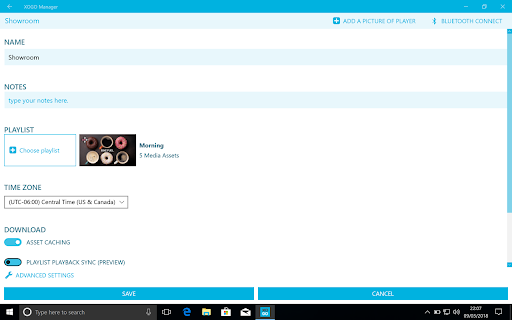

About
The easiest digital signage platform on the planet. Sets up in 3 quick steps!

In the era of smart phones and cloud computing, you shouldn't need to hire an IT team to set up a digital sign. XOGO makes the process incredibly easy. Just download this app and use our free manager app https://manager.xogo.io to turn any screen into a digital sign. Create and schedule a playlist of images, videos, and websites. A perfect solution for retail, hospitality, schools, assisted living, corporate environments, or any situation where you want to schedule content to run on a screen!

This is the Chrome player. However, XOGO Player runs on any Windows, Android, Fire TV, WebOS, BrightSign or Chrome device. Connecting this player to your account is simple. Use https://manager.xogo.io and enter the PIN code the comes up on your screen. Please check out https://www.xogo.io/getting-started for step-by-step instructions and an intro video.
Technical
- Version
- 1.0.192
- Manifest
- V2
- Size
- 3.33MiB
- Min Chrome
- 31.0.0.0
- Languages
- 1
- Featured
- No
Metadata
- ID
- ilcaabhemammbfjnpbhdoikbginenael
- Developer ID
- u212cca5e742cecb65da5c4400af75341
- Developer Email
- [email protected]
- Created
- Nov 14, 2018
- Last Updated (Store)
- Oct 28, 2025
- Last Scraped
- Jun 4, 2026
- Website
- —
- Support URL
- https://www.xogo.io/faqs/
- Privacy Policy
- —
Similar extensions
Alternatives to XOGO Digital Signage, ranked by description similarity.

OptiSigns Digital Signage
Turn any screen into a digital signage screen by downloading this app and remotely manage your screens contents from our portal:…
—

Fugo Digital Signage Player
Digital Signage for Chrome
137

Screenage
Screenage is Digital Signage made simple. A web app that harnesses the power of the Chrome Web Browser to provide a simple digital…
—

ScreenCloud Digital Signage Player
Easy to use cloud based Digital Signage content management. Designed to work with Google apps, Chrome, Chromebox, & Chromebit kiosk
—
★ 4.1

Yodeck Web Player Extension
Unlocks all features of Yodeck Web Player
40.0K
★ 3.3

Save to Screenly
Display live web pages on your Screenly digital sign.
399
★ 5.0
HootBoard Screens
Add content from your HootBoard to signage in a jiffy. HootBoard Screens works in two interfaces:
- Digital Signage Mode: Cycle…
—
Zoom Rooms
Zoom Rooms for Chrome OS
—
★ 3.3
Data sourced from the Chrome Web Store · last verified Jun 4, 2026.